Getting Started
Set up your PlayStation®2 computer entertainment system according to its Instruction Manual. Ensure the MAIN POWER switch (located on the back of the console) is turned on.
Press the standby/RESET button. When the power indicator lights up, press the OPEN button to open the disc tray. Place the Hot Wheels™ Velocity X Maximum Justice™ disc on the disc tray with the label side facing up.
Press the OPEN button again to close the disc tray. Attach game controllers and other peripherals as appropriate. Follow on-screen instructions and refer to this manual for information on using the software.
Memory Cards
To save game settings and progress, insert a Memory Card (8MB) (for PlayStation®2) into MEMORY CARD slot 1 or MEMORY CARD slot 2 of your PlayStation®2.
You can load saved game data from the same card, or any memory card containing previously saved Hot Wheels™ Velocity X Maximum Justice™ games. For more information, see SAVE AND LOAD.
Main Menu
Use the directional buttons or left analog stick up/down to highlight the options, then press the X button to confirm.
•
One Player – Push your Hot Wheels® cars to the extreme in Adventure, Challenge, Drag Race, Battle and Joyride modes.
•
Multi-Player – Go head-to-head against other Hot Wheels® drivers in Battle or Drag Race modes.
•
Load Game – Load and play a previously saved game.
•
Save Game – Save your progress.
•
Options – Change game settings, cheats, music, sounds, and controller settings to maximize your Hot Wheels™ Velocity X Maximum Justice™ game experience.
•
Extras – View these cool extras!
Options Menu
•
Controller - Change the configuration of the button commands for the controller. Unlocked cheats can be accessed through this menu.
•
Difficulty - Choose easy, normal, hard or very hard.
•
Sound Mode - Select STEREO or MONO.
•
Music - Select the volume level for the background music.
•
SFX - Select the volume level for the sound effects.
Playing a Game
Vehicle Selection Screen
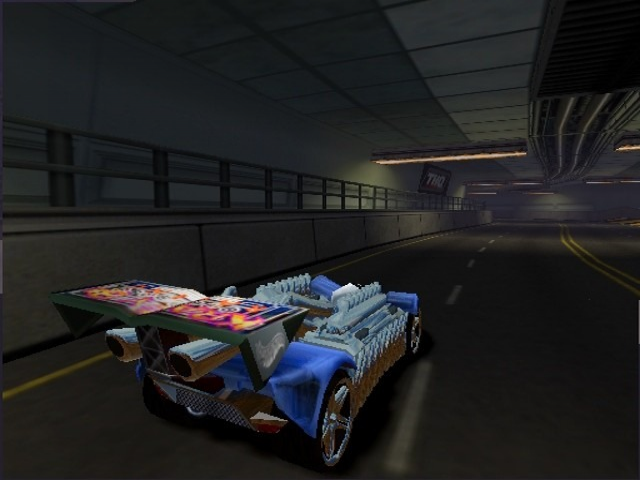
Use the directional buttons or left analog stick to cycle through the vehicles and press the circle button to access vehicle information. Scores ranging from 1 to 100 (100 being the strongest) indicate each car's strengths and weaknesses.
Confirm your selection by pressing the X button. There are 33 different Hot Wheels® vehicles to choose from. Try to unlock them all!
•
Speed - Determines how fast your car can go!
•
Armor - The more armor you have, the more enemy attacks you can survive.
•
Stunt - Perform stunts faster with a high Stunt rating.
•
Grip - Take tight corners at high speeds with a high grip rating.
Gadgets
Choose your vehicle's default gadget. Use the directional buttons or left analog stick to highlight the gadget, then press the circle button to test the gadget. Make your selection by pressing the X button.
Additional gadgets can be picked up by running over them. Before equipped gadgets can be used, the gadget meter must be charged up. Perform stunts and collect power-ups to charge your gadget meter.
Use the L2 button to cycle through gadgets. Use the R2 button to activate the selected gadget.
•
Jet Boosters - Increases your top speed.
•
Armor Repair - Repairs all damage.
•
Super Zapper - An impressive energy pulse gadget.
•
Ripper Wheels - Tear your way out of trouble.
•
Atom Blaster - Fire a stream of blasting atoms.
•
Freon Bomb - Cover an area with an explosive blast of Freon.
•
Energy Shield - Temporarily increases shielding.
•
Magnet Mine - Stick it to your enemies.
•
Doom Disks - A deadly spray of heavy metal.
•
Sonic Boom - Takes out everyone within earshot.
•
Oil Drum - Slippery oil makes enemies slide.
•
Laser Cannon - Blast your enemies with the power of light.
Unlocking Vehicles And Gadgets
Complete missions and challenges to unlock new Hot Wheels® cars. Unlocked cars have better speed and handling.
Gadgets are also unlocked during missions and challenges. As you progress through the challenge levels, advanced gadgets will become available.
Stunts
Performing stunts allows you to charge your gadget meter and turbo booster. Points are awarded for each successful stunt.
As your vehicle goes over a jump, use the left analog stick/directional buttons and/or the R1 and L1 buttons for special stunts.
Helper Arrow
A helper arrow indicates the right direction to complete missions. If you get lost or don't know what to do, just follow the arrow!
Points
Points are awarded for doing stunts, eliminating enemies, and collecting power-ups. Certain challenges require you to get a specific point total in order to complete them.
Mission Failed Screen
Use the directional buttons or left analog stick to highlight RETRY or MAIN MENU on the Mission Failed Screen. Press the X button to confirm.
One Player
There are five awesome modes for single players.
•
Adventure - Story mode with mission objectives.
•
Challenge - Develop your driving skills with exciting challenges.
.png)

.png)

.png)

_1.png)
.png)


.png)







.png)

_1.png)
_1.png)