Getting Started
Set up your PlayStation®2 computer entertainment system according to its Instruction Manual. Ensure the MAIN POWER switch (on the back of the console) is ON.
Press the RESET button. When the power indicator lights up, press the OPEN button to open the disc tray.
Place the American Chopper™ 2: Full Throttle disc on the disc tray with the label side facing up. Press the OPEN button again to close the disc tray.
Attach game controllers and other peripherals as appropriate. Follow on-screen instructions and refer to this manual for software information.
PlayStation 2 Console Diagram
Note on Console Types
Illustration may not match all PlayStation 2 console types. For owners of SCPH-70000 series PlayStation 2 systems, refer to the setup instructions supplied with your system. Memory Card (8MB) (for PlayStation®2)
To save game settings and progress, insert a memory card (8MB) (for PlayStation®2) into MEMORY CARD slot 1 of your PlayStation®2 system.
You can load saved game data from the same memory card or any memory card (8MB) (for PlayStation®2) containing previously saved games.
The Garage
Select a Character
In American Chopper 2, you will play as Paul Senior, Paul Junior, Mikey, and Vinnie. You can switch characters at any time during the game.
Each character has unique missions and their own bike to build. You must play as every character to win the game.
Character Selection Screen
The trophies at the top of each character in the character selection screen represent your current progress. They show how many levels you have played and what medal you have earned (bronze, silver, or gold).
The Garage Menu
The garage serves as your home where you will build and paint your bikes, unlock new parts, and select missions.
•
Assemble: Assemble and build your custom bike.
•
Fabrication: Unlock parts using fabrication points that you can earn during the game.
•
Paint: Give your bike a custom paint job.
•
Missions: Select a mission, unlock new bikes, and earn new parts for your bike.
•
Show Room: View the bikes from the T.V. show.
•
Options: Change game options like audio settings, vibration, and gearbox type.
•
Save Game: Save your progress.
•
Load Game: Load a previously saved game.
•
Character: Switch to a different character.
•
Extras: Watch unlocked movies.
Camera Skip
When you make a selection in the garage, the camera will move through the garage to the selected area.
If you prefer, you can instantly move to the selected area by pressing the X button while the camera is moving.
Chopper Assembly
You will have the opportunity to build four custom choppers in the game – one for each of the playable characters. To begin, select the Assemble option from the garage menu.
Instant Bike Option
When entering the Assemble menu for the first time, you will be asked if you would like to have a bike assembled for you. Select yes if you would like a chopper automatically assembled with basic parts.
Select no if you prefer to hand pick the parts yourself. You will not be able to drive the bike in the game until you have put all of the necessary components on the bike.
Some parts cannot be placed on the bike until a prerequisite is in place. For example, you cannot put an exhaust on the bike until you have first picked an engine.
Navigation
Rotate around your chopper by using the right analog stick. Zoom in and out by using the and buttons respectively.
You can also hide the menu to get a full view of your bike by pressing the O button.
Chopper Attributes
The parts that you add to your bike can affect the performance of the bike while riding. The following items can be affected:
•
Acceleration: How quickly your bike gets up to speed.
•
Speed: Top speed of the chopper.
•
Handling: Turning and maneuverability.
•
Style: Style multiplier (see description below).
With any part selected in the Assemble menu, you can press the O button to access part information. Here you will find the part name, description, and information on how the part will affect the bike when it's applied to the bike.
Style Multiplier
Your style multiplier affects how quickly you can gain style points during missions. At the end of the mission, style points will translate into fabrication points that you can use to unlock parts in the garage.
See the gameplay section for more information about style points.
Unlocking New Parts
New parts can be unlocked by earning medals during missions or spending fabrication points in the fabrication menu.
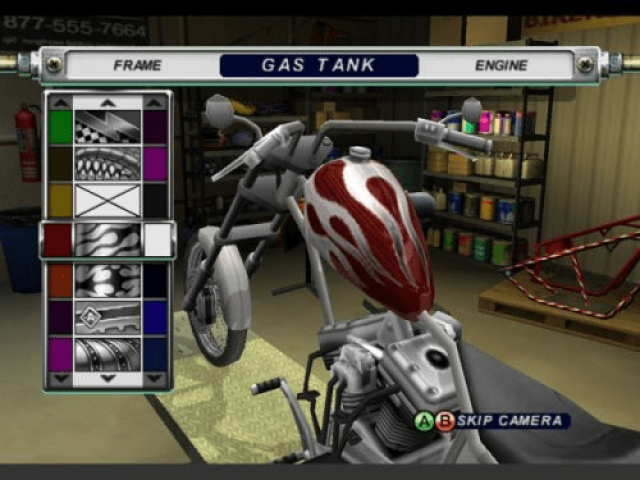
Painting
Nearly every part on your chopper can be painted. To paint the parts, simply select them from the menu and choose the color you want to apply.
Paint Themes
Certain parts can be painted with theme paint jobs. If the part can have a theme paint job, it will appear in the menu as a design graphic with colors on each side.
The color on the left represents the base color, and the color on the right is the secondary color for the theme.
Fabrication
Earn fabrication points during the game then apply them in the Fabrication menu to unlock new parts.
.png)

.png)
.png)
.png)
