Menu Navigation
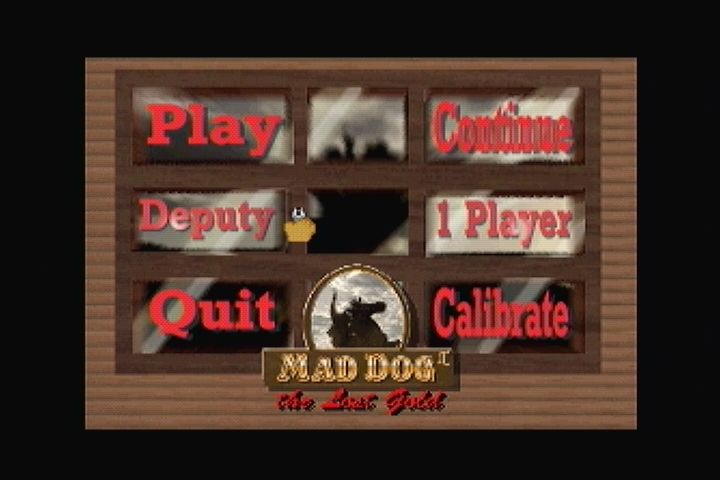
The game launches in a looping mode displaying various scenes. To start, press the “Stop” button on the game pad or the option button on the lightgun to access the menu screen. Move the cursor over an item and press the “A” button or shoot the item with the lightgun to select it.
Start Game
Selecting “Start” initiates a new game session.
Difficulty Levels
Difficulty increases from easiest (Deputy, which is the default) to toughest (U.S. Marshall). This level can be adjusted at any time during gameplay.
Game Hints
•
Shoot the cow skull to receive extra bullets.
•
Earn a bonus life for every 5000 points scored.
Continue
This option resumes a paused game, but a game must be in play to use it. If paused mid-game, play resumes exactly where it left off. If all lives are lost, the game can be continued up to NINE times, providing one life per continue. In two-player games, switching to one player does not consume a continue.
Player Selection
Selecting this option toggles between one and two players. In a two-player game, both players act simultaneously with separate scores, bullets, and lives.
Player One is indicated by red bullet holes, red score text, and a flesh-colored hand cursor with a game pad. Player Two is indicated by blue bullet holes, blue score text, and a blue-colored hand cursor. Player One's game pad must be first in the daisy chain, followed by Player Two's game pad or lightgun.
Calibrate Lightgun
This option is available only if a lightgun is connected. Use the option button located on the upper left side of the gun to access settings. Four feet is recommended as the optimal distance for calibration and play.
Follow these steps to calibrate:
1. Shoot the calibration option on the menu screen or press the option button to open the “Calibration Menu.”
2. Aim carefully at the center of the bullseye on the calibration screen and shoot once.
3. Practice shooting the bullseye to test the new gun calibration.
4. If unsatisfied, press the option button to repeat the procedure.
5. Shoot the “Exit” option to return to the main menu.
This sequence can be repeated at any time.
Quit
Selecting “Quit” exits the game.


_2.png)
.png)
