Product Overview
Thank you for purchasing Taito's HuCARD, 'S.C.I.'. Please read this Instruction Manual carefully regarding handling and precautions. Keep this manual in a safe place. •
HuCARD is a game card dedicated to the SYSTEM E.
•
Do not copy the software without permission or use it for rental business.
Handling & Precautions
•
Precision Device: Avoid use or storage under extreme temperature/humidity conditions or strong shocks. Do not forcibly bend the card.
•
Terminals: Do not touch the terminal portion or soak it in water to prevent malfunction.
•
Cleaning: If terminals get dirty, wipe lightly with soft gauze or gauze soaked in ethyl alcohol.
•
Eye Strain: Play while staying approximately 2 meters away from the TV screen.
•
Breaks: Take a 5-10 minute break every hour when playing for long periods.
Reset Method
To restart the game from the beginning, press the SELECT button while holding down the RUN button during gameplay.
Game Introduction
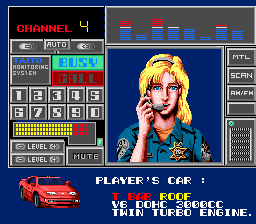
Emergency communication from Headquarters initiates the start of each stage. Catching the wireless communication activates the digital console, where Nancy informs you of the incident. The culprit's vehicle is displayed, followed by an overview of the incident, escape route, and course characteristics. Once you have committed this information to memory, the pursuit begins.
•
Digital Console: Displays messages with incident details or escape routes.
•
Vehicle Display: Shows the vehicle the culprit is riding in.
•
Course Characteristics: Displays the specific features of the stage's course.
•
Cancel Demo: Press the RUN button to cancel the demo screen.
Tracking Mode
When the screen changes to tracking mode, a timer immediately starts and displays the remaining time. If you do not spot the criminal's car before the timer reaches '0', the mission fails and it is game over. Catch up to the criminal's car as quickly as possible; once spotted, the timer is extended.
The distance to the criminal's car is shown on the DISTANCE meter in the upper right of the screen. The gauge decreases as you get closer.
Obstacles on the Road
Various obstacles are placed on the course. Touching them may cause a course out or reduce speed, resulting in varying time loss. Incorrect handling may allow the criminal's car to escape.
•
Trees, rocks, houses, buildings: Cause a crash and significant time loss.
•
Construction barricades, oil drums: Decrease your speed.
•
Falling rocks, oncoming cars, buses: Cause you to spin or come to a stop.
Worst-Case Course Out
Some areas feature drops into the sea or a valley. Falling results in significant time loss, so pay close attention to steering in these areas.
Combat & Items
Player Gun Attack
In addition to body slams, you can attack with guns. Usually, you use a handgun, but depending on the stage, you may purchase a shotgun. Press the trigger button to fire at any time. This damages and stops criminal vehicles.
Bazooka Item
Catching the bazooka item dropped by the support helicopter allows you to fire a powerful bazooka. You have only 5 rounds; once used, you revert to your normal weapon.
Turbo
Press the turbo switch to accelerate the player vehicle. It can be used three times in each stage.
Stage Data
Stage 1: Red Sports Car
A highway heading towards the suburbs. Car enthusiasts and road racers block your path, likely causing considerable time loss.
Stage 2: Brown Wagon
A trunk road running along the coast. Waves crash onto the road. Distracting scenery may lead you to plunge into the sea.
Stage 3: Continental Limousine
A winding road in a mountainous area that has experienced landslides.
Stage 4: Hijacked Prisoner Transport Van
A 3-lane road that tempts you to accelerate, but buses jump out at intersections. Be careful.
Stage 5: Huge Convoy + ???
If you have cornered the true culprit, spotting the perpetrator's vehicle is a matter of time. The enemies in this stage are tough, and something scary is lurking in the convoy.


.png)

.png)
