CREATING A NEW WORLD
1. Select the character's name
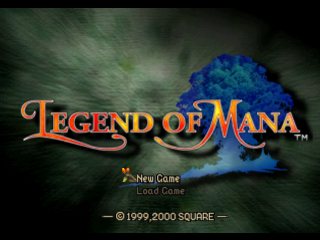
The default name for the main character is "YOU." To change this, select a letter type from the list on the left. Move the cursor to the letter screen and press the button to execute.
You can enter a maximum of ten letters. To delete letters, set the cursor to and press the button or button.
To select default names, set the cursor to AUTO and press the button. Move the cursor to <UNDO> and press the button to restore the default name. When the name is finalized, press the button at <OK!>.
2. Select the location for land creation on the World Map
After naming, a large area map displays. Press the button to show a frame. Move the frame with the directional button to select a land creation location.
Press the button twice to execute the command. Some sections may not be suitable for land creation.
•
If the area within the frame is the same color as the surrounding areas, it is possible to incorporate this area into the World Map.
•
Areas with too much water or dark areas within the frame are not suitable.
3. Determine the position of your Home
Once the land creation location is set, the land creation process begins. Use the Mailbox to position Home. Home may not be placed in the ocean.
4. The adventure begins at Home
When Home appears, the prologue explaining the story's background will begin. After the prologue, gameplay starts at Home. At Home, players can save the game, care for pets, and create weapons.
LOAD GAME: Continuing the game from saved data
When <Load Game> is selected, the screen switches to the Loading Screen. Select the MEMORY CARD slot by pressing the directional button LEFT/RIGHT. Then, select the saved data by pressing the directional button UP/DOWN.
Play time, character name, saved land name, and data order are displayed at the bottom of the screen. Press the button to resume the game from the selected saved data.
Save and Continue
To save, press the button while standing near a Save Point. After selecting <Save>, the screen switches to the Save Screen.
After selecting the MEMORY CARD and Save Slot, press the button. Even if the whole party is defeated, it is still possible to try again.
Save Points
•
In front of the bed on the second story of Home.
•
In front of the Save Point on the Field Maps.
•
At Miss Yuka's Inn in the town of Domina.
PLAYING THE GAME
Legend of Mana allows the player to structure the World Map freely through the land creation system. To advance the game, the player must clear various events and gain new locations on the World Map. Examine various locations and build a unique world.
MOVEMENT METHOD: Between Lands & Inside Towns
The following three screens are used for movement. From the location created on the World Map, the player enters the Field Map and can move freely. The Town Map is displayed when the player enters a town. The player can move between lands at all times except during forced events.
MAP SCREENS
World Map
On the World Map, the player may move between created locations.
Town Map
When the character enters a location from the World Map, the Town Map is displayed. The dots on the roads extending through the town are different locations within the town. The directional button will move the character on this map.
Home and dungeons have no Town Maps.
Field Map
When the character moves onto a blue dot on the Town Map, he or she will enter that location, and the screen will change to the Field Map. Here, town locations such as shops and other buildings may be entered. Most of the game takes place on the Field Map (or Field), from character interactions to enemy encounters.
COLLECTING INFORMATION: Collecting Information & Events
Towns and dungeons exist on the Field. In towns, there are many types of residents. If the player stands in front of them and presses the button, they will begin a conversation.
Events may occur depending on answers selected during the conversation. At other times, events may occur just by entering a particular location. While there are a number of important events that must be completed before reaching the ending, it is not necessary to finish every event.
Introduction to Fa'Diel's species Vol. 1:
•
Little creatures that seem to appear out of nowhere and end up living in any town.
•
They all share the same mind with each other.
LAND CREATION SYSTEM
The Land Creation System involves strategically placing artifacts on the World Map, thereby forming new lands and creating the world that the game takes place in. The story unfolds as new lands are created.
LAND CREATION PROCESS: PLACING ARTIFACTS ON THE WORLD MAP
1) Obtain Artifacts
The first step is to obtain mysterious items called artifacts. Artifacts may be obtained through talking to townsfolk, completing events, and other accomplishments. The absolute number is not certain - obtain as many as possible. Open the "items" section of the Menu screen to check acquired artifacts.
Artifacts with Ancient Power
Artifacts are crafted works of art holding strange powers, created by wise ancients long ago. They are repositories of the land's long-forgotten memories and the many events that once took place there. The lost memories come to life when the power of the artifact is released.
**2) Select the Location to Place the Artifact
.png)


.png)



_1.png)


_1.png)

 (Bonus Disc).png)



.png)


.png)