PLAYING THE GAME
THE GAME SCREEN
Reaction Command
A triangle appears when you can execute an ability in battle, when there's something that may be worth examining, or when there's someone onscreen you can talk to. Press the triangle button to perform the command.
Commands
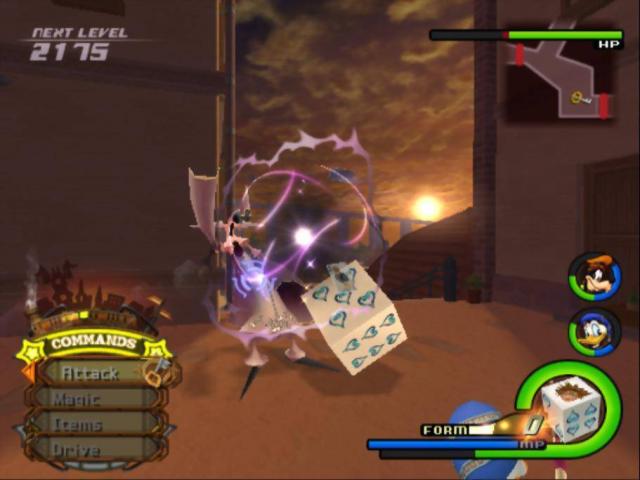
Depending on what you select, you can carry out various actions. Reaction Commands are displayed at the very top. The command at the bottom may also change with certain Combination Attacks and Summons in battle.
Depending on what command you select, several actions are possible. Some commands may not be available, depending on your remaining MP or your Drive Gauge level. Unavailable commands will be displayed in gray. Press the left directional button to cycle command lists.
•
Attack: Brandish a weapon.
•
Summon: Call on mighty friends for help.
•
Party: Swap out party members.
•
Drive: Transform for new abilities.
•
Limit: Team up with your party members to unleash combination attacks.
Reaction Commands
At certain times, a triangle will appear automatically on screen and a special action will appear at the top of the command list. This means there's something that may be worth examining, someone's onscreen for you to talk to, or another action has suddenly become available, maybe even while fighting. Press the button at just the right time and you can execute various actions which might be especially advantageous in battle.
Navigational Map
A simple map.
Party Gauges
Gauges showing the condition of each party member.
Controlled Character Gauge
A gauge showing the condition of the currently active character.
GAUGES
The green gauge displays your Hit Points (HP), or health. Once it falls below a certain level, a warning alarm will sound and the gauge will flash red. If HP drops to zero, it's game over.
The blue gauge shows your Magic Points (MP). These are used to cast magic spells or perform Limits. If MP drops to zero, the gauge will turn pink, and no MP-based abilities may be used. During this time, however, your MP will recover slowly.
The orange gauge is the Drive Gauge. When it reaches a certain level, you can perform Drives and Summons (after obtaining summon magic). Different Drive forms require different Drive Gauge levels.
Each gauge can be replenished in different ways.
•
HP Gauge: HP recovery orbs or items / Recovery magic / Save points (full recovery) / During Drives
•
MP Gauge: MP recovery orbs or items / Save points (full recovery) / During Drives / Over time
•
Drive Gauge: Drive recovery orbs or items / Attacking and defeating enemies
TARGETING AND LOCKING ON
When a yellow target appears on an enemy, the controlled character will direct his or her actions toward that enemy. The target will appear on the enemy closest to the controlled character. You can also press the R1 button to lock on to a particular enemy and cause the camera to automatically follow it. Press the R1 button again to release the lock.
•
To switch targets, hold down the R2 button and use the right analog stick while locked on.
THE MAIN MENU
Press the START button to display the main menu. There are times when the menu will be unavailable, such as during battle. The main menu is where you can use and equip items, swap weapons and armor, equip abilities, and more. See the in-game help messages for more information about each menu item.
Jiminy's Journal
This journal is Jiminy Cricket's record of your adventure. As Royal Chronicler, Jiminy takes an abundance of notes during the course of the game.
Config
Change various gameplay settings.
MOVEMENT AND ACTIONS
Apart from moving around as usual on the field, you can also jump to some areas. While jumping, you can grab onto ledges, then tilt the left analog stick forward to pull yourself up onto the ledge (or press the button to let go).
You can enter some doors and gateways on the field, but not all. If you approach a door, a subtitle appears showing your destination. Areas not yet visited will be displayed as "???" to start, and then replaced by the destination after your first visit there. There are also places you can't enter initially, but will be able to access later in the game.
Treasure Chests
Treasure chests are scattered throughout the game. These can contain recovery items, synthesis items, and navigation maps. You can even open treasure chests in battle.
Navigational Maps
The navigational maps you obtain from events and treasure chests will be displayed in the upper right corner of the screen. Use these to check out the terrain, where the active character is headed, and how to move on to the next section of the map.
SAVE POINTS
Save points are scattered throughout the field. When you press the button, not only can you save your game at save points, but you can also go to the World Map. Your HP and MP will also be restored.
•
There are two kinds of save points. Type A save points provide all the facilities mentioned above, but you will be unable to access the World Map from type B save points.
The battles in Kingdom Hearts II take place on the Field Map. All battles are real-time; therefore, the party is susceptible to damage at all times, even while selecting items and spells. Commands glow yellow in battle. They glow red for certain bosses and other battles from which you can't escape. COMBOS
With the Attack command selected, press the
.png)

.png)
.png)

.png)


_(En,Fr).png)


_1.png)

.png)

.png)
.png)
.png)

_1.png)


_1.png)









.png)
.png)