MAIN MENU
Career
Choose your favorite Van Halen member: David Lee Roth, Eddie Van Halen, Wolfgang Van Halen, Alex Van Halen.
Alternatively, create your own character for guest artist songs.
Choose from a guitarist, drummer, vocalist, bassist, or band career.
•
Note: You will not be able to access any game mode without attaching a Guitar Hero controller. The options will be grayed out until a Guitar Hero controller is activated.
Quickplay
In Quickplay all songs are unlocked for play by default.
Head to Head
2 Player competitive modes including:
•
Face-Off: Two players compete in a guitar, bass or drum match while alternating play on the same note chart. Each player can adjust the difficulty to fit their skill level.
•
Pro Face-Off: This is the ultimate duel for guitar, bass and drum champions. Two players battle it out by playing the same note chart at the same time on their selected difficulty levels.
•
Battle: Challenge a friend to a guitar or bass shred off with Battle Mode! Earn Attacks that you can use to disrupt your opponent. To activate Attacks you'll need to either tilt your guitar controller like you would when activating Star Power or by pressing the Star Power Button.
Backstage
•
Extras: View the Van Halen Soundboard, watch the game credits, and read song lyrics!
•
Rock Star Creator: Start from scratch and create the rocker you've always dreamed of. Choose from different body features, outfits and much more.
•
Top Rockers: Check out who the top rockers are!
Practice
You can take any song in the game that you've currently played and can practice any part of it at the normal setting.
You can also slow the song down to really help you out.
SETTINGS / OPTIONS
Cheats
Enter codes to enhance your experience.
Band Info
•
Rename Band: Change the name of your band.
•
Edit Band Logo: Use the graphic editor to create a unique logo for your band.
Save/Load
•
Autosave: Turn autosave on or off.
Calibrate Lag
Some televisions and AV receivers have an audio/visual lag that can make it difficult to play the game. Use this screen to calibrate your lag.
Audio Settings
Change the volume of any instrument in the band as well as the crowd and sound effects.
Functional Options
•
Lefty Flip: Players 1-4 can turn on lefty flip if they would like to play left handed.
•
Scrolling Vocals: Turn on scrolling vocals or static vocal text.
•
Star Power Clap: Turn off or on the ability to activate Star Power by clapping into the microphone.
•
Countdown: Turn off or on the countdown from unpausing the game.
•
Star Power Tilt: Turn off or on the ability to deploy Star Power by tilting the guitar.
•
Touch Strip: Turn off or on the ability to use the Touch Strip for Slider Notes sections.
•
Progressive Scan: Turn on Progressive Scan for better quality video if your TV supports 480p video resolution.
HOW TO ROCK
GUITAR CONTROLLER
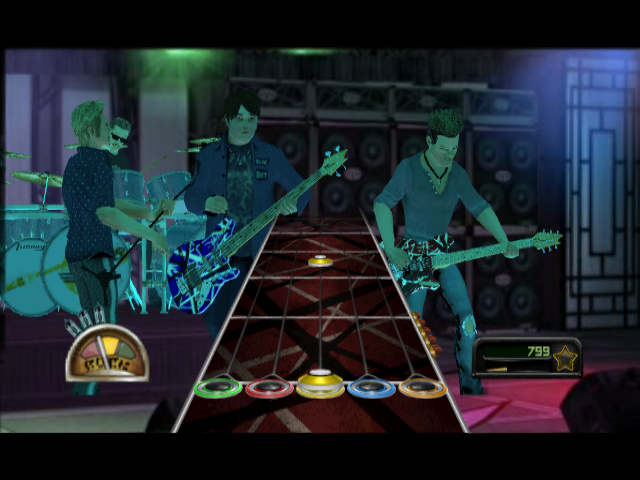
Press the Fret Buttons and strum on the Strum Bar UP or DOWN in sync to the notes that are on the screen.
Basic Notes
1. Hold the Fret Button that corresponds to the note on the screen.
2. Strum on the Strum Bar UP or DOWN to play the note.
Long Notes (otherwise known as sustains)
1. Hold the correct Fret Button down.
2. Strum.
3. Hold the Fret Button down until the whole note has played.
Chords
Chords are two or more notes played at the same time. These can come in the form of Basic Notes and Long Notes.
Touch Strip
1. Tap the Touch Strip while pressing the Fret Buttons to simulate strumming.
2. Slide your finger on the Touch Strip during Long Notes to alter the sound of the note.
3. When you see clear notes, you can catch them by touching the Touch Strip without pressing the Fret Buttons.
*Note that when using guitar controllers without the Slider features, hit the Slider Notes using the Fret Buttons.
Open Notes (only for Bass)
Strum without pressing any Fret Buttons. Open notes are displayed as a purple bar on the screen.
The Whammy Bar
Press the Whammy Bar in and out on Long Notes to add your own style to each song.
DRUM KIT CONTROLLER
Hit the correct drum pads in sync to the notes that are on the screen.
Basic Notes
Hit the drum pad that corresponds to the note on the screen.
Kick Drum Notes
Use the kick pedal to hit the wide purple notes on the screen.
MICROPHONE
Use the microphone to sing along to your favorite songs across 5 different difficulties.
•
Sing the words that appear on the screen and get judged based on pitch and timing.
The Rock Meter
The Rock Meter is the ultimate gauge for how you are doing. It will show you your points, note streak, and how much Star Power you have.
The Multiplier Meter
If you can nail a series of notes perfectly, then you'll receive a handy "Score Multiplier" which is 2-4X the value of each note you hit.
In band play the band multiplier
.png)

.png)
.png)
.png)




_Front_Cover.jpg)
.png)



_1.png)