Getting Started
DUALSHOCK®2 Analog Controller Configurations
•
directional buttons (D-buttons)
•
left analog stick (L3 button when pushed down)
•
right analog stick (R3 button when pushed down)
Starting Up
1. Set up your PlayStation®2 computer entertainment system according to the instructions supplied with your system.
2. Check that the system is turned on (the on/standby indicator is green).
3. Insert the Boogie™ disc in the system with the label side facing up.
4. Attach game controllers and other peripherals as appropriate.
5. Follow the on-screen instructions and refer to this manual for information on using the software.
Connecting Your Microphone
To connect your microphone to your PlayStation®2 system, insert the end into the USB connector on the front of your console. In addition to the microphone that comes with your copy of Boogie, the Sing Star™ microphone should also work.
Starting the Game
Create a Character
The first time you play Boogie, you are prompted to create a character. Select one of the five character varieties (see Characters for the five varieties), then customize him or her with hair, clothing, shoes, and accessory options.
When you are finished, choose a new name for your character, highlight OK, then press the Circle button to select OK and advance to the Main menu.
•
Your game progress and preferences are stored to your character profile.
•
Videos are saved separately and must be manually saved each time you record or edit one.
Boogie Meter
Dance on beat to fill your Boogie Meter with Boogie Power. Changing your style while still staying on beat fills the meter even faster.
When your meter is completely full, press the L1 button or the R1 button to perform cool dance moves only available to you when you spend your Boogie Power.
Combos
Press and hold the L1 button and follow the on-screen arrows by pressing the left analog stick and the right analog stick at the same time to perform a combo move. If you can do all steps in sequence and on beat, you'll pull off an awesome combo!
Solo Mode
This mini-game is only available in Dance mode and the Story mode stages in which you only dance. It offers a chance to earn a lot of points and Boogie Power.
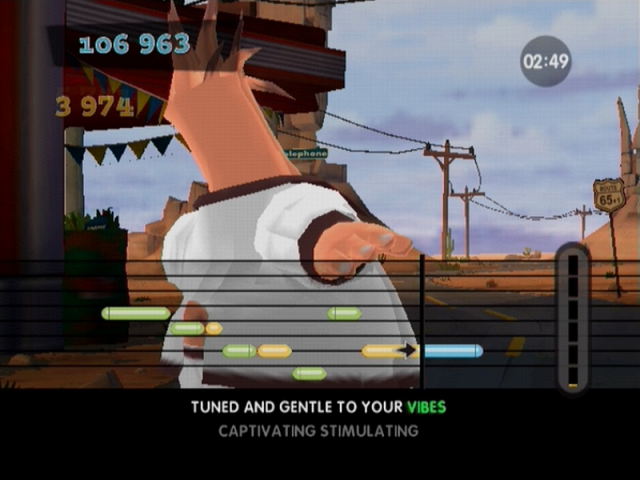
A countdown appears, letting you know that you are about to enter Solo mode. Your character begins lip-syncing and a set of bubbles—much like the ones that appear when you sing in Karaoke mode—appear on-screen. Press the L2 button at the appropriate times as the bubbles scroll (much like you would sing when the bubbles indicate in Karaoke mode). If you perform correctly, you earn both points and Boogie Power.
Strike A Pose
Press and hold the R1 button to activate Strike A Pose. Strike A Pose depletes your Boogie Meter, so be sure you have some Boogie Power saved up first.
In Strike A Pose, press the right analog stick and the left analog stick to move the X onto the targets that appear on-screen. As you select them, your character strikes all sorts of brand-new funky poses.
Press the R2 button to open and close your character's eyes and the L2 button to move your character's mouth.
Pick-Ups
Pick-ups, carried by Party Freaks, drop randomly during gameplay. When you see one, walk over and touch it to collect the goods.
•
POINT MULTIPLIER: Grants you double the amount of points earned for 10 seconds.
•
BOOGIE BOOST: Completely fills your Boogie Meter.
•
TOKENS: Gives you 5, 10, or 25 tokens with which you can purchase songs, stages, or clothes from the Shop.
•
REVERSOMATIC: Rotates your opponent's controls for a short time. (Party Mode Only)
•
FREEZE BURN: Immobilizes your opponent for a short time. (Party Mode Only)
Tokens
In addition to the tokens you can pick up during the game, you are also awarded tokens at the end of each performance. These tokens are redeemable for songs, stages, and clothing in the Shop.
The Shop
As you perform, you can earn tokens. You can spend these tokens in the Shop to acquire new clothing items, songs, and stages.
To enter the Shop, select SHOP in the Main menu.
•
After you've purchased new clothing items, select CHANGE CHARACTER in the Main menu, then CUSTOMIZE to use your new goodies.
Game Modes
There are a variety of ways to play Boogie, whether your passion is for singing, dancing, making videos, or all of the above.
Story Mode
Select a character and follow him or her on a series of challenges that unravel that particular character's unique storyline.
To begin a game in Story mode, select STORY in the Main menu. In Story mode, you can unlock special songs, stages, and clothing items which cannot be unlocked by merely scoring tokens.
Dance Mode
Show off your most stylin' moves in Dance mode.
.png)

.png)


.png)
.png)
.png)

.png)





.png)
.png)



.png)
.png)

.png)
