GETTING STARTED
SETTING UP YOUR PLAYSTATION 2 SYSTEM
Set up your PlayStation 2 computer entertainment system according to the instructions in the manual. Make sure the MAIN POWER switch (located in the back of the console) is turned ON. Press the RESET button. When the power indicator turns green, press the OPEN button and the disc tray will open. Place the Amplitude disc on the disc tray with the label side facing up. Press the OPEN button again and the disc tray will close.
Attach a game controller and other peripherals, as appropriate. Follow on-screen instructions and refer to this manual for information on using the software.
MEMORY CARD (8MB) (FOR PLAYSTATION®2)
To save game settings and progress, insert a Memory Card (8MB) (for PlayStation 2) into Memory Card slot 1 of your PlayStation 2 computer entertainment system. You can load saved game data from the same card, or any Memory Card (8MB) (for PlayStation 2) containing previously saved Amplitude games. Use Memory Card slot 1 for Solo and Online play. To copy game data from one Memory Card (8MB) (for PlayStation 2) to the other, use Memory Card slots 1 and 2. 72 kb of free space is required to save Amplitude game data.
•
For Online play, the Memory Card (8MB) (for PlayStation 2) must contain a valid Network Configuration. (See "Online Play in this section.) MULTITAP (FOR PLAYSTATION®2) AND MEMORY CARDS (8MB) (FOR PLAYSTATION®2)
In Multiplayer mode, you may use Memory Card slots 1 and 2 for 2-player games. For 3 and 4 player games use the Multitap in controller port 1 and insert up to four memory cards in Memory Card slots 1-A, 1-B, 1-C and 1-D.
MULTITAP (FOR PLAYSTATION®2)
For a 3 or 4 player game, use a Multitap (sold separately). Each player will need a controller. Connect the Multitap to controller port 1 of the PlayStation 2 computer entertainment system. Then connect the controllers to the controller ports on the side of the Multitap. You cannot use the Multitap in Controller Port 2. When the Multitap (for PlayStation®2) is connected to Controller Port 1, you cannot connect a controller to Controller Port 2.
AUDIO
Amplitude produces high quality audio. To get the most out of the game, hook up a stereo system to your television or use headphones connected to your television.
ONLINE PLAY
To play Amplitude online you must have a Network Adaptor (Ethernet/modem) (for PlayStation®2) installed on your PlayStation 2 computer entertainment system and an internet connection through a broadband or 56K dial-up account. Install the Network Adaptor (Ethernet/modem) (for PlayStation®2) according to the instructions in its manual. A Memory Card (8MB) (for PlayStation 2) with a valid Network Configuration must be inserted into Memory Card slot 1 before starting up Amplitude to play online. If you are using a Multitap (for PlayStation 2), a Memory Card (8MB) (for PlayStation®2) with a valid Network Configuration must be inserted into Memory Card slot 1-A. LET THE MUSIC TAKE CONTROL
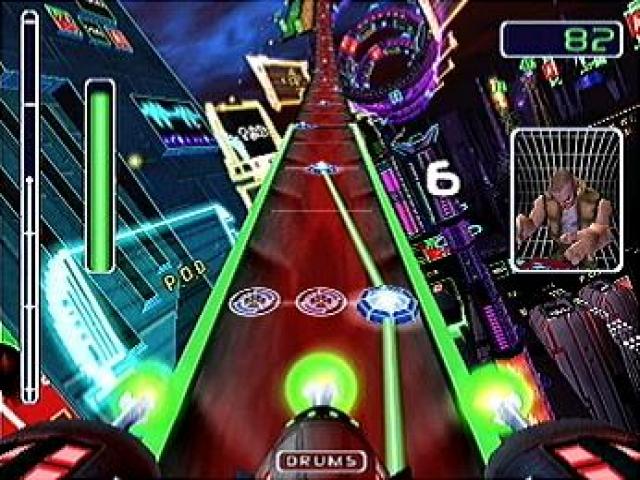
Welcome to the world of Amplitude. Here the Net's best and brightest (and loudest) have come to prove their skills in the ultimate musical competition. Load up your Beat Blaster and launch down a six-track musical datascape fueled by surging rhythms.
Each track is a different instrument of the song: drums, bass, vocals, guitar, FX, and synthesizers. Blast the note capsules to release the sonic energy inside! The more complex the song, the more furiously you have to work. Do you have what it takes to keep the beat alive? Only the fast-fingered will survive!
Game mode challenges you with four difficulty levels played out in five pulsing arenas. There are a total of 25 songs if you are insane enough to unlock them all. In Remix mode, rearrange your favorite songs to suit your style.
You can even play your remixes locally for Game mode competition or share them via Amplitude Online. In Multiplayer Remix mode, up to four mixers can team up to create a slammin' new mix together. Multiplayer Game mode really unleashes Amplitude's competitive spirit.
Up to four players scream through a song blasting notes (and opponents too). In 2-player Duel mode, each player lays down note patterns that the other must match during a feverish musical showdown.
Amplitude Online makes the Internet sing as up to four players clash in the demanding sport of musical competition or pursue the pure enjoyment of remixing songs. Log in and join a game, or host your own with a remixed track you created.
Use the Chat feature to keep in touch with other online players or hurl taunts at the competition. Want others to experience your greatest remix hit? Upload your creation to the Online Remix Repository loaded with tons of remixes submitted by players nationwide. You can even download remixes and play them as games!
Turn down the lights, turn up the bass, and strap yourself in. Amplitude will blow your mind!
MAIN MENU
**STARTING THE
.png)

.png)


.png)
.png)
.png)


.png)





_Front_Cover.jpg)