GETTING STARTED
Set up your PlayStation®2 computer entertainment system according to the instructions supplied with your system. Check that the system is turned on (the on/standby indicator is green).
Insert the Brunswick Pro Bowling disc in the system with the label side facing up. Attach game controllers and other peripherals as appropriate. Follow the on-screen instructions and refer to this manual for information on using the software.
MEMORY CARD
To save game settings and progress, insert a memory card (8MB) (for PlayStation®2) into MEMORY CARD slot 1 of your PlayStation®2 system.
You can load saved game data from the same memory card or any memory card (8MB) (for PlayStation®2) containing previously saved games.
Game Overview
Want the chance to play in pro bowling Tournaments? Brunswick Pro Bowling gives you the chance to compete in local Leagues all the way up to the Pro challenges.
Customize your own unique character, buy authentic Brunswick gear, build your reputation...but don't let it get to your head, because challenges like other great bowlers and varying lane oil patterns can ruin your game at any time.
Work your way through the Leagues and Tournaments in Career mode or use Practice mode to improve your skills with different bowling pin configurations. The better you play, the more hidden lanes and items become unlocked. Get set for the fun and challenges of Brunswick Pro Bowling.
Options
From the Main Menu, select Options to modify game settings. This also displays the Playstation 2 Controller diagram with the various controls for gameplay. Music
Scroll left or right to adjust the volume of the music played during gameplay. The default is 50% music volume.
Sound FX
Scroll left or right to adjust the volume of sounds (such as pins dropping) during gameplay. The default is 50% sound volume.
Autosave
Select ON to automatically save changes throughout the game (requires Playstation 2 Memory Card). The default is ON. Controller vibration
Select ON to play with the controller's shock/vibration feature. The default is ON.
Animations
Select ON to show congratulatory screens after each spare or strike is thrown.
Tips and Hints
Select ON to display help over the course of gameplay. The default is ON.
Gameplay
•
Toggle between ball types by pressing R1. Quick Play mode uses one default ball. Career mode allows for up to two balls during play (choose your balls from the Pro Shop).
•
To view the lane's oil pattern, press and hold R2. This impacts how your ball will roll down the lane.
•
Use the left analog stick to control your position on the lane.
•
Use the right analog stick to control your aim.
•
Your score per frame is displayed in the upper left menu. Select X to set up your approach.
•
Once you are comfortable with your setup, press X to bowl.
•
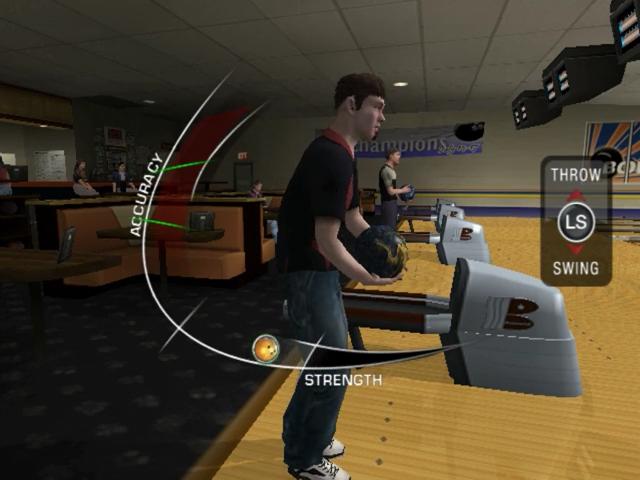
To start your approach, press DOWN on the left analog stick. Your accuracy and gameplay improves the closer you reach the green hot spot on the meter.
•
Press the left analog stick UP to swing down and release the ball.
•
To exit and return to the previous menu, press (start button) and select Quit Game.
Game Mode: Quick Play
From the Main Menu, select Quick Play to head straight to bowling. Up to 4 players can play in this mode.
When 2-4 players are selected (Multiplayer Mode), each player takes turns. The player with the highest score after 10 frames is the winner. Players also have the ability to play against 3 CPU players.
•
For each player, toggle Left or Right to select from pre-made bowlers.
•
To change the player's preferred bowling hand, press the Square button.
•
Select the Game Type by toggling Left or Right. Select Pin Select to modify the pins to practice your hooks or choose Standard to play with all 10 pins.
•
The Location indicator determines which city or venue you will be bowling at.
Game Mode: Career
Build your bowling career starting from amateur league nights up to pro tournaments to become the Brunswick Pro Bowling Champion. By winning matches, leagues, and tournaments, you will increase your reputation, bowling average, and earnings.
With your earnings, you can buy items from the Pro Shop and pay the entry fee for tournaments. Your earnings and reputation will also unlock additional tournaments, lanes, and special merchandise from the Pro Shop.
Customize Your Character
•
Select Career from the Main Menu. Load an existing character, or select New to customize a new character.
Create a new bowler by naming your character and choosing physical attributes (such as gender, hairstyle, and clothing).
Visit the Pro Shop
From the Career menu, select Pro Shop. At the Pro Shop, you can purchase Brunswick bowling balls, shirts, shoes, and accessories.
Certain items in the Pro Shop increase your attributes. As you gain more money and gain your reputation, more items are unlocked for purchase. The purchase price is displayed in the top right corner.
•
To buy an item, press X.
•
To equip your bowler with an item purchased for the next game, press X again. The items you currently have for your next game are labeled Equip as you scroll through available inventory for purchase.
Select A when complete to back out of Career main menu.
**League and Tournament
.png)

.png)

.png)


.png)
.png)


