Setting Up Your System
Set up your PlayStation®2 computer entertainment system according to its Instruction Manual. Ensure the MAIN POWER switch (on the back of the console) is turned on.
Press the RESET button. When the power indicator lights up, press the open button to open the disc tray.
Getting Started
Place the SILENT HILL®2 disc on the disc tray with the label side facing up. Press the open button again to close the disc tray.
Attach game controllers and other peripherals as appropriate. Follow on-screen instructions and refer to this manual for information on using the software.
Memory Cards
A memory card for PlayStation®2 (8MB) is required to save game settings and progress. Insert the memory card into MEMORY CARD slot 1 or MEMORY CARD slot 2 before starting play.
You can load your saved games from the same card, or from any memory card for PlayStation®2 (8MB) containing previously saved SILENT HILL 2 games. PlayStation® game console memory cards cannot be used.
SILENT HILL 2 uses at least 94KB of memory card data to save each game. Make sure there is enough free space on your memory card before starting play. Do not insert or remove a memory card while saving/loading games or after the power has been turned ON.
Starting the Game
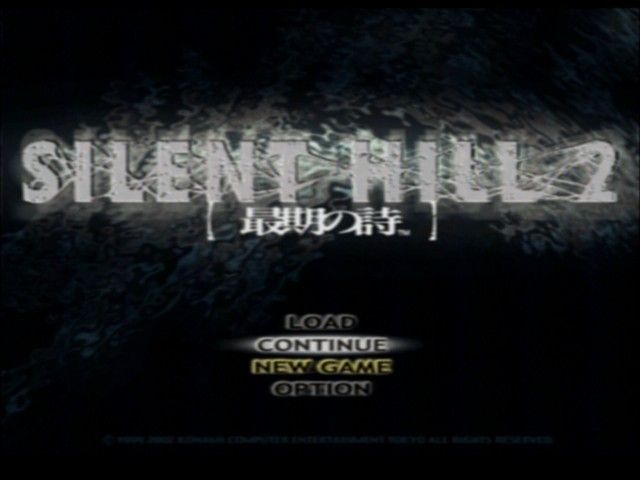
After the introductory screens are displayed, the Title Screen will appear. Select NEW GAME, CONTINUE, LOAD, or OPTION using the Directional Buttons or left analog stick.
Enter your selection with the button or START button. Cancel the selection with the button.
New Game
Select NEW GAME to play a game from the beginning. Choose between the main game and the additional game. It is highly recommended that you complete the main game prior to playing the additional game.
Subsequent menus will prompt you to select an Action and Riddle difficulty level. Use the following chart to help select the desired levels. Once you have selected the difficulty level, it cannot be changed later in the game.
•
HARD: Monsters are very strong and fast
•
NORMAL: Standard difficulty
•
EASY: Weak monsters and simplified controls
•
BEGINNER: Enjoy the storyline, drama, and puzzles of Silent Hill 2 without fighting
•
HARD: Riddles are complex
•
NORMAL: Standard difficulty
•
EASY: Riddles are simplified and hints are provided
•
BEGINNER: Riddles are very easy
Regardless of the difficulty levels selected, the game scenarios and endings will be the same. There is no riddle difficulty level in the additional game.
Continue
Select CONTINUE to resume playing a previously saved SILENT HILL 2 game using data saved on a Memory card (8MB) (for PlayStation®2).
The CONTINUE option will not appear on the Title Screen until a previously saved SILENT HILL 2 data file exists or after a check point is cleared within the game.
Load
Select LOAD to choose a specific SILENT HILL 2 data file from a Memory Card (8MB) (for PlayStation®2). At the Load Screen, select the desired game using the Directional Buttons or left analog stick and enter your selection with the button.
The LOAD option will not appear on the Title Screen until a previously saved SILENT HILL 2 data file exists.
Option
Select OPTION to adjust game settings. Follow the on-screen menus for additional information.
Game settings can also be adjusted during game play by pressing the START or SELECT buttons to bring up the Item Screen. Select OPTION from the Item Screen to adjust game settings.
Playing the Game
Objective
James has returned to Silent Hill to uncover the truth about his late wife Mary. As James ventures deeper into town, he must successfully overcome the challenges that await him.
In some situations, defeating/avoiding monsters and solving puzzles will be necessary. If James can persevere the obstacles, information regarding the origins of the mysterious letter might be revealed and possibly even darker secrets.
How to use the map
If James has a map in his possession, press the button to view the map. Use the button to zoom in/zoom out.
When the map is zoomed in, use the Directional Buttons or left analog stick to view specific areas. If the map consists of multiple floors, press the Up/Down Directional Buttons to view the additional map pages.
As James searches certain areas, he will automatically make notations on the map in red marker. The green pointer on the map represents James' current position.
Field
During the game, control James using the Directional Buttons or left analog stick. When James is near objects or items, press the button to search the immediate area. Important information or useful items may be discovered.
Game Over
The upper left corner of the Item (accessible by pressing the START or SELECT buttons) will show James' current health status inside the Status Box. The current health status of James is determined by color, which will gradually turn red as health decreases.
If the vibration function is enabled (accessible in the OPTIONS menu), the controller will begin to shake more violently as James receives more damage. This is an effective tool for gauging current health status during normal game play.
James will die when his health is completely depleted. Use items, such as the First aid kit and Energy drink to replenish James' life gauge. **Saving
 (USA).png)

 (USA).png)
.png)
.png)



.png)
_1.png)
.png)


.png)