Setting Up
Set up your PlayStation®2 computer entertainment system according to its instruction manual. Ensure the I/ indicator on the front of the console is lit red. Press the I//RESET button to turn the indicator green.
Press the button on the front of the console to open the disc cover. Place the FORBIDDEN SIREN® 2 disc in the disc holder with the label side facing upwards, pressing lightly until it clicks into place. Close the disc cover firmly until you hear a click.
FORBIDDEN SIREN® 2 will then commence loading. It is advised not to insert or remove accessories once the power is on. Owners of SCPH-30000 and SCPH-50000 series consoles should refer to their console's setup instructions.
Important Note
The information in this manual was correct at the time of printing, but minor changes may have occurred during product development. All screenshots are from the English version and some may be from pre-completion screens that differ slightly from the finished product.
Memory Card (8MB) (for PlayStation®2)
Throughout this manual, 'Memory Card' refers to the Memory Card (8MB) (for PlayStation®2) - (SCPH-10020 E). Memory Cards (SCPH-1020 E) designed for PlayStation® (PS one®) format software are not compatible with this game.
To save game settings and progress, insert a Memory Card into MEMORY CARD slot 1. You can load saved game data from the same Memory Card or any Memory Card containing previously saved game data.
Ensure there is enough free space on your Memory Card before commencing play. If you do not have a Memory Card, you can still play FORBIDDEN SIREN® 2 but will not be able to save game settings and data.
Directional Buttons - Movement
In this manual, ↑, ↓, ←, → etc. denote the direction of both the directional buttons and the left analog stick unless stated otherwise. On startup, the Analog Controller (DUALSHOCK®2) will default to analog mode (indicator: red).
Getting Started
The first screen displayed on startup is the Language Select Screen.
•
Press the ← or → directional buttons to choose English, Francais, Italiano, Deutsch or Español.
•
Press the Ⓧ button to confirm and access the Title Screen.
Using Menu Screens
•
Press the ↑, ↓, ← or → directional buttons to highlight an option.
•
Press the Ⓧ button to confirm.
•
To return to the previous menu screen, press the Ⓞ button.
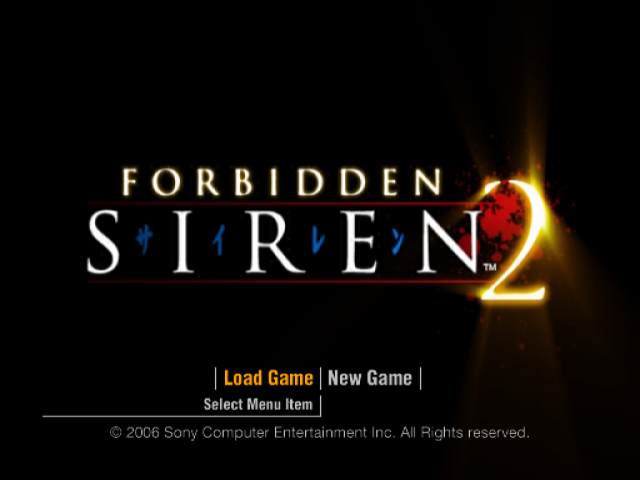
Title Screen
•
Press the ← or → directional buttons to highlight an option.
•
Press the Ⓧ button to confirm.
•
Load Game: Load game data previously saved to Memory Card.
•
New Game: Start a new game from the beginning.
Beginning a New Game
Select New Game from the Title Screen and configure the following settings:
1.
Adjust brightness and screen position
•
Increase or decrease brightness by pressing the L1 button or R1 button.
•
Reposition the game screen by pressing the ↑, ↓, ← and → directional buttons.
•
When the screen is lit and positioned correctly, press the Ⓧ button.
2.
Select a difficulty level
•
Choose either Easy or Normal difficulty level.
•
Press the Ⓧ button to continue.
•
NOTE: You can also access the Options Menu from the Select Difficulty Level screen to configure additional gameplay options.
Saving Progress
Progress can be saved after each individual stage is completed. You can also set the 'Autosave' function to On via the Options Menu. After manually saving once, subsequent progress will be automatically saved after each stage is completed.
Options Menu
Various game settings can be adjusted via the Options Menu.
•
Select the item you want to change and press the button.
•
Make adjustments by pressing the directional buttons as required.
•
Select 'Restore Defaults' to revert all settings to their original status.
System Options
•
Difficulty: Increase or decrease the difficulty level.
•
Autosave: Toggle the Autosave function on/off.
•
Hints: Switch the hints display on/off.
•
NOTE: You cannot adjust the Difficulty level during gameplay.
Controller Options
•
Key Configuration: Reconfigure the game controls.
•
Vertical Camera: Select Normal or Reverse.
•
Horizontal Camera: Select Normal or Reverse.
•
Vibration: Toggle the vibration function of the Analog Controller (DUALSHOCK®2) on/off.
Screen Options
•
Screen Adjust: Adjust screen display settings.
•
Caption: Turn subtitles on/off.
•
Map Marker: Turn on to constantly display a character's Map Marker, off not to display it, and Light only to display the Map Marker when equipped with a flashlight.
•
Alert Effect: Choose the type of effect to indicate that an enemy has detected you.
•
Viewpoint: Choose from two camera positions.
Additional Driving Controls
•
Left analog stick: Steer
•
button: Headlights On/Off
Playing the Game
Game Progression
FORBIDDEN SIREN® 2 is comprised of 'stages' which involve certain characters and different timeframes. The playable character will differ from stage to stage, but generally there will be one single playable character per stage.
Clear each stage to proceed to the






_1.jpg)



.png)