Starting the Game
1. Set up your Sega Saturn system as described in its instruction manual. Plug in Control Pad. Note: Shining the Holy Ark™ is for one player only.
2. Place the Shining the Holy Ark™ disc, label side up, in the well of the CD tray and close the lid.
3. Turn on the TV or monitor and the Sega Saturn. The Sega Saturn logo appears on screen. If nothing appears, turn the system off and make sure it is set up correctly before turning it on again. 4. If you wish to stop a game in progress and return to the onscreen control panel, simultaneously press Buttons A, B, C and Start on the Sega Saturn Control Pad. When the game title screen appears press again to go to the onscreen control panel. Handling the Disc
Your Sega Saturn CD contains a security code that allows the disc to be read. Be sure to keep the disc clean and handle it carefully. If your Sega Saturn system has trouble reading the disc, remove the disc and wipe it carefully, starting from the center of the disc and wiping straight out toward the edge. Entering the Game
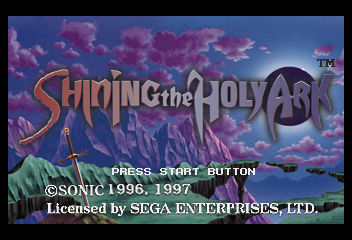
An animated story sequence follows the Sega and Sonic Software Planning logos. Wait for the animation to end, or press any button while it plays to make the Press Start Button message appear onscreen. Press Start to bring up the Start menu and enter the game. Name Entry
The first time you load the game, and whenever you begin a new game, the Name Entry screen appears. Press the D-Pad in any direction to highlight a character, and Button A or C to select. Press Button B, or select Backspace to delete the previous character. Select End of name to finish entering your name, and to begin the game.
Be warned - you cannot change your character's name during play, so choose wisely.
Game Data Menu
If you have data saved from a previous game, the Game Data menu appears. This menu allows you to select game data to delete, copy, continue a saved game, or start a new game from the beginning. Press the D-Pad up or down to highlight a menu item, and Button A or C to select.
•
If you select From the beginning the Name Entry screen comes up.
•
Otherwise the Game Data Options menu appears. In the Game Data Options menu, press the D-Pad up or down to highlight Begin, Copy or Erase, and Button C to select.
Saving Game Data
Saving Game Data is a crucial part of your Shining the Holy Ark adventure. Each data file occupies 65 memory units in your Sega Saturn's internal RAM, or on your Sega Saturn Backup™ cartridge (sold separately). If you don't have enough memory available to save game data, a message appears onscreen before you start your game, warning you that you will not be able to save new game data. Access the Sega Saturn Memory Manager screen to erase unneeded data before beginning play. Exploration Modes
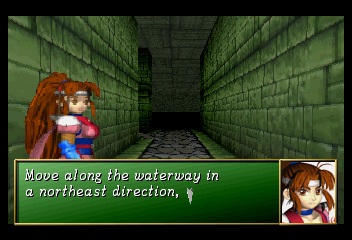
Whether it be searching the corridors of a dank subterranean maze, or visiting with friendly townsfolk in an isolated village, most of your adventure will be spent in the 3D Motion screen environment. Within the 3D Motion screen, there are several main types of modes:
Search Mode
This is the mode that shows your surroundings as you move through the wilderness and dungeons of Enrich. In Search mode, press:
•
Button A: To call up the Main Options icon menu.
•
Button C: To Check areas for clues and secret treasure caches. (Also used to call up the Main Options menu when you are not facing a searchable area.)
•
Button X: To look to the left and right.
•
Button Y: To look up and down.
•
D-Pad up twice quickly and hold: To dash forward at high speed, letting you race down long tunnels or crash through stubborn barriers. (White speedlines appear onscreen when you dash.)
•
Button B: To continue facing forward while moving to the left or right.
•
Start: To call up the area map, when you have lost your way.
Options Mode
Options mode allows you to use items and magic, check the status of party members and reconfigure several aspects of gameplay.
Battle Mode
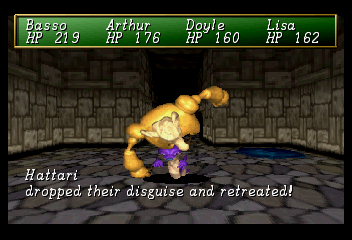
When you encounter monsters, the game automatically shifts into Battle mode and the Battle Options icon menu appears. If you succeed in a battle you gain both Gold and Experience, so fight bravely.
Factfinding Mode
Not all of your adventure will be spent in forbidding dungeon areas - you must interact with townsfolk and other characters you meet in order to gather clues and purchase items to aid you in your quest. Move about towns and buildings just as in the Search mode, and be sure to check all areas thoroughly for hidden treasure. When you meet other characters, press Button C to engage them in conversation - they might have some knowledge of value to impart.
Exploring Dungeons
To unriddle the mysteries of the Holy Ark, Arthur and his companions must make their way through grim cave networks, murky enchanted forests, frozen mountain caves and haunted ruins. These areas are known as dungeons, and while they hold many dangers for the unwary traveler, they also reward the stout-hearted with fabulous hoards, lost ancient secrets, and items of magical power.
Sharp-eyed adventurers may find helpful booty in pools of water or hidden under rocks, or release an enchanted pixie from the trunk of an old tree. Treasures may be hidden anywhere in a dungeon, so check all suspicious areas thoroughly by pressing Button C. The
.png)

.png)
.png)
