OBJECT OF THE GAME
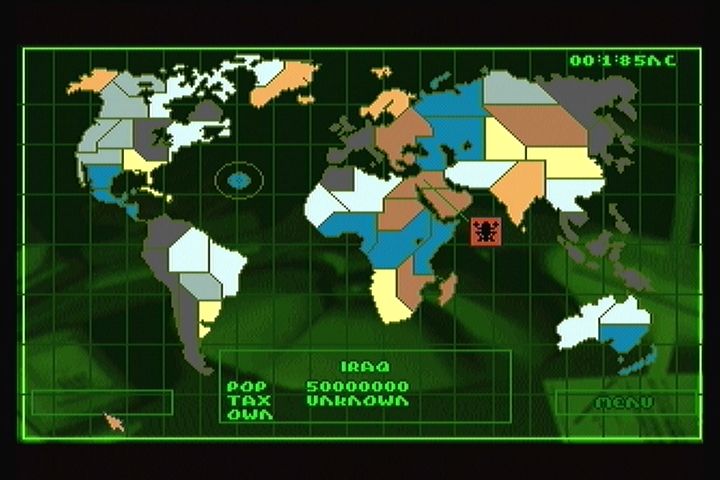
The aim of the game is to spread the dark stain of your Syndicate's color across the surface of the entire globe. The world map is divided into various territories. From your home base in Europe you invade adjacent territories and, through the violent subterfuge of your agents, wrestle them from rival Syndicates. Having done so, raise taxes on the locals to increase your profits and punish them for serving the wrong Syndicate. But raising taxes can make you very unpopular. And furious natives leading popular rebellions can eat into Syndicate profits. So keep an eye on foreign interests and pick off troublemakers with your teams of agents. And while you're busy expanding your Syndicate's empire abroad, rival agents are working in your own backyard to de-stabilize your Syndicate. Ensure agents are briefed to weed out traitors whose actions might bring about your downfall. By meeting all the challenges, destroying all targets and gaining control of all the territories, your Syndicate triumphs. COMMAND SUMMARY
•
B - Select weapon (See Using Weapons)
•
C - Use weapon (See Using Weapons)
•
Right Shift + D-Pad - Select Agent
•
Right Shift + C - Alter IPA levels (See IPA Levels)
•
P - Pauses Game and brings up Pause Menu:
•
A + Left/Right Shift - Increase or Decrease Sound FX Volume
•
B + Left/Right Shift - Increase or Decrease Music Volume
•
C - Mono/Stereo Sound FX
•
X - Withdraw from Mission
•
Left Shift + A + B + C - Self-destruct (if equipped with Version 2 or 3 chest)
•
P - Go to Mission Debriefing after mission
•
Left Shift + D-Pad up/down/left/right - Move mission view
GETTING STARTED
1. Turn ON the power switch on your 3DO™ Interactive Multiplayer™. The READY light indicates that the unit is on. 2. Make sure a Control Pad is plugged into the Control Port on the Multiplayer console. If not, turn the player OFF, plug in a Control Pad and then turn the player ON again.
3. Press the OPEN/CLOSE button. The disc tray extends.
4. Insert the Syndicate disc into the tray (label side up) and press OPEN/CLOSE to retract the tray. The 3DO logo appears. If you don't see it after a few moments, turn OFF the Multiplayer and begin again at step 1. 5. The Bullfrog Logo screen appears, followed by the opening introductory sequence. Press A at any time to leave the intro early.
MAIN MENU OPTIONS
Use the D-Pad to move the cursor to highlight the chosen file and press A to open.
•
CONFIGURE COMPANY - Customize your Syndicate by choosing logo, color and name. For more information see Configuring Your Company. •
BEGIN MISSION - Pick a mission territory, equip your agents and pit your Syndicate against your global rivals. For details see Preparing To Play Syndicate. •
LOAD AND SAVE GAME - Preserve current game status or reload previous games of Syndicate. See Loading And Saving A Game. •
RESTART GAME - Things not progressing too well? Kinda get the feeling a particular game of Syndicate is cursed? Simply return to Main Menu and press A at Restart Game to go back to the beginning and start again. CONFIGURING YOUR COMPANY
Press A at Configure Company to reveal the Select Detail To Change box. Select Detail To Change allows you to personalize your Syndicate color and logo, Syndicate name and player name here. CHOOSING COMPANY COLOR & LOGO
Press A at the Color And Logo option. Scroll through the color list with the D-Pad until the desired color appears. There are eight colors to choose from. The chosen color/logo combination appears in the top right hand corner of the screen. Press A at OK to confirm your selections.
CHOOSING COMPANY LOGO
Press A at the Color And Logo option. Scroll through the logo list with the D-Pad until the desired logo appears. The logo list contains 40 logos.
CHOOSING COMPANY NAME
The Select Detail menu will now reappear. Press A at Company Name to bring up a keypad. Using the D-Pad, highlight a letter and press A to select it. Once you have selected your letters, confirm the name.
EQUIPMENT AND WEAPONS
D-Pad up to Equip. Current equipment and future purchases are listed to the bottom right of the agent icon. Press A to reveal the Equipment list. D-Pad up and down through the list and press A to reveal Weapon Details.
As with the Info and Enhance options, it is up to you to balance expenditure against the requirements of a mission.
Weapon Details
At the beginning of the game you have only five equipment options: persuadertron, pistol, shotgun, scanner and medikit. Research money is needed to perfect more (see Research). The Weapon Details window reveals Name, Cost, amount of Ammo carried, effective weapon Range and the unit cost of ammo or Shot.
Only by playing Syndicate do you learn the ideal mission environment for each weapon, but for tactical hints and details of specific equipment uses see Equipment 
.png)
