Buildings
Each building has multiple rooms and often more than one floor. Each room has up to six possible exit directions: LEFT, RIGHT, IN, OUT, UP, and DOWN.
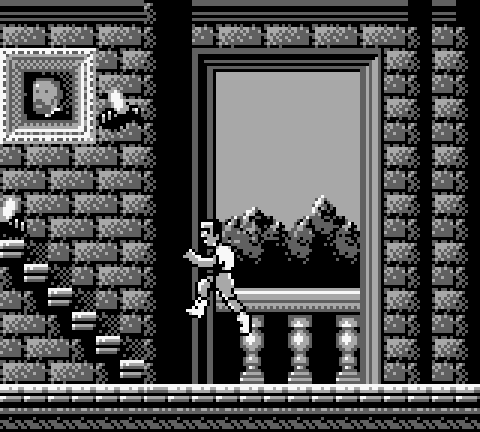
To exit LEFT or RIGHT, walk off the respective side of the screen. To exit IN, stand in front of a door in the backdrop and push up on the control pad. To exit OUT, stand behind a bobbing "EXIT" sign (Franky will face the screen) and pull down on the control pad. To exit UP or DOWN, jump or drop Franky through holes in the top or bottom of the screen.
Large Scrolling Levels
Franky will encounter large scrolling areas that are taller and wider than the screen. To explore horizontally, run left or right. To explore vertically, Franky needs to climb.
He can climb by jumping onto ledges in the backdrop. Remember Franky has a limited jump. Find a ledge near the ground to jump to others nearby. If you fall off, you may have to start again.
In The Sea
In one area, Franky must explore the ocean depths. Gravity pulls him to the seabed unless he swims. Pressing and holding the A button makes Franky gradually swim up. The longer you hold A, the higher he swims.
To float back down, release the A button. Keep an eye on Franky's oxygen level. Swim through floating oxygen tanks to replenish it. Avoid sea creatures, as they are harmful.
GAME FEATURES
Map Screen
Selecting MAP from the In Game Option Screen shows a plan view map. If inside a building, it shows the current floor. Otherwise, it shows a general map of Franky's location.
Inside a building, the location and floor number are at the bottom of the screen. A bouncing hand indicates Franky's current room. Using the map to note your position helps learn building layouts.
Outside, the map indicates (clockwise): Egypt, The Village, The Forest, Sea World, The Garden, and The Chateau in the center.
Room Names, Sound Effects & Music
When entering a new room, its name displays briefly at the bottom of the screen. This can help guide Franky.
Once familiar with building layouts, you can turn room names off. Go to the Electric Room on the ground floor of the Chateau. Jump UP in front of the left electrical switch to disengage it and turn names off. Jump UP again to engage it and turn names back on.
Similarly, you can turn Sound Effects and Music on and off using the middle and right switches, respectively. Switch positions are not saved when you save the game.
Energy
Franky's energy is an electrical cell in his body. Contact with creatures or gaseous bubbles depletes it. Losing all energy results in losing a life. You start with three lives; losing all three ends the game.
To restore energy, use the recharge machine in the Electric Room on the Chateau's Ground Floor. A vital component is missing and must be found before recharging. Recharge by standing inside the cubical (Franky will face the screen) and pressing UP on the control pad. The screen will flash as energy replenishes.
Franky's current energy level is shown on the In Game Option Screen.
Shields
Franky can collect a Shield to protect himself from enemies. When active, Franky flashes and a beating sound plays. In this state, Franky can walk through any enemy unharmed.
Shields last for 20 seconds and are found in the same spot each time. If you lose a life or a transporter, Franky returns with shield protection for a few seconds.
Oxygen
While exploring the ocean, Franky must maintain his oxygen supply. He can do this by swimming through floating oxygen tanks. Franky's current oxygen level is displayed on the In Game Option Screen.
Transporter
The transporter is a very useful object. Franky can pick it up and drop it at any desired location. Once dropped, you can jump back to that location from anywhere in the game, as often as you wish.
The transporter is operated from the In Game Option Screen. First, PICKUP the transporter from its hidden location, then DROP it at another location. After dropping it, you can GOTO that location at any time.
If you save the game after collecting and dropping the transporter, Franky will return carrying it when you restart with that code. You will then need to drop it again.
You may only drop the transporter inside a building or structure and only on a level surface.
Objects
The game map is littered with objects, each with a written clue. There are six main types of objects:
•
Pieces of the golden Bitsy tablet.
•
Objects to repair the recharge machine.
•
Objects that unlock doors or remove blockages from entrances.
•
Objects that move scenery to reveal hidden rooms.
•
Objects that make other objects appear.
•
Gold coins to allow access to other locations.
The World
Franky's interaction with his surroundings is designed to be logical. You can stand on most solid-looking objects like barrels, boxes, tables, chairs, crates, and tree stumps. Franky can pass in front of almost everything except solid objects such as walls, roofs, and boulders.
In Game Option Screen
Pressing the select key during play brings up a menu screen with the following functions:
•
(A) Save Game: Presents a sixteen-digit code to restore the game to its current status. Write this code down each time.
•
(B) Transporter: Allows you to perform transporter functions.
•
(C) Inventory: Displays a list of
.png)

_2.png)
 (En,Fr,De,Es,It,Nl,Sv).png)

 (SGB Enhanced).png)

_1.png)
 (En,Fr,De,Es,It,Nl,Sv).png)

.png)




 (Beta).png)