Starting Up
Correctly insert the Game Boy Game Pak into your Game Boy unit, and switch on the power.
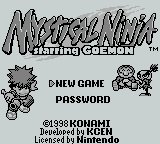
Select either "NEW GAME" or "PASSWORD" from the Title screen with the Control Pad, and press the A button to set.
New Game
Play the game from the beginning.
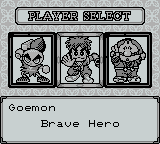
If you select "NEW GAME", the Chapter 1 Title screen will appear, followed by the Character Select screen. Choose to play as either Goemon, Ebisumaru, or Sasuke, then start the game. When you clear a stage, the Title screen for the next chapter will appear, followed by the Character Select screen. Choose one of the characters you haven't selected before, then continue playing.
•
You can play as any character you want once you reach Chapter 4.
Password
Input PASSWORD to play the game from the stage you last left off.
When you clear a chapter, a PASSWORD made up of a combination of 16 different icons (bamboo pipe, bomb, etc) will appear on screen. Select "PASSWORD" at the Title screen to switch to the PASSWORD Input screen. If you correctly input the 14 icons of the PASSWORD in order, you will be able to start playing from the start of the stage corresponding to that PASSWORD. If you have made a mistake when inputting the PASSWORD, an error warning will sound. You can reinput as many times as you like if you make a mistake.
To exit, press A + B + Start + Select at the same time. If you notice you've made a mistake while you're still inputting, press the B button to delete one character at a time.
How to Play
"Mystical Ninja Starring Goemon" is an action role-playing game. You must collect information and items, and defeat the boss characters that lie in wait for you in each stage to progress. •
You have a certain amount of strength. When you take damage from enemy attack, or fall into holes, rivers or the ocean you lose strength. If you completely run out of strength the game ends.
•
You can regain strength by staying in inns or buying items.
•
You will find a variety of items with different effects as you progress through the game.
Game Flow
This is how the game is structured.
Character Select
Select either Goemon, Ebisumaru, or Sasuke to be your character. Game Starts
Sword Battle Action Mode
This mode is made up of an outside scene and a dungeon scene. You start outside, fighting enemies and collecting information, items and clear items.
Surprise Match Mode
A boss character lies in wait for you at the end of the dungeon scene. If you defeat him, you clear the stage.
Game Screen
•
ST: Shows your current strength level.
•
Shuriken: Shows how many shuriken (daggers) you have. •
Attack items: Shows whether normal attack items or special attack items are activated.
•
Level: Move to upper or lower level.
•
1000-coin box: Contains gold coins and items. •
River: If you fall into the river your strength level decreases by one.
The Surprise Match
The 100-Meter Dash
Try to get to the finish line before your opponent by pressing the A button repeatedly.
Lantern Attack
Move the cursor with the Control Pad and press the A button to pick which of the 6 lanterns doesn't belong.
Tug-0-War
Test your strength by pressing the A button repeatedly to pull your opponent into the center.
Contest of Nerves
Move the cursor with the Control Pad and press the A button to turn over the cards. Try to collect all 8 different patterns of two cards each.
Octopus Whack
Each button on your Game Boy unit corresponds to one of the jars. Hit the buttons to whack all the octopi as they come out!
Last Battle
Take on the final boss by moving the target left/right with the Control Pad, and pressing the A button to punch!
Events
There are events in each stage. If you win you'll receive items or other rewards.
Roulette
Shoot three arrows at the roulette wheel to make a score equal to or greater than the target value.
Face-to-Face
Use the Control Pad to make your character jump forwards. Memorize the order in which the different faces appear, then change all the panels to the face of the character you are currently using.
The Quiz Contest
You must get at least five answers correct in this quiz.
.png)

 (SGB Enhanced).png)
 (SGB Enhanced).png)
