PARK MENU
The Park Menu is structured into several key areas for management and construction. It includes the Construction menu, Full Map view, Facility Management options, and the Mode Menu for switching between different operational states.
CONSTRUCTION
The Construction menu is divided into several sub-menus for building the park infrastructure:
•
Vegetation and Boulder Placement Menu
•
Building Construction Menu
•
Facilities Construction Menu
•
Remove (to delete areas, buildings, or roads)
ROADS AND PATHS
Construct vehicle roads for buses, as this is the only way to travel around the park. Build roads along the borders of dinosaur areas so visitors can see dinosaurs from the buses. Ensure all roads connect to rotaries and the gate at the southern end of the island. Note that roads cannot connect directly to hotel, restaurant, or shop entrances; walking paths are used for those connections.
Construct walking paths for visitors. Connect these paths to rotaries and facilities like shops and hotels to help visitors navigate. You can build crosswalks where vehicle roads and walking paths intersect. Be aware that the ground around dinosaur areas is built up high, so visitors cannot see dinosaurs from walking paths in those specific zones.
ROTARIES AND FACILITIES
Rotaries serve as bus stops for visitors. Construct vehicle roads up to the rotaries' entrances and exits, and walking paths up to their entrances and exits. You must specify direction during rotary construction.
The Building Construction menu allows you to build hotels, restaurants, and shops. Hotels provide rest for visitors when the park is large. Restaurants come in three types: Rex Burger, Spino Grill, and Pteranodon Cafe. Shop types vary based on merchandise sold. When constructing hotels, restaurants, and shops, you must specify which direction they face.
VEGETATION AND SYMBOLS
Use the Vegetation and Boulder Placement menu to place calming elements for visitors. The Symbol Placement menu allows you to construct landmarks to help orient guests in the park. Area pieces are constructed to create living spaces for dinosaurs; these are detailed further in the game manual.
FACILITY MANAGEMENT
Manage park facilities such as hotels, restaurants, shops, and dinosaur areas. Selecting a facility type displays a list of existing structures. Selecting a specific facility shows its details screen. Management screens allow you to view Facility Levels, Capacity, Rates, Maintenance Costs, Profits, and Visitor counts. You can upgrade facility levels and change fees from these screens.
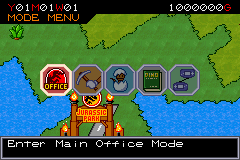
MODE MENU
Switch between the following operational modes:
MAIN OFFICE MODE
Set the entry fee for the park and manage buses. You can buy or sell buses to move visitors around, with a maximum ownership limit of 20 buses. Buses outside the gate can be sold.
Run advertisements to attract visitors. Select the type (TV, Newspaper, Magazine, Internet) and target audience (Men, Women, Couples, Boys, Girls) based on your park's profile. Advertisements can only be run once a month.
View park statistics including visitor numbers, budget, and opinions. The visitor graph shows past year data, plus current and past week numbers. The budget screen details income and expenses. The opinion screen displays the top five visitor opinions to help guide park decisions. You can also view the total park score, adjust game speed, and save your game data.
EXCAVATION MODE
Send excavation crews worldwide to find amber containing dinosaur DNA. The region selected determines the likelihood of finding specific dinosaur species. The team departs once you select the region and time period.
RESEARCH LAB MODE
Analyze amber to extract DNA blocks. Each DNA set consists of five blocks (A through E); assembling all five completes the set. Use completed sets to create eggs, which are then sent to the incubation plant.
View plant information to track dinosaur egg incubation. You can move hatched dinosaurs from the plant to the park map. Hatched dinosaurs must be placed in a dinosaur area within 24 months, or they will be automatically retired.
ILLUSTRATION MODE
View illustrations of all hatched dinosaurs in the plant. Unhatched species are marked with a "?". This screen displays Order, Family, Diet, Body Length, and Era information. Use the R Button and L Button to skip through "?" pages.
EXCHANGE MODE
Use a Game Link® cable to trade DNA blocks with other players. This is useful for obtaining missing DNA blocks. You must have more than one of the block you wish to trade. Each player must give and receive a block; one-way trades are not allowed. The maximum number of any single DNA block owned is 9.
HOTEL, RESTAURANT, AND SHOP DETAILS
Facility details include Level, Capacity, Rate, Maintenance Cost, Profits, and Visitor numbers. Higher facility levels increase capacity but also raise maintenance costs.
Shop details require managing products. You can select three item types to sell, adjusting prices based on wholesale cost and profit margin. Choose products carefully based on visitor types and dinosaur species present.
DINOSAUR AREA DETAILS
View area security levels, durability, piece count, geographical attributes, and dinosaur counts. Higher area levels increase maximum durability but raise maintenance costs.
Dinosaur activity gradually reduces security durability. If durability drops too low, dinosaurs may escape. Use the "Restore" option to return durability to its maximum.
Geographical attributes include Land, Sea, and Fresh Water. Mismatched geography causes dinosaurs to grow weak. You can upgrade area security levels (maximum level 8), restore durability, and

 (En,Fr,De,Es,It).png)
 (En,Fr,De,Es,It).png)
 (En,Fr,De,Es,It).png)