Starting the Game
Make sure the POWER switch is OFF. Insert the LEGENDS OF WRESTLING™ 2 Game Pak into the Game Boy® Advance slot as described in your Nintendo Game Boy® Advance instruction manual. Turn the POWER switch ON.
Note: The LEGENDS OF WRESTLING™ 2 Game Pak is for Game Boy® Advance only.
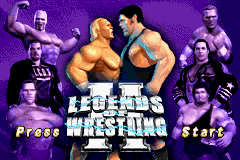
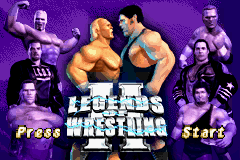
At the title screen, press START to advance to the Main Menu.
Main Menu Options
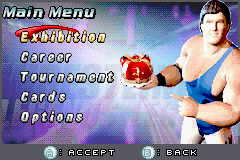
At the Main Menu, you will have these choices:
•
EXHIBITION: Play a single match.
•
CAREER: Vie for the World Belt in a series of matches.
•
TOURNAMENT: Wrangle your way up the tournament ladder to victory.
•
CARDS: View a selection of cards featuring top wrestlers.
•
OPTIONS: Set up your game.
Game Options
Set up your game to suit your taste. Press UP or DOWN on the Control Pad to cycle through options, press the A Button to toggle through options choices, and press the B Button to return to the Main Menu.
•
Difficulty: Set to Jobber (Easy), default Mid-Card (Medium), or Legend (Difficult).
•
Knockout: When set On (default), allows knockouts in Exhibition and Tournament matches. When set to Off, knockouts are not possible in Exhibition and Tournament matches. NOTE: Knockouts are always allowed in Career Mode, regardless of Options settings.
Basic Controls and Moves
While walking around, use the following controls:
•
SWITCH FOCUS: Next Opponent
•
TIE UP OPPONENT: B Button
•
REVERSE: An opponent's move, or prevent them from reversing
Running and Attack Combinations
•
Double-tap Control Pad ◀ or ▶ to run.
•
While running, hold the A Button to attack.
Turnbuckle Moves
While at the turnbuckle, use these combinations:
•
Primary move: Press the diagonal direction of the turnbuckle + A Button.
•
Secondary move: Press the diagonal direction of the turnbuckle + B Button.
Secondary Slam Moves
Use these combinations for secondary moves:
•
Secondary scoop slam: ↑ + B Button
•
Secondary head between legs: ↓ + B Button
•
Secondary belly to belly: ← + B Button
•
Secondary full nelson: → + B Button
Ground Moves
When an opponent is on the ground (and you are standing next to them horizontally):
•
TURN OPPONENT OVER: Turn Opponent Over
•
PIN OPPONENT: If on back
•
STOMP OPPONENT: Stomp Opponent
•
PERFORM GROUND MOVES: Perform Ground Moves
•
PICK UP OPPONENT: ↑ + L Button (At head)
Game Modes: Exhibition
Choose "Exhibition" from the Main Menu, then choose one of four types of Exhibition Match: Versus, 3 Way Dance, 4 Way Dance, or Tag Team.
Whatever the mode, there are several types of matches. In Career mode, you play whatever match the promoter is putting on. In other modes, you can select the type of match you wish to play.
•
VS MODE: Versus mode matches feature your wrestler against a selected opponent.
•
3 WAY DANCE: Turn up the heat when three grapplers set out to punish all opponents until only one wrestler remains.
•
4 WAY DANCE: The clown cotillion continues when four wrestlers go at each other until only one is left to tell the story.
•
TAG TEAM: In tag team matches, you have a partner outside the ring who will come in to carry on your crusade when tagged. Once all opponents are defeated, the player left is the winner.
Wrestler Selection
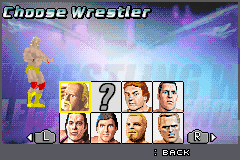
Press the Control Pad to move the cursor. Press the L Button and R Button to page through the wrestlers.
Press the A Button to choose your wrestler. Do the same for your tag team partners and/or opponent(s). When all wrestlers are chosen, the wrestlers will make their entrances and the match will begin.
Question marks in the wrestler selection menu indicate locked wrestlers. These can be unlocked by winning Career mode.
Career Mode Overview
In Career mode, you select a wrestler to guide you through an entire series of matches, battling across this great land until at last you seize the ultimate prize, the World Championship Belt.
If you have already played career mode with a wrestler, you will be asked whether to continue that saved career, or to start over. If you choose 'Start Over' you will be asked 'Are You Sure?' If you choose 'Yes' your saved data will be overwritten and that wrestler will begin a new career. One career will be saved for each selectable wrestler.
Career Mode Progression
Your manager will appear to guide you through your career before and after matches. If 'Tips' in Options Menu was set to ON, your manager will also give you gameplay tips, such as how to counter an opponent's attack.
Your manager will prompt you to choose a region to compete in. The Career Mode Map Screen will appear. Use your cursor to select a region, and press the A Button to confirm. Your opponents will be chosen for you. Most matches will