Tennis Anyone?
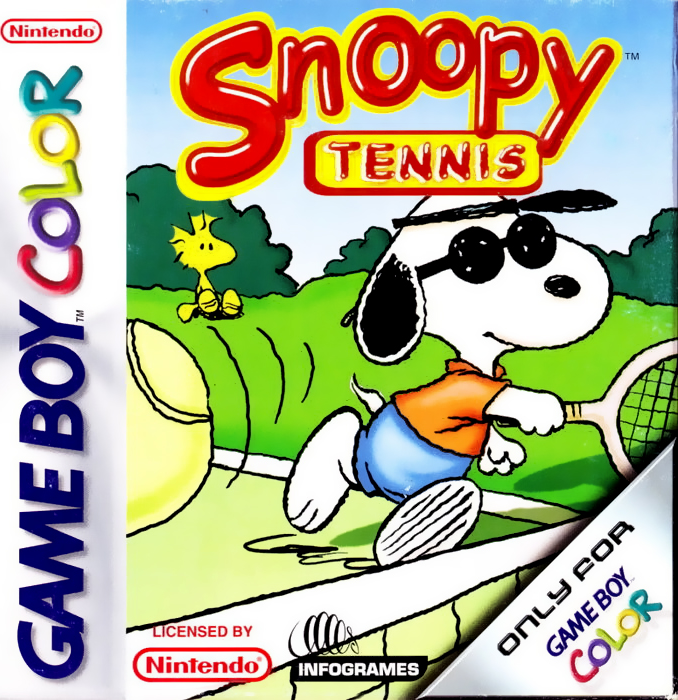
Join the Peanuts® gang for an exciting string-busting, ball-bashing tennis game in Snoopy™ Tennis for Game Boy® Color. Swing from the back court, rush the net, lob the ball, add backspin, and smash an overhead on nine awesome courts! Play solo or challenge a friend head-to-head in tennis matches designed for kids of all ages. Snoopy™ Tennis provides hours of exhilarating entertainment with the unique twist of the world inhabited by the Peanuts® characters. Have fun! Starting the Game
After turning the power "ON", the Game Boy Color will arrive at the Language Selection screen. Here you can select your preferred language.
•
Scroll up and down with the Control Pad until you find the desired language.
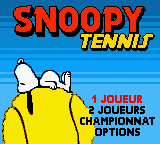
After this, you will proceed in the language of your choice to the Main Menu screen.
1 Player Game - Normal
To access a single player game in the Main menu, highlight the "1 Player" text and press the A Button. This will advance you to the "Select Mode" screen.
On the Select Mode screen you can choose from 5 different playing modes:
Normal is the same as traditional Tennis using the advantage system of scoring. For a refresher on the advantage system of scoring, please see Schroeder's™ appendix on page 22. •
To select this mode, move the arrow next to Normal and press the A Button.
•
You will then advance to the "Select Character" screen.
Selecting Characters and Opponents
•
Press the A Button to select the character of your choice.
•
You can always deselect a character by pressing the B Button and starting over.
After you select the playing character, you must then select the opponent. Scroll the opponent list the same way you scrolled the player list, then choose the opponent by pressing the A Button. Next, you will advance to the "Select Court" screen.
Selecting a Court
On the "Select Court" screen you can choose from 4 different courts. The select court screen shows the court composition and setting. For a complete overview, please see "Snoopy's™ Aerial Shots" on page 15. •
Press the A Button when you find your preferred court.
You are now ready to play tennis.
Pausing the Game
•
You can pause the game at any time by pressing Start.
•
Pressing Start again returns the game to action.
While paused, a submenu allows you to choose whether to view the game stats, quit the game or resume play.
1 Player - Other Modes of Play
We've just covered the instructions for Normal mode. There are also four other modes to explore for those interested in playing intriguing variations of the traditional form of tennis. The four mode variations are:
Power Mode
In this mode of singles play, icons called power-ups appear at random around the court. Each power-up forces an immediate action or result. We tabulated the power-ups below.
Point Race
Point Race is based on the tiebreaker scoring system. Score as many points as possible within a two-minute time period.
With two linked Game Boy® units (Game Link® cable), Point Race becomes a thrilling race to see who can score the most points within the given time period. The seconds tick by only when the losing player serves.
Sudden Win
In tennis, service break occurs when the one receiving the serve scores. In Sudden Win, you play until first break of serve, thereby winning the set. Otherwise, the standard rules of tennis apply.
Squash
Sloping walls replace the sidelines, but otherwise the regular rules apply. Bounce the ball off either wall to produce challenging angles. It is impossible to hit the ball over the walls. Since there is only one squash court, selecting this mode bypasses the court selection screen.
Doubles: 2 Player Mode
With a Game Link® cable, you can connect two Game Boy® units head to head. All the same game modes work: Normal, Power Mode, Point Race, Sudden Win, and Squash.
If you experience a broken link error, adjust the Game Link® cable until it is securely in place.
•
For two-player mode, two copies of the game are required, one for each Game Boy®.
•
The option settings of the first player to enter 2 Player mode will be used.
•
A Game Boy Advance Game Link® cable will not work.
Options
This screen enables you to customize the match length, difficulty, court position, controls, and passwords.
Match Length
•
This can be adjusted to 1 or 3 sets. If you select the latter, you must win two sets.
•
To toggle between the Match Length options press the A Button.
•
When finished simply press down on the Control Pad to continue adjusting other options or press the B Button to back out to the main menu.
Difficulty
Here you adjust how aggressive the computer-controlled character will be.
•
To toggle between the difficulties press the A Button.
•
You may choose between Easy, Medium or Hard.
Password
Here you can enter passwords that let you jump to the point where you last left off in a game.
•
Press the A Button once to get into the password entry screen.
•
To enter a Password simply use the Control Pad to move through the letters.
•
Press the A Button to select the appropriate letter and 'OK
.png)



 (En,Fr,De,Es,It,Nl).png)
.png)


