Setting Up
Set up the PSP™ system according to the instructions in its instruction manual. Turn the PSP™ system on and the POWER indicator will light up green. The XMB™ Menu will be displayed. Open the disc cover and insert the Persona 3 Portable disc with the label side facing the rear of the PSP™ system and then securely close the disc cover. Select the 🎮 icon from the XMB™ Menu and then select the 💿 icon. An image of the software will be displayed. Select the image and press the ⓧ button to commence loading.
PLEASE NOTE: the information in this manual was correct at the time of going to print, but some minor changes may have been made late in the product's development. All screenshots for this manual have been taken from the English version of this product, and some screenshots might have been taken from pre-completion screens that differ slightly from those in the finished product.
Memory Stick Duo™
To save game settings and progress, insert a Memory Stick Duo™ into the Memory Stick Duo™ slot of the PSP™ system. Saved game data can be loaded from the same Memory Stick Duo™ or any Memory Stick Duo™ containing previously saved game data. Main Menu Options
After the opening movie, the title screen is displayed. Press any button to open the Main Menu.
•
New Game: Start the story from the beginning. First, you will choose the main character's gender and the difficulty setting. Once chosen, these cannot be changed.
•
Load Game: Continue the game from a previous save. Select a file to load and push the X button.
•
Config: Adjust the game options. You can also access this menu in-game by choosing System from the Command Menu.
•
Data Install: Install aspects of the game data onto your Memory Stick Duo™ or Memory Stick PRO Duo™ to lessen loading times. Requires at least 258MB of free space. After installing, turn "Data Install" ON in the Config menu.
Character Creation Details
•
About gender: The interface's colour scheme and the available Social Links will change depending on the protagonist's gender.
•
Entering your name: When you start a new game, you must name the main character. Once you have entered a first and last name, push the START button.
Text Entry Controls
•
Directional buttons: Move cursor
•
L/R buttons: Toggle between previous/next letter slot
Saving the Game
You can save at the sign-in sheet in the dorm, the lobby of Tartarus, or at your desk in class. Choose a file to save to and confirm with the X button.
If you choose a file with save data already on it, it will be overwritten. A Memory Stick™ with at least 352KB of free space is required to save your game. Do not remove the Memory Stick™ or turn the power off while saving.
School Life Exploration
•
Hotspot Icons: Press the R button on the field to display icons on people and places you can interact with.
•
Shortcuts: Press the □ button to access a list of places you can go from your current location for faster travel.
Types of Hotspot Icons
•
NPC: You can speak with people here
•
Exit: Move to another place
•
Object: Something that can be inspected
•
Door: Somewhere you can enter
•
Save: You can save your game here
Social Links
It is very important to create a lot of Social Links by becoming friends with as many people as you can. Participate in club activities and attend Student Council to meet schoolmates.
•
Specialized Extracurricular Execution Squad (SEES): This is the first Social Link you will be able to join. It consists of students living in the dorm who possess the "potential."
•
Club Activities: Joining a club will enable you to learn more about the other members. Each club meets on a different day.
•
Classmates: You can create Social Links with your favorite classmates, as well as people who do not go to your school.
Around Town Locations
When you leave school, you will move to the town map. Select a location and press the X button to move there automatically.
•
Paulownia Mall: Stock up for Tartarus by buying weapons and equipment at the Police Station or items at Aohige Pharmacy. Features an entrance to the Velvet Room below the karaoke box, and an adult nightclub open during the evening.
•
Iwatodai Strip Mall: Features fast food restaurants where you can spend time to improve the main character's Courage and Academics.
•
Naganaki Shrine: Located near the dorm. Features a playground, an offering box, and a fortune dispenser in the back.
•
Port Island Station: Features venues like the movie theater that you can visit to increase your Charm and Courage.
•
Part-Time Jobs: Work at the movie theater, the Paulownia Mall cafe, or the healing shop Be Blue V to increase stats and earn money.
Entering Tartarus
To explore Tartarus, talk to Mitsuru in the dorm at night and select "Go to Tartarus tonight." Choosing this option will proceed to the Dark Hour.
Once you are at the Tartarus lobby, talk to people in order to add or remove them from your party before going into the tower.
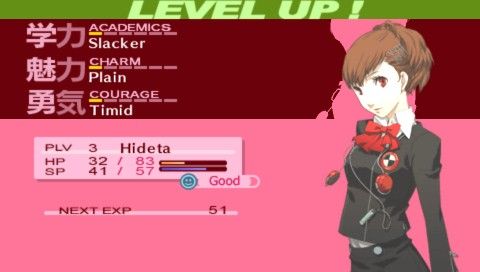
Ally Physical Conditions
Talk to Mitsuru to check your allies' physical conditions:
•
Great: Evasion and critical hit rates increase significantly.
-
.png)


.png)
.png)
.png)
.png)
.png)