Setting Up
Set up your PlayStation® according to its Instruction Manual. Insert the A BUG'S LIFE™ disc and close the disc cover. Turn the PlayStation® ON at the POWER button. It is advised that you do not insert or remove peripherals or Memory Cards once the power is turned on. Make sure there are enough free blocks on your Memory Card before commencing play.
Please Note
All screenshots for this manual have been taken from the English version of this game. Some screenshots might have been taken from pre-completion screens that differ slightly from those in the finished game.
How To Play The Game
Main Menu
To access the Main Menu, press the START button at the Title Screen. The Main Menu is made up of a vine. Each leaf on the vine takes Flik to a different place.
Move left and right along the vine to access the various selections, then press the ✖ button. From left to right, the vine will show:
•
OPTIONS: See the Options section further on in this manual.
•
LOAD/SAVE: Access the Memory Card save & load functions.
•
MOVIE CLIPS: As you complete sections, you will be rewarded with clips from the movie. You can rewatch them here.
•
TRAINING: This is a level to teach you the basics for survival.
•
ANTHILL: Begin your journey by finding the entrance to the Anthill.
•
Other levels: These will appear as you proceed through the game.
Options
To choose an option selection, select the options leaf and press the ✖ button. In the options screen you can perform the following functions:
•
CHANGE CONTROLS: Choose from 8 alternative Controller configurations.
•
MUSIC VOLUME: Press ⬅ or ➡ to decrease or increase the music volume.
•
SFX VOLUME: Press ⬅ or ➡ to decrease or increase the sound effects volume. This also controls the volume for the speech in-game and in the movie clips. If you turn the sound completely off, you might miss important information!
•
VIBRATION: Toggle the Vibration Function of an Analog Controller (DUAL SHOCK) ON or OFF.
•
CENTRE SCREEN: Use the directional buttons or left stick to centre the screen, then press the ✖ button to confirm and return to the OPTIONS menu.
Saving and Loading Games
You must have a Memory Card inserted in your PlayStation game console before you turn on the power in order to save a game or load a previously saved game. DO NOT INSERT OR REMOVE MEMORY CARDS ONCE THE POWER IS TURNED ON. Make sure you have at least 1 free block on your Memory Card before commencing play.
To save a game:
•
Use the directional buttons or left stick to select the leaf marked LOAD/SAVE and press the ✖ button.
•
Press the ✖ button to access the Save screen.
•
Next, use the directional buttons or left stick to highlight the block you wish to save onto and press the ✖ button to save your game.
To load a saved game:
•
Use the directional buttons or left stick to select the leaf marked LOAD/SAVE and press the ✖ button.
•
Press the ✖ button again to access the Load screen.
•
Next, use the directional buttons or left stick to highlight the save you wish to load and press the ✖ button to load a game.
Training
Select the Training leaf to learn everything you need to know about berry throwing, planting seeds and using plants. Your teacher is Mr. Soil. Pay attention to the master and you'll soon be ready to go grasshopper hunting.
Choosing a Level
Use the LEFT/RIGHT directional buttons or the left stick to select a Level leaf. Now press the ✖ button to enter the level.
Keep Flik Moving!
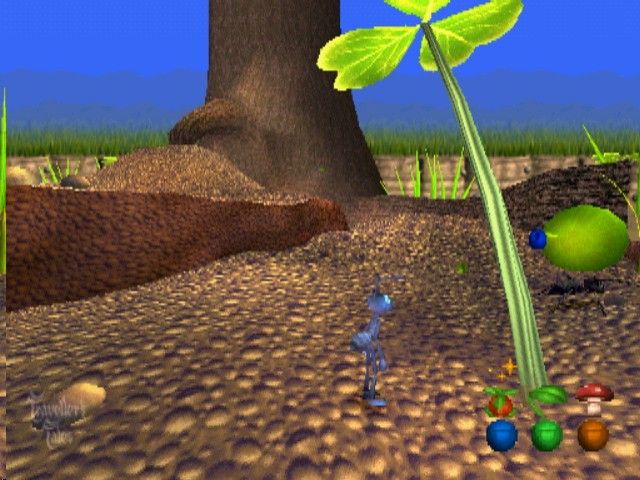
Flik is one agile ant! He's strong too, since all ants are strong. Flik can pick things up and haul them around. He can throw berries and whack a flying wasp right between the eyes (if the wasp deserves it). He can jump, abdomen bounce, spin, kick, slide and swing from vines.
To move Flik around in his world, press the directional buttons or left stick in the direction you want him to go.
If he needs to get over an obstacle, press the ✖ button to make him jump. Many obstacles are too high for Flik to jump over unless he has some help. Check out your surroundings to find what you need. Think like a bug!
Flik can pick up objects. When Flik gets close to a seed, press the ✖ button. If the seed is moveable, Flik will hoist it over his head. If not, Flik will do a handstand on it.
Hint: Movable seeds are resting on the ground. Immovable seeds are planted a small bit into the ground.
Seeds and Plants
There are plenty of seeds scattered throughout Flik's world. All seeds are brown when you first see them. The plants that grow from them can do amazing things:
•
Grow platforms for jumping.
Seed Tokens
Seed tokens (
.png)

.png)
.png)
.png)

