THE BASICS
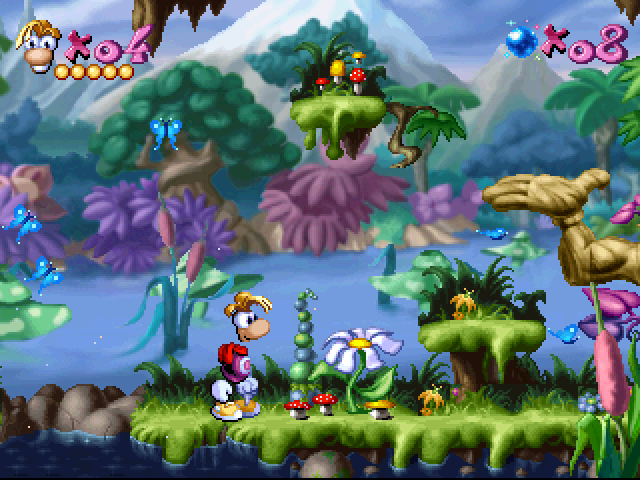
Rayman must free imprisoned Electoons to restore order to his world. Each level has a medallion with 6 empty spaces, corresponding to cages of Electoons you need to find. Freeing a cage fills one space on the medallion.
To enter the Candy Chateau level, you must first free all Electoons in the first five worlds.
Rayman's Abilities
At the start, Rayman can walk, jump, hold onto vines, and crawl. As you progress, he gains new powers.
These include a punching fist, the ability to hang onto platforms, a grabbing fist, the ability to run, and a special helicopter feature. Betilla the Fairy grants these powers.
A brief explanation of how to use new powers will appear on screen when you acquire them. Once acquired, a new power can be used throughout the game.
Exploring Levels
You should backtrack to thoroughly explore levels you've already completed. You probably haven't seen everything yet.
Some surprises are waiting for you, things that you were unable to reach the first time you went through.
World Map and Exits
At the beginning of each game, a map of Rayman's world will be displayed. Each time you complete a level, the available stages will be highlighted. Most of the time, you can choose to move in two directions.
The "normal" exit to any level is at the end of it, indicated by an exit sign. You can also exit the first stage of a level by going back through the entrance door.
However, if you exit through the entrance door, you will lose all items (Tings, special powers, etc.) picked up in that stage.
STARTING THE GAME
Insert your Rayman disc into your PlayStation console. Press the POWER button. From the "RAYMAN" title screen, pressing the START button as screens are displayed leads you to the game, validating all pre-selected options. If you want to change anything on those selection screens, follow the messages written on each.
If you leave the "RAYMAN" title screen unchanged for a few seconds, an automatic demo showing several sequences of the game will be shown. You can stop it at any time and go back to the "RAYMAN" screen by pressing the X or START button.
Saving Your Game
If you have a Sony PlayStation Memory Card, you can choose between using the Memory Card saving system or passwords. See the "Saving the game" section for more details on these two possibilities, and on using the "Choose a game" screen that follows if you selected the Memory Card system. If you don't have a Sony PlayStation Memory Card, you can either start the game from the beginning or use a password if you already have one. See the "Saving the game" section for more details on passwords. Options Screen
In the Options screen, you can change the level of the music and sound effects, as well as the functions of your PlayStation buttons. In most selection screens, pressing the SELECT button allows you to return to the "RAYMAN" title screen. RAYMAN'S POWERS
From the start of the game, you can make Rayman crawl.
•
Press R (1 or 2) to crawl to the right.
•
Press L (1 or 2) to crawl to the left.
There are two types of powers: permanent powers (those you keep no matter what happens) and temporary powers.
Permanent Powers
These are given by Betilla the Fairy.
Telescopic fist
•
Press to get a punching fist. The longer you keep the button pressed, the further the fist will go.
Hanging onto platforms
•
When Rayman jumps or falls, he automatically hangs onto nearby platforms.
Helicopter
•
Press X to jump, then press it again to slow your descent with your helicopter blades.
IMPROVING YOUR GAME
Powers
Powers symbolize Rayman's energy reserves. He starts with 3 powers but can win more or lose some during battles.
When you run out of power, you lose a life.
•
A Simple Power gives you one extra energy point.
•
A Double Power gives you two energy points.
•
A Big Power gives you a full load of energy points.
Lives
Look for lives; they come in handy when you face enemies.
Speed-ups
Speed-ups increase the speed of the punching fist. There are 3 different speeds available.
The golden fist
The golden fist increases the power of Rayman's blows. Your fist loses its power and exceptional speed each time you are hit by an enemy.
Tings
If Rayman picks up one hundred Tings, he gains an extra life. Tings can also be used to pay the magician, who will give you access to bonus stages.
When Rayman dies, he loses all the Tings he collected.
Continues
If you lose your last life, a Continue allows you to restart the game from the last level played with a credit of 5 lives. The Continue screen appears after Rayman dies for the last time.
To use a Continue, you must ring the alarm clock by pressing the X button or the START button. This awakens Rayman from his stupor before he staggers to the "Game Over" sign.
Playing a saved game at the Save/Load screen
When you start RAYMAN, you can choose to continue a game you started and saved earlier. You can choose from up to three previously saved games. The commands at the Save/Load screen allow you to ERASE or COPY a game.
.png)

 (Fr,De,Es,It).png)
 (En,Fr,De,Es,It).png)
.png)



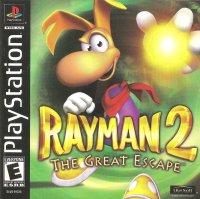
 (Fr,De).png)
 (En,Fr,Es).png)
.PNG)





 (En,Fr,De,Es,It) (No EDC).png)
 (En,Fr,De,Es,It).png)
.png)
 (En,Fr,De,It).png)

_1.png)


.png)
.png)



_1.png)
.png)
