Getting Started
Set up your PlayStation console as instructed in its manual. Ensure the power is OFF before inserting or removing discs. Insert the APE ESCAPE disc and close the disc cover. Insert a DUAL SHOCK™ analog controller and turn on the PlayStation console. Follow on-screen instructions to start a game. Important Controller Information
The DUAL SHOCK analog controller is required, or other official PlayStation brand or licensed controllers featuring the "ANALOG CONTROL" icon. Analog mode only. May not function or performance may vary with other controllers. We recommend using the DUAL SHOCK analog controller for the coolest monkeyshines.
Memory Cards
To save game settings and progress, insert a Memory Card with at least 1 free block into Memory Card slot 1 of the PlayStation game console before starting play. You can resume your saved games from the same card, or from any other Memory Card containing previously saved APE ESCAPE games. Note: Memory Card slot 2 is not used.
Starting a Game
•
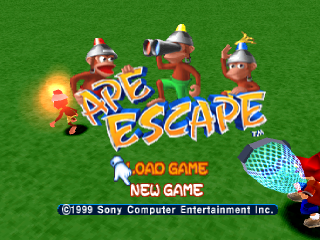
When you see the Title screen, press the START, X, or O Button to start a NEW GAME.
•
If you have a Memory Card inserted with saved games, pull the left stick back to LOAD GAME, then press the START, X, or O Button and use the Load/Save Game screen to continue play.
The Great Ape Hunt
Specter and his apes are messing with the past. You must stop them before something terrible happens. Specter is already turning history into a mystery!
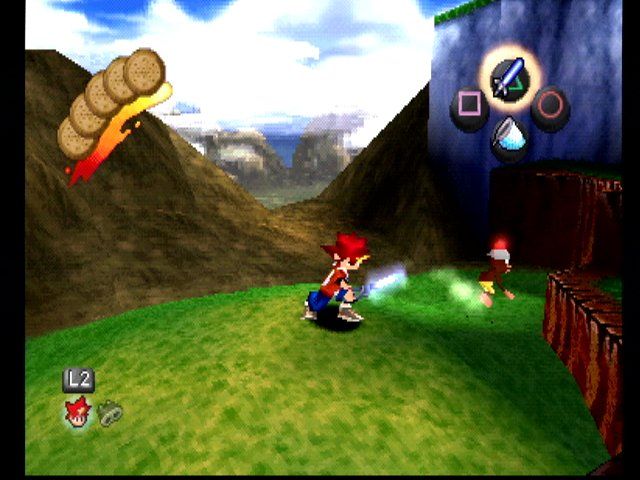
Swing the Stun Club that warped through time with you to knock down and stun the monkeys. Then flip to your Time Net to capture them and warp them back to the Time Station.
We'll send you other Gadgets as soon as we can. You'll be able to access up to four at a time. But remember, the Time Net is the only Gadget that snares monkeys. Never give up the Time Net!
Stop the Chimps!
The Professor will send you messages to help you, especially when you're entering new areas. Please listen carefully. He'll give you hints about surviving the unknown lands.
You'll need this, and he'll often have news about what Specter is up to. With the Professor on your side, you're good to go!
You've Got Mail!
Want to stay in the game longer? Check out your mail. Mailboxes are super sources for Gadget instructions, survival tips, advance warnings, "how to" hints, and loads of other information.
Press the O Button to read through an entire note. If a message doesn't appear when you approach a mailbox, swipe it with your Stun Club.
The Clue in the "Headlights"
With their helmets on, the apes are much smarter than you think. They'll attack you with different weapons, just to keep from being caught.
The lights on the monkeys' helmets are indicators that let them know you're near. Learn to read these giveaway "headlights" and you'll outsmart the ape escapees.
•
Blue: They have no clue you're there. Ignorance is bliss. Approach with stealth, and make the nab! Try crawling toward the simple simian with your Time Net ready, or hide behind objects to remain invisible as long as possible.
•
Red: They see you! They'll either attack or run away, or both. Avoid attacks, and chase the ones who run. If you're close, you have a good chance of netting them.
•
Yellow: They sense your presence but don't know exactly where you are. Lay low for a bit until the light turns blue and then get 'em!
•
Flashing: A helmet light flashes or changes color when they're hunting you or about to attack you.
Got Monkeys?
Before entering a stage, check Casi's WARNING message for the number of monkeys you MUST capture. Then watch the bottom right corner of the Status Window; each time you get a pillaging primate you'll see a tally.
When you net the required number, you'll clear the stage. Get ready for the next one!
Note: Once cleared, it's OK to replay a stage and capture more monkeys while solving riddles you missed before - not to mention, it'll ruin Specter's day! Sometimes you'll need a Gadget to get a monkey you've missed.
Man of Many Moves
Run/Walk
•
Push the left stick all the way in any direction to run.
•
Tilt it slightly to walk.
Crouch/Crawl
•
Press and hold down the left stick (like a button) to crouch.
•
While holding, push the stick in any direction to crawl.
Jump
•
Press the R1 or R2 Button to jump from a standing or running position.
•
Press either button twice to double-jump to higher places.
Climb/Swing
•
Jump on a tree or pole and use the left stick to climb and descend.
•
Jump on an overhead rail and use the left stick to swing hand-over-hand.
Checking Inventory - And More!
•
Ape Count: Remaining/Captured
Press the START Button to pause the monkey mayhem and check out your inventory. While on this menu, you can:
•
Press the X Button to check out your Gadgets and change their button assignments.
•
Press the O Button to see your Status.
•
Press the Triangle Button to set
.png)



.png)



 (En,Fr,De,Es,It) (No EDC).png)
 (En,Fr,De,Es,It).png)
.png)
 (En,Fr,De,It).png)

_1.png)
_1.jpg)


.png)







_1.png)