BASIC RULES
This game basically follows FIFA rules.
GAME LENGTH
Matches can be set to 5, 10, or 15 minutes. You can adjust match length at the start of the game.
EXTENDED GAMES
Depending on the game mode, there may be extended games and penalty kick shots.
YELLOW AND RED CARDS
If a player receives two yellow cards in the same match, he will be sent off the field. If a player receives a red card, he will be sent off the field.
PERIPHERALS AND MEMORY CARDS
It is advised that you do not insert or remove peripherals or Memory cards once the power has been turned on. Make sure there are enough free blocks on your Memory card before commencing play.
ANALOG CONTROLLER
This game also supports the Analog Controller. Use the left joystick in place of the directional buttons. You must enter analog mode (LED: Red), using the analog mode switch.
ADDITIONAL EQUIPMENT
•
If you purchase a second controller, you can play against or together with a friend.
•
If you purchase a Memory Card, you can save League and Cup results and settings.
SELECTING GAME MODES AND PLAYER MODES
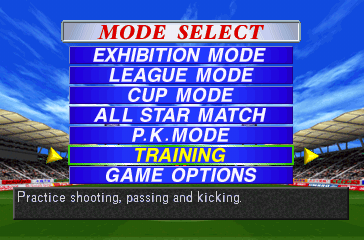
Press any button at the Title screen to bring up the Mode Select screen. Select a mode and the Player Mode Select screen will appear.
•
Press the Directional buttons up/down to select a mode.
•
Press the button to set a selection.
•
Press the button to cancel a selection.
PLAYING THE GAME FOR THE FIRST TIME
First, go into Training mode and familiarize yourself with the basic game controls. Practice passing, dribbling, corner kicks, and free kicks with a team of your choice. There is no opposing team in this mode.
PLAYING A LEAGUE MATCH
Select 16 teams and play against every other team round-robin style. You play either a half season of 15 matches, or a full season of 30 matches, aiming to come out the champion.
SIMULATING INTERNATIONAL CUP MATCHES
Try your skills in an International Cup match. First, qualifying matches are played round-robin style between 32 teams divided into 8 groups. The top 2 teams in each group then play each other tournament-style, with the losers eliminated progressively until a victory is decided.
PLAYING AGAINST A FRIEND
Select a team for an Exhibition match, All-Star match, or Penalty Kick shootout, and play a single match. There are five player modes - you can play against the computer, against a friend, with a friend against the computer, in co-operation with the computer, or CPU vs CPU.
PLAYING IN A PARTICULAR AREA
There are cups for Europe, Africa, North America, South America, and Asia. You play tournament-style, with the losers being eliminated progressively.
PLAYING THE GAME YOUR WAY
In the Konami Cup you get to choose the number of teams (3 to 16) and match content. OPTIONS
Make memory card utility settings, settings for the controller during matches, screen adjustment settings, player name edit settings, sound settings, and screen mode settings. (See page 28)
TRAINING
Practice passing, dribbling, corner kicks, and free kicks with a team of your choice. There is no opposing team in this mode. To quit training, select "Quit training" from the Pause menu.
EXHIBITION
If a match results in a tie, it goes into extended time. If that fails to break the tie, a penalty kick shootout is played.
•
Set match environment (P.18)
•
Check game results (P.24)
ALL STARS MATCH
Select either World All Stars or European All Stars. If a match results in a tie, a penalty kick shootout is played (without the match going into extended time beforehand).
P.K. MODE
After selecting a team, set the order in which players will kick.
LEAGUE MATCHES
Select 16 teams and play against every other team round-robin style. There are three modes in the game: you can play against the computer, with a friend against the computer, or in co-operation with the computer. There is no extended time. The level, time and player mode can be changed using the memory card utility.
PLAYING FROM THE BEGINNING (LEAGUE)
•
Set difficulty level and match time
•
Select half season (15 games) or full season (30 games)
•
Game results/score (P.24)
•
Versus card result display (P.25)
CONTINUING A GAME (LEAGUE)
•
Chart of previous wins & losses/Ranking change graph/Versus chart/Score ranking display (P.25)
•
Select "Save", "Next Match", or "Quit" (Select "Move to Next Match" if continuing play) (P.27)
•
Chart of wins & losses/Ranking change graph/Versus chart/Score ranking display (P.25)
CUP MATCHES
In this mode you play against the computer. There may be extended time, depending on which Cup match you are playing.
 (En,Fr,De,Es,It).png)

 (En,Fr,De,Es,It).png)
.png)
