STARTING THE GAME
1. Set up your PlayStation™ game console according to the instructions in its Instruction Manual. Make sure the power is OFF before inserting or removing a compact disc. 2. Insert the Nuclear STRIKE™ disc and close the Disc Cover.
3. Insert the game controller and turn on the PlayStation™ game console. 4. Press START or to bypass the opening movie and title screen. The Main menu appears.
•
To begin the first campaign, press START.
•
To exit the demo, press or START.
CONTROL SUMMARY
•
Directional Button (D-Button)
OFF THE RECORD: WELCOME TO STRIKE
Nuclear devices come in all shapes and sizes. So do the lunatics who use them. If anyone tells you the threat of thermonuclear war is over, he's a fool, an enemy, or both.
Earle Bio
Commanding Officer. A veteran of many wars, General Earle is the guiding force behind every STRIKE operation.
Quick Tips
•
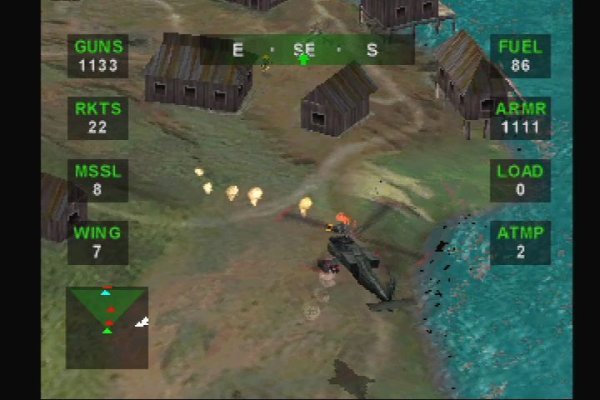
To maneuver your Super Apache, press the D-Button ↔↑.
•
To jink your chopper and avoid enemy fire, press L1/R1.
•
To fire a weapon, press an action button (i.e.●,■,▲, or ✖). •
To activate a targeting box for a particular weapon, press L2 + the appropriate action button. e.g., L2+▲ activates the wingtip targeting box. To deactivate the targeting box, press L2. •
To pause the game and access the Super Multi-Functional Display (SMFD), press START.
•
To automatically winch aboard friendly forces, munitions, and other assets, maneuver the Super Apache over the object so it's in the chopper's shadow.
•
To restore your armor, drop off passengers at specified Landing Zones (LZ).
•
To drop cargo, press L2+R2.
NOTE: Cargo jettisons automatically if you carry it to a designated LZ.
•
To transfer yourself to another vehicle, land on designated LZs.
•
When all of your missions are complete, return to Home Base.
•
Manage your resources well. You begin each campaign with only three attempts (i.e., lives).
•
To exit a campaign and return to the Main menu, at the game screen hold SELECT + START.
MAIN MENU
The Main menu appears automatically at the start of Nuclear STRIKE and after you complete or exit a campaign. From this screen, set the difficulty level, configure the controller and weapons setup, view STRIKE files, adjust the volume, and enter a password to begin a new campaign.
To select an option at the Main menu:
1. To highlight a category, D-Button ↑.
2. To select a highlighted category, press ✖.
3. To a highlight a sub-category or option, D-Button ↑.
4. To select a highlighted sub-category or option, press ✖.
•
To cycle options if available, D-Button ↔.
•
To exit a menu, press ▲.
•
To begin a campaign, press START.
LOAD/SAVE
Access the next campaign using the Load/Save menu. A password is issued automatically at the completion of every campaign, but if you save a game, you can access the next campaign from a customized list.
NOTE: You can only save a game when you have completed a full campaign.
ENTER A PASSWORD
To begin a new campaign, enter its designated password:
1. Select ENTER A PASSWORD, then D-Button ↑ to cycle letters.
PLAYING THE GAME
To be successful, know your mission, then carry it out. It's that simple. Download STRIKE.net to learn your mission; use the Super Apache and other combat vehicles to carry it out.
People used to say what you don't know can't hurt you. Not anymore. What you don't know will get you killed. Knowledge is power and STRIKE.net is our generator. It connects us to everything, everywhere, anytime.
Hack Bio
Communications Officer. Computer genius with a knack for hacking into secured mainframes.
STRIKE.NET / SUPER MULTI-FUNCTIONAL DISPLAY (SMFD)
The SMFD links you to STRIKE.net and downloads all pertinent campaign data. When you begin a campaign, immediately access the onboard SMFD.
•
To access the SMFD (and pause the game), press START.
•
To scroll SMFD categories, D-Button.
The game is paused while you view the SMFD.
SMFD Categories
You can view each category in three different ways—the map is currently displayed.
View the current campaign's missions.
View key hostile equipment.
View your assets.
NOTE: In the first campaign all Ammo Packs, Fuel Pods, and Armor Crates are visible on the SMFD.
Obtain background information on the current campaign.
Each category from the SMFD can be viewed in three ways: MAP, INFO, and STATUS.