CHOOSE YOUR GAME
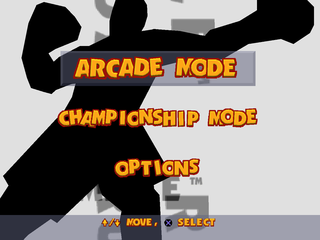
At the Title Screen, press Start to reach the Main Menu. Here you can choose from Arcade Mode, Championship Mode, or the Options menu.
To make a selection, highlight it using the Directional button or Left Stick, then press the X button. Pressing the ▲ button will take you back to the previous screen.
ARCADE MODE
Pick a boxer and fight your way to the top! More information is available on page 10, as well as complete information on all of the boxers on pages 24-26.
CHAMPIONSHIP MODE
Championship Mode lets you create a gym for yourself. Pick a boxer and train him or her to become the Champ! Build up your boxer through a variety of games and prize fights to earn more money.
Use the cash to buy more equipment for your gym or to place bets on your boxer's bouts! For more info on this unique game mode, see CHAMPIONSHIP MODE on pages 11-18.
OPTIONS
Under the Options menu, you can adjust different settings of the game, as well as re-configure your Controller. All of the game's Options are located on the next page.
OPTIONS MENU
Highlight OPTIONS from the Main Menu and press the X button. This will access the Options Menu. The options listed on the next two pages can be adjusted. Options will be saved automatically to your Memory card if you have one inserted.
To adjust the game's options, do the following:
•
Highlight the option using the Direction button or Left Stick.
•
Adjust the option by pressing Left and Right on the Direction button or Left Stick.
•
When finished, press the ▲ button. This will exit the Options Menu.
SKILL LEVEL
This deals with the overall difficulty of the game. If you're new to it, try EASY. Or, if you think you're all that, try DIFFICULT. The default setting is MEDIUM.
KNOCKDOWNS
This sets the number of knockdowns it'll take to defeat an opponent or the number of times your butt can be knocked down before you lose.
ROUNDS
How many rounds do you want to fight? Can you go a full 12 Rounds or are you lacking the stamina?
ROUND TIME
You can set the length of your Rounds to be as short as 15 seconds or go the distance with a regulation round of 180 seconds (3 minutes)!
NOTE
Knock Outs, Rounds and Round Time affect Arcade Mode only.
MUSIC VOLUME
You can adjust the background music volume by percentage. 100% is the game's loudest setting while 0%.
SFX VOLUME
Adjust the sound output for either STEREO or MONO.
CONTROLLERS
Under this option you can access the Controller Configuration screen and change your Controller's settings. Highlight CONTROLLERS and press the X button.
If you have two Controllers plugged in, two Controllers will be seen at the top of the screen. To adjust the Controller, highlight the row next to the action you want to change with the Direction button or Left Stick. To change the button that corresponds with that action, press the button you want to use. The button will change and adjust other buttons accordingly.
Repeat this process to configure the controller to your liking. At any time, select Normal to reset the buttons to their original default configuration.
For example, if you want Low Block changed from L1 to the R2 button, highlight the row next to LOW BLOCK (default is L1) and press the R2 button.
ARCADE MODE
Selecting ARCADE MODE will allow you to take control of a boxer (not ranked in the Bronze Class) and fight against the computer or a friend. To play against the computer, select ONE PLAYER and press the X button.
ONE PLAYER GAME
Playing against the computer has you duke it out against the other boxers while you progress up the ranks. There are three classes to go through: Bronze, Silver and Gold. Highlight ONE PLAYER GAME and press the X button.
You will then be able to select your boxer. Highlight the boxer you wish to use and press the X button. For information on playing the game, see PLAYING THE GAME on pages 19-22.
NOTE
•
If you press the □ + ○ buttons before choosing your Boxer, they will appear in an alternate costume.
•
If you press the □ button + Up, Down, Right or Left on the Direction button, you will be able to select a specific Cornerman. If you do not select a Cornerman, one will be randomly selected.
TWO PLAYER GAME
Select TWO PLAYER from the Arcade Mode screen. Before you play a two player game, make sure there are two controllers plugged in. Please see Starting Up on Page 4 for information on plugging in controllers.
Each player will then be allowed to select his/her boxer. To select a boxer, highlight them with the Direction button or Left Stick and press the X button.
To play with two people, you must select TWO PLAYER GAME. The second player may not "challenge" a player in either a One Player game or a Championship Mode Game.
CHAMPIONSHIP MODE
At the Main Menu, highlight CHAMPIONSHIP MODE and press the X button. Championship Mode allows you to initially pick one of three boxers and raise them from BRONZE class to CHAMPIONSHIP level. Make all of your boxers champions to win the game.
Sharpen their fighting skills by keeping your Boxers in training at your Gym. Winning bouts and moving your Boxer to the
.png)

.png)
.png)
.png)

.png)






.png)
_1.jpg)
.png)


.png)

.png)
.png)

.png)

.png)