GETTING STARTED
1. Set up your PlayStation®2 computer entertainment system according to the instructions in its Instruction Manual.
2. Make sure the MAIN POWER switch (located at the back of the console) is turned ON.
3. Press the RESET button. When the power indicator lights up, press the OPEN button and the disc tray will open.
4. Place the NASCAR® 07 disc on the disc tray with the label side facing up. Press the OPEN button again and the disc tray will close.
5. Attach game controllers and other peripherals, as appropriate.
6. Follow on-screen instructions and refer to this manual for information on using the software.
ON THE TRACK
Take on a field of up to 43 cars in a single Race Now event. You have four racing series, the top drivers, and all the real-world tracks to choose from, plus unlockable cars and fantasy tracks. In the Race Weekend menu, you have the option to run a practice session or qualify for the race. You can also make adjustments to your car's setup to match the current track in the Car Setup screen, or skip these options and immediately begin the race.
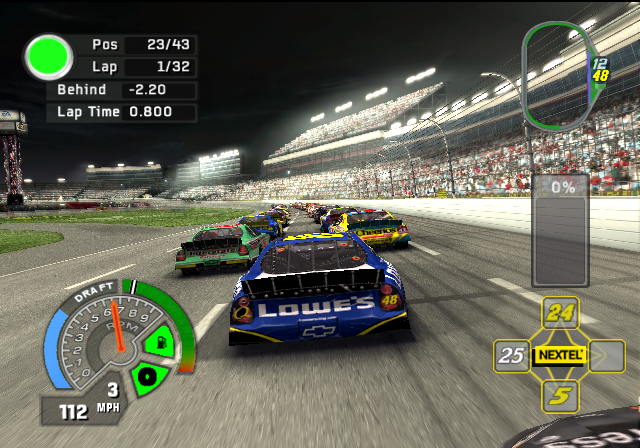
GAME SCREEN
•
Dynamic Driver Attributes meter
NEW DRIVER ATTRIBUTES
Player-controlled drivers in Race Now, Season mode, and Chase for the Cup™ mode are assigned attributes based on real-world performances on certain track types. For example, Elliott Sadler's car performs significantly better than a rookie's car thanks to his professional experience.
Some drivers tend to perform better on speedways or superspeedways, while others have higher ratings for road courses and short tracks. Ratings all depend on the drivers and their tendencies.
NEW VARIABLE DRIVER ATTRIBUTE SYSTEM
Positive and negative Skill Points collected during Race Now, Season, Chase for the Cup, and Fight to the Top modes affect your driver's attributes. You begin every race with the Dynamic Driver Attributes Meter set to 0%.
As the race progresses, you have opportunities to gain Skill Points by surviving unpredictable situations, leading laps, sharing a draft, intimidating other drivers, clean passing, qualifying well, and making rivals/allies. When Skill Points are earned, your driver's attributes increase, and your meter begins to approach maximum performance. If you lose Skill Points, your performance decreases but you can never lose what you started with at the beginning of a race.
SKILL POINTS
Earn Skill Points (excluding multiplayer and online modes) by accomplishing objectives during a race. Points are earned and added to your Skill Points account during the race, from simple tasks like sharing a draft to helping teammates place 1-4. Skill Points can also be used to unlock tracks, cars, sponsors, and more from the Chase Plates screen.
SKILL POINT INVESTMENTS
Convert your Skill Points into money for your Fight to the Top career, or wager them against real-world drivers in Race Now, Season, or Chase for the Cup modes. Use winnings for significant upgrades or scramble to climb out of a hole when losing big. Drivers with lower ratings have better returns because the odds are stacked against them. You can invest Skill Points from the Select Driver screen.
DRAFTING, FLAGS, AND MORE
Standard Drafting
When you pull up close to the bumper of the car in front of you, both cars can go faster than if they were driving separately. The Draft Meter shows the current strength of the regular draft. Share Draft
•
Press the button to Share Draft with the car in front of you.
•
Share Draft increases the speed of both cars and improves your relationship with the other driver.
•
Heroes tend to make allies faster, and their Draft Meter works from greater distances.
Intimidator™
To be an Intimidator, approach the bumper of another car. When the Draft Meter begins to fill, press the button to intimidate. The intimidated driver may lose concentration and slide out of the way, allowing you to pass, but that driver may hold a grudge against you. Villains tend to intimidate other drivers easier, and their Draft Meter works from greater distances.
Grudges & Alliances
When you run into or intimidate another driver, he remembers your actions on the next lap, or even during the next race (Season, Fight to the Top, Chase for the Cup modes only). A red icon above a car indicates a driver holding a grudge against you, while a green icon represents an ally.
You can form an alliance with other drivers by sharing a draft. In turn, an ally is more likely to work with you during the heated moments of a race.
Flags
During the course of a race, flags indicate changes in track conditions. A green flag starts and restarts a race. A yellow flag indicates a caution and means you must slow down and maintain your current position in the field (excluding Online mode). There are no yellow flags in Whelen Modified races.
A white flag means the leader of the field crossed the finish line to begin the race's last lap. When the first-place driver crosses the finish line again, he receives the checkered flag of victory.
Pit Stops
During longer races, you have to make pit stops to refuel, get new tires, and possibly repair your car. You can change your
.png)

.png)
