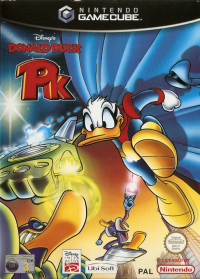
STARTING THE GAME
1. Set up your PlayStation®2 computer entertainment system according to the instructions in its Instruction Manual.
2. Make sure the MAIN POWER switch (located on the back of the console) is turned on.
3. Press the standby/RESET button. When the power indicator lights up, press the open button and the disc tray will open.
4. Place the Disney's PK disc on the disc tray with the label side facing up. Press the OPEN button again and the disc tray will close.
5. Attach game controllers and other peripherals, as appropriate.
6. Follow on-screen instructions and refer to this manual for information on using the software.
Caution: You are advised against inserting or removing peripherals once the power is switched on.
THE MENUS
SELECTING THE LANGUAGE
The language can be selected when you start the game. Select the language using the left analog stick or the directional buttons in the Select Language Menu. Confirm your selection by pressing the X button.
Once you have selected a language, you must quit the current game in order to select a different language.
START MENU
•
New Game: Start a new game.
•
Load Game: Load a saved game.
•
Sound: Access the sound options.
•
Vibration: Activate or deactivate the vibration function.
PAUSE MENU
You can interrupt the adventure at any time during the game by pressing the START button. You will then have access to the following options:
•
Continue: Continue the current game.
•
Restart Level: Restart the current level or select another level. This will be very useful when rescuing the scientists, as you can also see how many scientists you need to rescue in each level.
•
Sound: Access the sound options.
•
Vibration: Activate or deactivate the vibration function.
•
Quit Game: Quit the game and go to the Select Language Menu.
LOADING AND SAVING
You can load and save when the memory card (for Playstation®2) is correctly inserted in the MEMORY CARD slot 1.
LOADING AN EXISTING GAME
You can load an existing game file if you have a memory card (for Playstation®2) on which Disney's PK: Out of the Shadows has been saved.
1. On the Start Menu, select Load Game.
2. Choose the adventure you want to load using the directional buttons or the left analog stick.
3. Then confirm your choice by pressing the X button.
SAVING A GAME
Disney's PK: Out of the Shadows has an Auto Save Feature. At the end of each level, the game is saved, but only if you have created a saved game in the Start Menu.
THE STORY
Hired as a security guard at Ducklair Tower, a building Uncle Scrooge has recently bought, Donald Duck is discovered by Computer One, a super-computer in need of some help. This chance encounter marks a turning point in Donald Duck's life. With the help of Computer One's genius, Donald is equipped with advanced cyber-gadgets, and outfitted in a hero's costume. Donald becomes PK - a real super-hero who needs a lot of real training! But before PK can start training, Computer One's alarms go off, and PK has his first mission (and some on-the-job training). It seems that the Evronians, a warlike race of aliens, are searching for worlds to conquer and they've chosen their next target: EARTH. Only PK has any chance of stopping the Evronians, and saving Earth!!! GAME RULES
PK needs to destroy the Evronians and rescue all the Scientists held captive. After PK rescues at least 40 of the Scientists, he will be able to reach the final battlefield...The Evronian Mothership. This will be PK's toughest challenge, and his only chance to save Earth! GAME INTERFACE
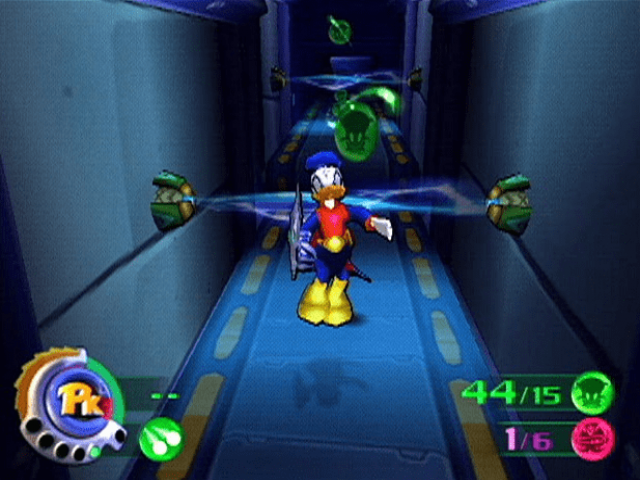
1. Health Bar (Energizer Meter)
This meter tracks PK's energy level. It also shows whether or not PK has enough energy to use the X-Transformer's SuperCharge function. In addition, it shows which type of ammunition the X-Transformer is using and how much ammunition is left.
Note: The X-Transformer automatically uses the most powerful ammunition first, so be careful not to waste any upgrades. The Glowing Green dots located on the lower left of the Energizer Meter keep track of each X-Transformer upgrade PK collects during his adventure.
2. Scientist Icon
This indicates how many Scientists PK has rescued in the current level. Every level has 6 Scientists needing to be rescued (with the exception of the Evronian Mothership and the Boss Battles). Remember, you need to rescue at least 40 Scientists to gain access to the final stage, the Evronian Mothership.
3. Scientist Timer Icon
One of PK's most important objectives is to rescue the Scientists. The real challenge for PK is that the Evronians don't want to let that happen. Therefore, PK only has a limited amount of time to rescue the Scientists, once the Evronians find out that PK is close. This timer pops up and shows PK how much time he has left to save the Scientists before the Evronians warp them back to the Mothership. It also lists the amount of Scientists that are in PK's tracking range. If PK runs out of time, he will need 


_1.png)



_1.png)