Getting Started
Set up your PlayStation®2 computer entertainment system according to the instructions in its instruction manual. Make sure the main power switch (located on the back of the console) is turned on.
Press the RESET button. When the power indicator lights up, press the OPEN button and the disc tray will open. Place the eJay CLUBWORLD disc on the disc tray with the label side facing up. Press the OPEN button again and the disc tray will close.
Attach game controllers and other peripherals, as appropriate. Follow on-screen instructions and refer to this manual for information on using the software.
Language Select
Upon starting eJay CLUBWORLD, you have to choose the language used in the game.
Once you have chosen the language it will be saved on the memory card (8MB) (for PlayStation®2) when you save your Settings. If Settings data exists, it will be automatically loaded before the game starts.
The Settings save is separate to any Mixes you save. Deleting the Settings data will not affect any Mix data you may have.
After you have chosen your language, you will be led to the selection of the different locations of eJay CLUBWORLD: THE GLOBE.
The Globe
Here is the starting point for your Club expedition. Here you can access all areas of eJay CLUBWORLD. On the globe you can see the clubs and the other levels that you can visit, the TUTORIAL and the JUKEBOX.
•
Club Name and Music Style There is no particular order in which you have to attempt the clubs. You can just choose the club with your sort of music. However, we recommend that you first take a look at the TUTORIAL. This shows you the controls and functions of the game. Tutorial
Arrange and mix songs, make your own drum beats and synthesizer sequences, jam live with friends, play your songs with video animation on the jukebox...that's quite a bit! To get to know the most important functions quickly you can take a look in the TUTORIAL.
Select the chapter you wish to view by using the directional buttons and then press the X button. To quit from a chapter, press the X button again.
When you have got the hang of these functions, you should be ready to mix it in all levels of eJay CLUBWORLD.
The Clubs
Amnesia started as one of the first big open-air Ibiza clubs, boasting the most legendary stories of never-ending parties, where the native bongo drummers heated up the atmosphere once the music had ended. There is a wide variety of music played in the club. At the famous foam party - Espuma the DJs manage to mix house and trance with rock and pop music. The foam, which snows down onto the dance floor from massive foam cannons, is nearly as high as the dancers are tall and it often goes higher! Other special nights, such as Cream, promoted by the renowned Liverpool club and the German Party Cocoon (with Sven Väth and friends!) bring top DJs from the whole of Europe onto the isle. Good trance music and a fantastic atmosphere are popular with both tourists and locals! Tool Selector
Besides the ARRANGER, each club has many other tools to offer you via the TOOL SELECTOR. To open the TOOL SELECTOR press the R2 button. The various symbols for the TOOLS appear on the screen. Choose the function you are looking for using the directional buttons and select it with the X button.
Arranger
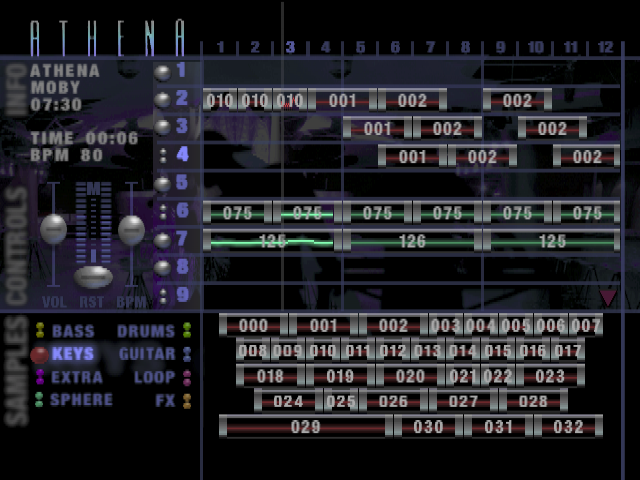
The ARRANGER is there to make complete songs out of the individual samples. You can access all sounds and all of the 20 stereo tracks. In addition you can vary the master volume and the playback speed of the song. The current song information and the most important controls are shown in the info field.
The Zones - Operation Fields
The ARRANGER - as with all of the other TOOLS - is divided into OPERATION FIELDS. You can switch between these by holding the R1 button and pressing a directional button. You cannot move the cursor beyond the edge of an OPERATION FIELD with the directional buttons alone, as they are intended for navigation within the field.
The different OPERATION FIELDS in the ARRANGER are the SOUND GROUP BUTTONS, SAMPLES, TRACKS, TRACK NUMBERS, INFO and VOLUME & PITCH.
Sound Samples
The SOUND SAMPLES are loaded from the individual sounds of the club. Each club has at least 1000 SOUND SAMPLES. The SAMPLES are found in the various SOUND GROUPS of the lower OPERATION FIELDS. When you choose one of the SOUND GROUPS such as drum loops, bass, keys, vocals etc., all sounds within that group will then be shown.
To hear and select SOUND SAMPLES:
•
Press the R1 button and the
.png)



.png)






.png)

.png)



.png)
