The Main Menu
Check out the cut-scene and game demo. When the TITLE SCREEN appears, press the START button to display the Main Menu.
Press the Directional button or left analog stick UP/DOWN to highlight a selection and press the button.
Tutorial
Learn the basics of FreQuency gameplay. Highlight GAME MODE or REMIX MODE and press the button. Follow the training program's direction.
Solo
Play Game Mode or Remix Mode in 1 Player games.
Multi
Compete in 2, 3 or 4 Player split-screen games.
For 3 & 4 Player games, use Multitap (for PlayStation®2) (sold separately).
Options
Set game options. Press the Directional button or left analog stick UP/DOWN to highlight a setting and press the button.
Setting Options
Press the Directional buttons UP/DOWN to highlight an option and press the button.
Game Setup
Audio
Select STEREO or MONO depending on your system.
Vibration Function
Turn vibration function ON/OFF on a DUALSHOCK 2 analog controller or DUALSHOCK analog controller.
Player Setup
Configure each controller for SOLO or MULTI modes. Press the Directional button or left analog stick LEFT/RIGHT to select the controller number you want to change and press the button.
Press the Directional button UP/DOWN to select a function and LEFT/RIGHT to select a button option. To complete the configuration you must make a button assignment for all controls displaying a "?".
When you are finished, press the button to save your new configuration to the Memory Card (8MB) (for PlayStation®2). Press the button to restore the default controller configuration.
Memory Card (8MB) (for PlayStation®2) Setup
Access the Memory Card (8MB) (for PlayStation®2) to copy or delete FreQuency campaigns or remixes.
See "Saving and Loading Game Data" on page 31.
FreQuency Credits
Meet the creators of Frequency.
Effects
To turn on an effect, press the right analog stick UP/DOWN to highlight an effect. Then press the right analog stick (F) in. The highlighted effect will change color from black to blue.
See "Playing Remix Mode" on page 18 for information on effects.
Portal
Portals are the divisions between each section of a song. To advance, press the Directional button UP once anytime before entering the portal and you will begin a new section. The words "Advance to Next Section" will appear. Your position will also advance on the Song Location Meter.
If you want to remain in the current section, do not press the Directional button UP. If you have already pressed it, press it again to toggle back to "Repeat Section".
Song Location Meter
The Song Location Meter highlights the section of the song you are remixing.
Playback
Press the SELECT button to listen/view your Remix in playback mode. You will not be able to edit your Remix when in Playback mode.
FreQuency Instruments
FreQuency Activator
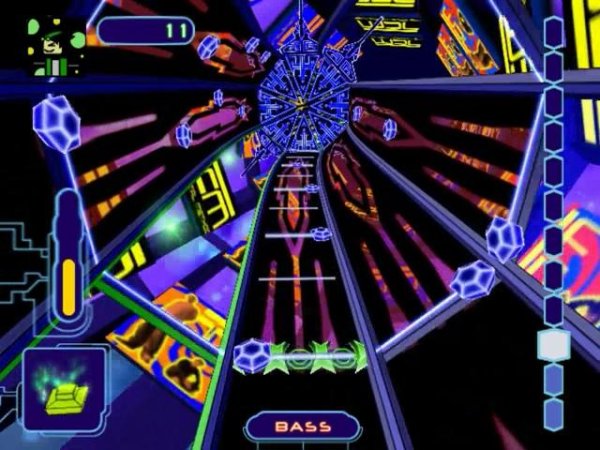
Use the FreQuency Activator to activate notes in Game Mode. By pressing the correct button just as a note passes under it, you activate the note. Activate the required number of notes consecutively and the whole track is activated.
When a track is activated, the activation alert flashes on-screen. You can then move to the next track by pressing the Directional button LEFT/RIGHT.
In Multiplayer Mode, each activator is color-coded.
Scratcher
When you move to a freestyle track in both Game Mode and Remix Mode, the Scratcher may appear. This instrument allows you to create turntable noise.
Move the left analog stick right and left to create a sound with the Scratcher. Press the button or L1, A button or R1, or button or R2 button to change the sample that is recorded when you scratch.
Axe
Use the Axe to play musical notes by moving the left analog stick right and left. Press the button, A button, or button to play certain notes. You will hear the Axe in its different forms as a Synthesizer or Guitar.
Playing Game Mode
Game Mode is the competitive game in FreQuency. Each FreQ starts out on a campaign through the game activating tracks in songs to survive. The more tracks you activate, the longer you stay in the game, which results in a higher score.
You must capture two bars of music at a time to score and unlock the music in the whole track. Miss one note in a two-bar section and you score nothing. In the beginning, the songs are fairly easy to master. But as you progress through the campaign, capturing tracks becomes feverishly complex. Notes
Press the button that matches the position of the note on the track at the exact time it passes through your activator.
See "Hitting the Notes" on page 6.
Tracks
Several tracks make up a song. There are drum, bass, instrument and voice tracks that must be activated, among others. When you activate one track, quickly switch to the next track (Directional button LEFT or RIGHT) and attempt to activate the next track.
Active Bar Alert
When you miss a note in the current bar, you can no longer score in that two-bar area and it becomes inactive. Look ahead, and you will see that the next