PlayStation®2 Setup
Set up your PlayStation®2 computer entertainment system according to the instructions supplied with your system. Check that the system is turned on (the on/standby indicator is green).
Press the OPEN button to open the disc cover. Place the "Happy Feet™" disc with the label side facing up in the disc holder, and then close the disc cover. Attach game controllers and other peripherals as appropriate.
Follow the on-screen instructions and refer to this manual for information on using the software.
PlayStation®2 Components
Memory Card
To save game settings and progress, insert a memory card (8MB) (for PlayStation®2) into MEMORY CARD slot 1 of your PlayStation®2 system.
You can load saved game data from the same memory card or any memory card (8MB) (for PlayStation®2) containing previously saved games.
Main Menu
New Game
STORY MODE
Play as Mumble and experience the Happy Feet game in Story Mode through Dancing, Swimming and Belly-Sledding missions (see Story Mode, pgs. 7-9).
Load Game
When you select this option, any saved games will be displayed up to three Save slots. Select a saved game to load to continue the game.
Family Mode
This is Happy Feet's multiplayer game mode. Two players can play a variety of Dancing, Belly-Sledding or Swimming missions (see Family Mode, pg. 10).
Options
LANGUAGE
Highlight English or French, then press the button to confirm your choice.
SETTINGS
Highlight an option, then press the directional buttons left or right to adjust music or Sound FX volume. You can also turn ON or OFF your controllers Vibration and Autosave.
Extras
CREDITS
View the names of those who worked to bring you the Happy Feet game.
UNLOCKABLES
As you play Happy Feet in single-player mode, you'll earn Gold Medals. Gold Medals can be used to purchase unlockable content.
As you collect Gold Medals, the amount will be saved to your memory card. When you go to the Unlockables screen, the number of medals earned will be displayed.
The Unlockables screen displays eight Unlockables, along with the number of Gold Medals you'll need to view them. Highlight the Unlockable you want to view, then press the button.
Unlockables Notes
•
Although you're awarded Silver and Bronze Medals, only Gold Medals can be used to unlock items.
•
The amount of Gold Medals saved on the memory card is only loaded when you boot up.
Story Mode
Belly-Sledding
The HUD display changes based on the type of Belly-Sledding mission you're playing. The Timer will appear for Checkpoint missions, and an item counter will appear for Collection missions.
Watch for rocks or rocky surfaces. They'll slow you down if you make contact. Ice surfaces will give you speed. To perform a trick, press the button while in the air.
TIMER/COLLECTIBLES
You must meet each Checkpoint to keep time on the Timer. If you're collecting, the number of collectible objects will be displayed in the upper left portion of the screen. During a race mission, the Timer display total race time.
RACE PROGRESS
The triangular cursor moves from left (beginning) to right (end) on the bar. The number inside the triangular cursor will show you if you're running in first or second place.
CHECKPOINT
Cross the Checkpoint to add more time to the Timer.
Dancing
GRACE METER
Using the directional buttons, you can make the penguin dance. Press the correct directional buttons as the Arrows enter the like icon on the Note Bar. Good timing will break apart the arrow, signifying that your timing was good. If the arrow turns red, your timing was off.
Press the directional buttons at the right time to keep the yellow dots from disappearing. If all of the dots disappear, the dance ends. If you lose any dots, successfully hitting arrows will refill the meter with one dot.
Grace Meter Note
If you run out of dots in Multiplayer mode, you'll have to wait for the Grace Meter to refill before you can continue.
ARROWS
These directional indicators rise from the bottom of the screen. As they cross the Arrows at the top of the screen, press that same directional button.
NOTE BAR
As indicators cross these arrows, press the matching directional button. For example, when the arrow is pointing up, press the directional buttons ↑.
Swimming
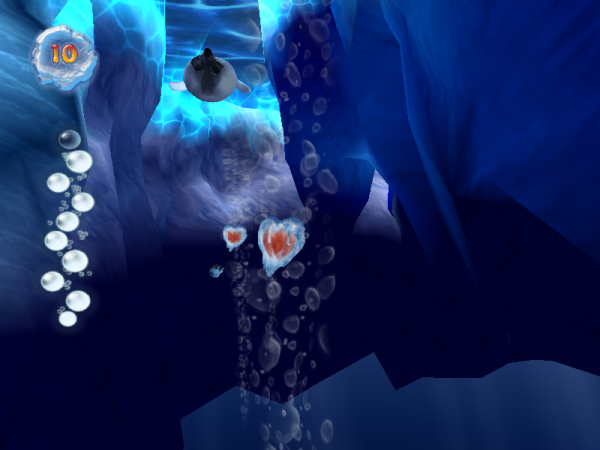
There are three types of swim missions: Collection (collect items), Checkpoint (race the clock) and Flee (escape from a predator).
The HUD display changes based on the type of Swimming mission you're playing. The Timer will appear for Checkpoint missions, and an item counter will appear for Collection missions.
Watch for falling Ice columns or ice pillars. They'll slow you down if you make contact, and you will lose air in your Air Meter.
BOOST/BOOST SPEED INDICATOR
Swim through Boosts to add speed to your swim. Each time you swim through a Boost,