GETTING STARTED
Set up your PlayStation®2 computer entertainment system according to its Instruction Manual. Make sure the MAIN POWER switch (located on the back of the console) is turned on.
Press the RESET button. When the power indicator lights up, press the open button, and the disc tray will open. Place the IndyCar™ Series disc on the disc tray with the label side facing up. Press the open button again, and the disc tray will close.
Attach game controllers and other peripherals, as appropriate. Follow on-screen instructions and refer to this manual for information on using the software.
PlayStation®2 Console Ports
Memory Cards
Within this booklet, the term 'memory card' is used to describe the memory card (8MB) (for PlayStation®2) - (product code SCPH-10020 E). Any other memory card such as memory card (SCPH-1020 E), which is designed for use with PlayStation® computer entertainment system, is not compatible with this game or hardware.
Make sure there is sufficient space on your memory card before starting play.
On-Screen Display Elements
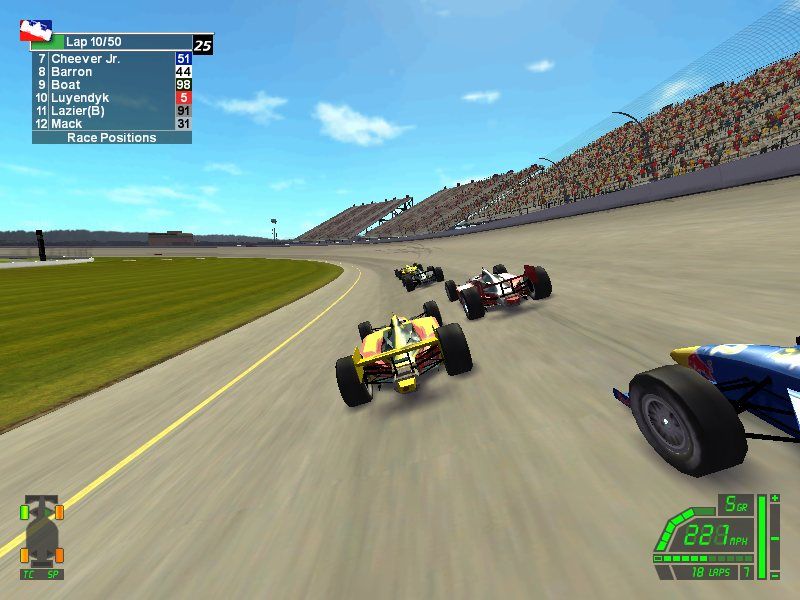
1. Speed Assist: Illuminates to indicate when Speed Assist has kicked in to reduce your speed and help you corner more easily.
2. Traction Control: Lights to indicate when Traction Control has kicked in to eliminate wheelspin.
3. Current Gear: Shows the current gear you are using. Set your transmission type through Main Menu > Options > Advanced Game Options. Automatic transmission takes control of your gears, allowing you to concentrate solely on driving, whereas manual transmission enables you to shift gears as needed. 4. Draft Meter: Shows the benefit your car is getting from riding the slipstream of the car in front. The fuller this is, the less drag your car is experiencing.
5. Rev Counter: When the final light illuminates, you have reached maximum revs and will need to shift up a gear.
6. Current Speed: Shows your current velocity.
7. Lap Indicator: Shows the estimated laps remaining on your current tank of fuel.
8. Fuel Tank: Shows how much fuel is left in your tank.
9. Damage Display: Each element brightens as you take damage. If you are racing at Pro skill level, internal components also can malfunction. •
Cooling System: as the cooling system is damaged, the ECU lowers the rev limit to prevent engine damage.
•
Oil System: damage to the oil system will reduce engine torque (pulling power).
•
ECU: if the ECU gets damaged, reliable fuel control may be lost, resulting in misfiring and rough acceleration.
•
Transmission: a damaged gearbox may not respond in all gears.
•
Engine: any engine damage is terminal.
10. Tire Temperature: Displays the temperature of your tires.
•
blue → yellow = cold → warm;
•
pink → white = severely hot.
Hotter tires provide more grip, but will wear faster than colder ones.
11. Caution / Pit Status: Illuminates if you enter a Caution Period. If "C" is displayed, the Pits are closed; if "P" is shown, the Pits are open. In extreme circumstances, you may enter the pits when they are closed; for example, if your car is damaged or about to run out of fuel.
12. Fuel Mixture: The Fuel Mixture controls adjust your fuel:air ratio during the race.
•
Increasing the richness of your Fuel Mixture will give you greater speed but at a cost to your fuel consumption (normal running = 4).
•
Decreasing the mixture has the opposite effect. Set the mixture to 0 to save fuel during Caution (yellow flag) Periods.
13. Weight Jacker: This corrects steering problems in real time during the race.
•
Adding weight will correct any understeer problems you may be experiencing.
•
If your car oversteers, subtract weight.
14. Multi Function Display: The MFD serves the following purposes:
•
Qualification: during qualification, your lap times and average speeds are shown.
•
Laps Remaining: this is always shown at the top of the Display during the race.
•
Race Positions: the positions of all drivers are shown periodically. Your position is always displayed in the top right corner.
•
Car in Front: how far the car in front is ahead of you (measured in seconds).
•
Car Behind: how far the car behind is from you (measured in seconds).
•
Split Times at the Line: the time difference between the player and the top five drivers.
•
Lap Speeds: shows your best and last lap times.
15. Warning Indicators: These icons indicate unusual track conditions:
•
Autodrive: takes control of your car at the start of a race, during caution periods and when you enter the pit lane. A 5-second countdown is shown when control of the car is about to return to you.
.png)

.png)
