System Components
System Setup
Set up your PlayStation®2 computer entertainment system according to the instructions supplied with your system. Check that the system is turned on (the on/standby indicator is green).
Insert the NPPL® Championship Paintball 2009 disc in the system with the label side facing up. Attach game controllers and other peripherals as appropriate. Follow the on-screen instructions and refer to this manual for information on using the software.
Memory Card (8MB) (for PlayStation®2)
To save game settings and progress, insert a memory card (8MB) (for PlayStation®2) into MEMORY CARD slot 1 of your PlayStation®2 system. You can load saved game data from the same memory card or any memory card (8MB) (for PlayStation®2) containing previously saved games.
Menu Navigation
To get straight into gameplay, please use the following options:
•
Select "New Game" from the menu.
•
Choose your character in the "Character Selection" screen.
•
Name your profile or accept the default name.
•
Select a team to join and then choose the difficulty level you want to play on.
•
Save your career or continue without saving.
Game Modes
Career Mode
The Career Mode takes you and your team through a succession of Speedball tournaments. You have complete control over your team, as you can decide who plays in each game, what strategies to use for each round or what gear to buy for your team.
Both your character and your teammates evolve throughout the course of the game. You can improve your character's skills by completing the training courses available under the "Dynasty Training Drills" menu and you can also buy skill points for specific teammates.
Quick Play
This mode throws you right into some fast action. Just choose among the maps presets available and jump right into the heat of battle. Your performance during Quick Play matches won't affect your stats in Career Mode.
Exhibition Mode
This mode gives you a lot of freedom over tweaking the details of a match. You can select who plays against whom, the game type or the number of players. This is also the place where you can play Woodsball matches on any of the five fields available.
And if you designed any custom maps using the Field Creator, this is the mode that allows you to play them.
Dynasty Training Drills
This mode serves both as a means to grasp the essentials and as a place where you can improve on (and eventually master) the skills that form the arsenal of any paintball pro. The drills are modeled after Team Dynasty's own workout regimen and - to make sure you make the most out of them - you'll be mentored by Team Dynasty themselves.
Field Creator
Try your own field configurations, devise new strategies, be creative and have lots fun with this easy to use field editor. When you're done, save your map and give it a try in Exhibition mode.
Gameplay Tips
Field Tactics
Apart from great accuracy and marker handling skills, paintball players need to be able to minimize the profile they expose to their opponents' paintballs in order to stay in the game. That is why it is so important to make full use of the tactics and maneuvers specific to paintball: leaning/snapping, sliding and diving. In the "Dynasty Training Drills" section you will find a number of drills specifically conceived to help you improve on these skills.
Leaning will be performed in the same direction as your current marker hand (i.e. if you're holding the marker in your right hand you will lean right). If you need to lean towards the other side, change marker hands first - this is a skill no serious paintball player can do without.
Sliding and diving are proven ways to get into a bunker without being hit by incoming paint. Remember: you can shorten the length of the slide/dive by pulling backwards on the left analog stick but you cannot change the direction of a slide/dive once initiated. That might be a fatal disadvantage in some situations, so carefully time your slides and dives.
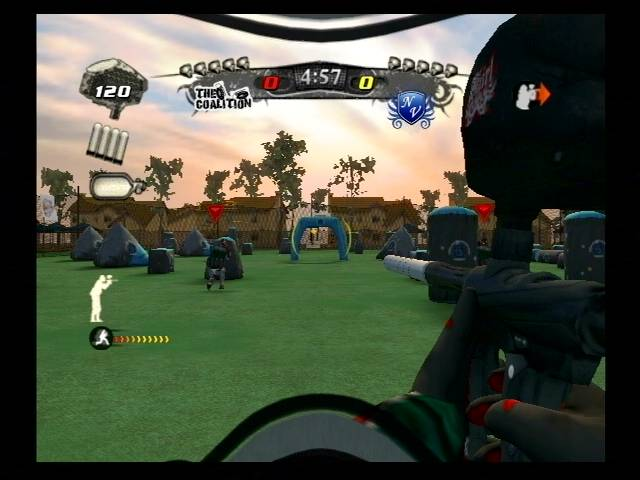
Also, the controls for sliding and jumping are contextual - they are both initiated by the same button but each can be performed within different ranges from the bunker, so watching the prompts in the lower left side of the screen is a good idea, until you master this difficult skill.
"Walking" the trigger is also a crucial skill: you'll notice that firing your marker can be performed using two of the controller buttons. Rapidly alternating these two button presses will result in fire rates impossible to achieve using only one trigger finger. Practice this as much as you can, as shooting half the amount of paint that your opponent does is not going to get you too far in the game.
Controlling Your Teammates
As the captain of your team you will need all the control you can get over your teammates.
Team Management
The basic control is, of course, deciding who plays. You can field or bench players in the Team Management screen. With most tournament formats you can do this only before the match but there will be some where you will be allowed to do this between rounds.
Note that you will always need to field the number of players required by that specific tournament format.
Breakout Planner
The breakout - the initial part of a round, despite being very short, has a tremendous importance on the evolution of the game. That'