SETTINGS
OPTIONS
Select "OPTIONS" to configure the game settings outlined below.
Controller
Choose between two different controller configurations.
Vibration
Turn the DUALSHOCK®2 analog controller's vibration feature on or off.
Sound
Change your audio settings to monaural, stereo, or Dolby® Pro Logic® II.
Dolby® Pro Logic® II
This game is presented in Dolby Pro Logic II. Connect your game console to a sound system with Dolby Pro Logic, Dolby Pro Logic II, or Dolby Pro Logic IIx decoding, and select "Dolby Pro Logic II" from the audio options menu of the game, to experience the excitement of immersive surround sound.
•
Please refer to your sound system's instruction manual for further details.
Dolby, Pro Logic, and the double-D symbol are trademarks of Dolby Laboratories.
Auto-Select Ability
Turn this on to automatically select your new ability whenever you learn one.
Minimap
Show or hide the minimap that appears in the lower right corner of the screen.
STARTING OVER
The "Game Over" Screen
The game ends if Musashi runs out of hit points (HP). You can then continue or end the game. Continuing allows you to play from the last checkpoint you touched. Ending the game returns you to the opening demo and start screen.
COMBAT
Combat Gauges
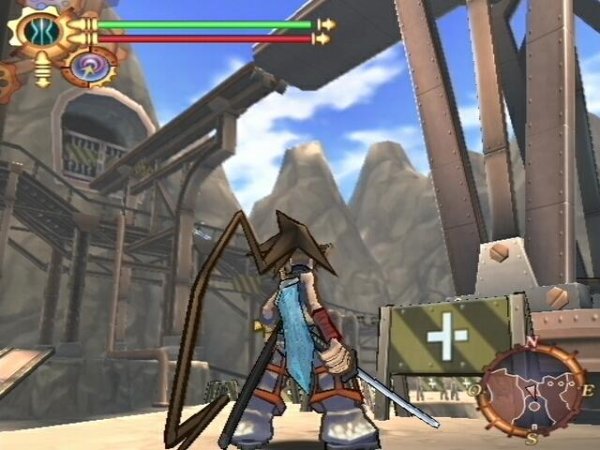
The gauges in the upper left corner of the screen indicate Musashi's current condition. •
Great sword currently equipped in left hand
•
Currently selected ability
Battle System
Be prepared to encounter both friend and foe outside Antheum's walls. Combat consists of slashing with your dual swords and performing techniques that you learn from opponents.
You gain experience points for each enemy you defeat and attain higher levels once you've earned enough. Defeated foes often drop money or items that replenish your HP and MP.
Recovering HP and MP
You can fully recover HP and MP by visiting Musashi's room in Antheum. You can also replenish HP and MP by consuming food and drinks purchased from local shops. Enemies you defeat in battle may drop energy orbs that will likewise restore HP and MP.
Minimap
The map in the lower right corner of the screen shows your current location and the immediate area. The top of the map is north, and the arrow indicates the direction you are facing.
Main Menu
Press the START button to open the main menu, where you can use items, change equipment, select abilities, and view other important information. Press the button to close submenus, or press the START button again to close the main menu and return to the game.
Title
Your title is determined by your level, the quests you've completed, and the number of abilities you've learned.
Lv. (Level)
Your current level is based on experience points earned by defeating enemies.
Time
This displays the amount of time that has passed since you started the game.
Money
This displays your current amount of "joules", the currency of Antheum.
ITEMS
Use items in your inventory and view equipment in your possession. "Use" is the default command, but you can access other options by pressing the button.
EQUIPMENT
Check or change the equipment you have at your disposal. Select which weapons and accessories to equip from the list.
•
Right Hand: The katana is carried in the right hand. Take it to a blacksmith to have it tempered and strengthened.
•
Left Hand: Choose between the great oar and any of the Five Swords in your arsenal.
•
Accessories: Equip the accessory best suited to the task at hand to improve your chances of success.
ABILITIES
Select abilities you've learned from enemies through "duplication" (see p. 14). You can perform each technique in battle whenever you press the buttons indicated in its help text. You can also select abilities via the quick menu.
MAP
View the layout of your current location.
STATUS
Check Musashi's current HP, MP, experience points, and attributes. RESCUE LIST
See which villagers you have rescued and how many are still out there.
HINTS
Keep track of completed quests and learn helpful tips for tackling others.
OPTIONS
Configure game settings (see p. 8).
THE QUICK MENU
Hold down the R2 button to open the quick menu. You can then swap great swords or change your selected ability easily.
Use the left and right directional buttons or the L1 and R1 buttons to scroll through your sword collection. Use the left analog stick to select an ability.
THE ROAD TO PERFECTION
Musashi earns experience points each time he defeats an enemy. He qualifies for new levels once he gains enough experience. When this happens, the words "Level Up!!" appear on the screen. You can then choose which attributes to raise by opening the main menu and selecting "Status." Once you have chosen an area to improve, Musashi's level will increase by one. THE KATANA
Press the button to slash with your katana, a swift Japanese blade wielded in the right hand. Press the button repeatedly to execute a combination.
THE GREAT SWORDS: THE GREAT OAR AND THE FIVE SWORDS
Mighty swords like the great oar and the legendary Five Swords are wielded in the left hand. Press the button to