GETTING STARTED
Note: Illustration may not match all PlayStation®2 console types.
SETTING UP YOUR PLAYSTATION® 2 CONSOLE
Set up your PlayStation®2 computer entertainment system according to the instructions supplied with your system. Check that the system is turned on (the on/standby indicator is green).
Insert the NBA 08 disc in the system with the label side facing up. Attach game controllers and other peripherals as appropriate. Follow the on-screen instructions and refer to this manual for information on using the software.
Network Adaptor (Ethernet/Modem) (for PlayStation®2)
In order to play NBA 08 Online, you must have installed a Network Adaptor (Ethernet/Modem) (for PlayStation®2) on your PlayStation®2 computer entertainment system before playing. Set up the Network Adaptor (Ethernet/Modem)(for PlayStation®2) according to the instructions included in its packaging.
Caution: Unplug the AC power cord on your PlayStation®2 computer entertainment system before adding any networking equipment to the system.
Note: NBA 08 must be played over a broadband Internet connection (DSL, cable modem, or higher speeds).
Memory Card (8MB)(for PlayStation®2)
For the purpose of this manual, the memory card (8MB)(for PlayStation®2) will be referred to as "memory card". To save game settings and progress, insert a memory card into MEMORY CARD slot 1 of your PlayStation®2 console. You can load saved game data from the same card or any memory card.
Selecting a New Defender
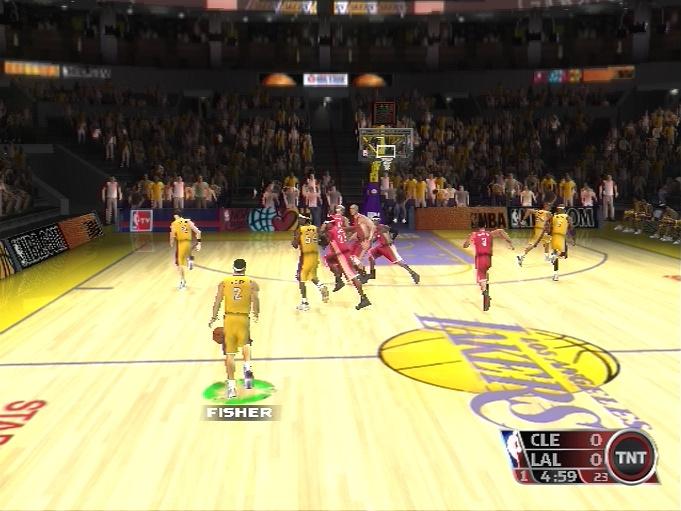
If you are beaten press to switch the defensive player you control. The player you switch to will be the closest non-human controlled player in front of the ball handler.
If there are no defenders in front of the ball handler, you will gain control of the closest defender to the ball handler.
Icon Switching
Icon switching allows you to switch to a specific player. To Icon Switch, hold L2 when you don't have the ball, and then press the icon that appears above the player's head that you want to switch to.
Showtime
Showtime is all about firing up the crowd and getting your teammates involved. As you make great plays, your team becomes energized and plays better. Everyone gets a spring in their step and the basket starts to look huge.
•
When you fill three blocks in the Showtime meter, your team gets energy, speed, and shooting boosts.
•
To fill the meter, perform Showtime events. Alley Oops, Dunks, No-look passes that lead to a basket, fast break scores, and blocks all increase your Showtime.
•
The Showtime meter will deplete from your side if your opponent performs a Showtime event, calls timeout, or if you mess up and perform a Showtime spoiler event. Turnovers and consecutive missed shots are Showtime spoiler events.
STARTING UP
MAIN MENU
When the game boots up, you will be taken to the NBA 08 Main Menu. While at the Main Menu, use the left analog stick or directional buttons ↑, ↓, ←, and → to highlight an option, press Ⓧ to select, and press ▲ to go back to a higher set of options or the previous menu.
If this is your first time playing, you will be asked to select your favorite team. Your created player will be assigned to your favorite team by default.
Quickly begin an exhibition game, practice your skills in mini games, manage your team, and adjust game extras and options.
Create your own character to train and play with.
Access season and playoff games.
Play against other players online or view leaderboards.
SINGLE PLAYER
Play a variety of different pick-up-and-play basketball games, from Exhibition, to Mini-Games, as well as Manage your team, access Extras, and adjust your game Options.
Exhibition
Select EXHIBITION to access the Team Select Menu and play a quick game of basketball. You may choose two teams and up to four players may join the game. In order to join, slide the controller icon to the same side of the screen as the team you wish to play on. Press Ⓧ to continue or ▲ to go back.
Mini Games
Take to the court with a host of pick-up and play Mini Games.
Go solo and practice your shooting skills in Open Court or shoot hoops with your teammates in Shoot Around. Perfect your free throw with Free Throw.
Own the Court is a shooting contest that works your rebounding, shooting, and positioning skills. Two-On-Two allows you to play a game with fewer players on the court.
Choose from seven different drills to improve your on-court performance.
3 Pt Contest is the classic contest of long-range shooting. Skills Challenge puts every one of your basketball skills to the test. You'll have to shoot, pass, and maneuver your way all over the court.
Manage Team
Manage your players before hitting the court.
Edit the lineup of your team.
Reset the roster to
.png)

.png)








.png)


.png)
.png)


.png)
.png)
.png)