Stage Select
After selecting the weapon set, or after clearing a stage, the Stage Select menu is opened.
Select the stage using the left analog stick or the directional button, then press the X button to confirm the choice.
Depending on how the player progresses through the game, additional stages may become available for selection. The player will also have the option of replaying cleared stages to improve their mission clear ranking scores.
Options Menu
Character
Move the left analog stick or the directional button sideways to choose the combination of controls and character.
•
By satisfying specific conditions, secret characters and special versions of the characters may be added. To switch to these special versions, move the left analog stick or the directional button vertically.
Difficulty Level
Choose the game's difficulty level. NORMAL Mode allows the adjustment of the player's starting number of lives.
•
By satisfying specific conditions, it is possible to increase the upper limit on the player's starting number of lives.
Controller
Adjust the DUALSHOCK®2 analog controller button configuration and turn the DUALSHOCK®2 analog controller vibration ON/OFF.
Sound
Select the sound mode.
Subtitles
Select the subtitle and turn subtitles ON/OFF.
Memory Card (8MB)(for PlayStation®2)
Select to save and load game play data.
•
To save and load game play data, a memory card (8MB)(for PlayStation®2) with at least 111KB of free space is required. Neo Contra will work only with MEMORY CARD slot 1. Etc.
Access various extra modes:
•
War Record: Check your play status and records.
•
Training: Select to try stages for training. Depending on your progress, the number of selectable stages will increase.
•
???: Indicates various other additional modes that become available by satisfying specific conditions.
Game Over
CONTRA Battle Results
Upon clearing a stage, the player's performance is evaluated. By performing well, the game's progress in later stages could change, even resulting in a different ending.
Hit Rate
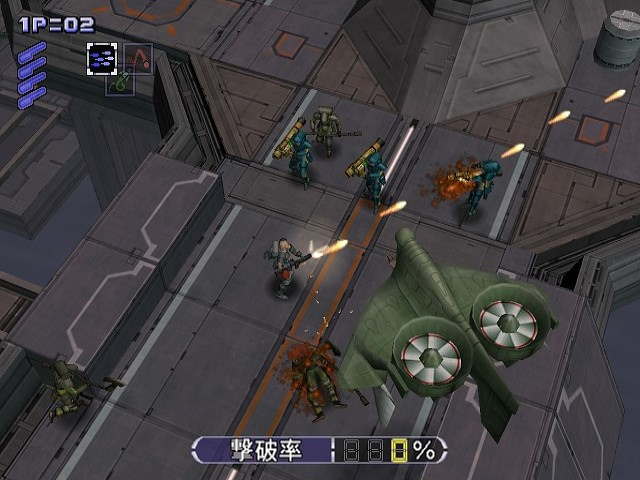
Indicates how much of the completed stage's enemies and traps have been destroyed by the player. If every hostile target is destroyed, the Hit Rate will be 100%.
Continue
Resumes the game at the cost of one credit. You cannot continue if there are no credits left.
There are two kinds of continues:
•
1) From the middle: The game is resumed from the current stage's last passed continue point. This choice is available only if the player has passed a continue point. If the game is continued from the middle of a stage, the number of characters lost in that stage is reset to zero. However, the destruction ratio is recounted only from the continue point onwards, and the use of game credit(s) is counted. These will negatively affect the mission clear rankings.
•
2) From the beginning: The game is resumed from the start of the stage. The number of lives lost in that stage, the number of continues, and the destruction ratio are reset to zero, so they will not negatively affect the mission clear rankings.
End
Quit the current game and return to the title screen. When this is chosen, the player will be asked if the data should be saved. It is recommended that the player save, as the play data affects the addition of extra modes.
Continue
If the player has continued the game from the middle of a stage, the Hit Rate score is reduced for each time the player has continued as a penalty.
Lost Remaining Life
If the player has lost lives during the stage, the Hit Rate is reduced for each lost life as a penalty.
Mission Clear Ranking
The player's stage performance is rated in five ranks from D to S based on the Hit Rate, the number of continues, and the number of lives lost.
Total Ranking
The player's performance over the stages already completed is rated in five ranks from D to S.
.png)

.png)
