GETTING STARTED
Set up your PlayStation®2 computer entertainment system according to its Instruction Manual. Ensure the MAIN POWER switch (on the back of the console) is ON.
Press the RESET button. When the power indicator lights up, press the OPEN button to open the disc tray. Place the ONIMUSHA® DAWN OF DREAMS disc label-side up. Press the OPEN button again to close the disc tray.
Attach game controllers and other peripherals as needed. Follow on-screen instructions and refer to this manual for software usage information.
MEMORY CARD (8MB) (for PlayStation®2)
To save game settings and progress, insert a memory card (8MB) (for PlayStation®2) into MEMORY CARD slot 1. You can load saved game data from the same memory card or any memory card with previously saved games.
You need at least 5311KB of free space on the memory card to save game data. If more space is needed, delete older data before playing.
Do not remove the memory card or turn off the power while saving or loading game data. This could damage your game data.
ONIMUSHA DAWN OF DREAMS
•
CAPCOM CO., LTD. 2006 ALL RIGHTS RESERVED.
STARTING A NEW GAME
Press the START button on the Title Screen to display the Main Menu. Use the directional buttons to cycle the cursor through options, and press the button to confirm your selection. •
NEW GAME - Start a new game from the beginning.
•
LOAD GAME - Load a previously saved file and resume the game from that point.
•
OPTIONS - Adjust various game settings.
•
SPECIAL - View special items you unlock by beating the game. If your character is attacked and runs out of energy, the character dies, and it's game over. If you die, you can choose to continue from your last saved location.
GAME OVER
MOVE CHARACTER
Move the left analog stick in the direction you want the character to go.
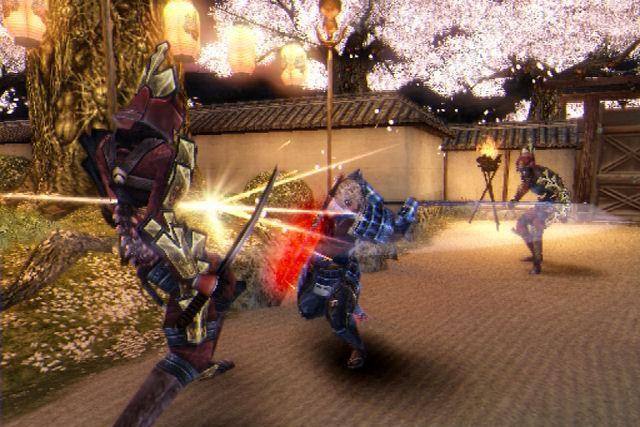
Hold down the R1 button to put your character in a ready stance. If enemies are around, this will lock-on to an enemy.
While holding down the R1 button, use the right analog stick to cycle the target lock among enemies. Different moves are also available when in ready stance. When you hold down the R1 button (ready stance) and move the left analog stick, the character will step in that direction while maintaining the ready stance.
CHECK
Walk over items dropped by fallen enemies to pick them up. Press the O button near regular items on the ground to pick them up. GUARD
Press and hold the L1 button to guard against attacks. Some attacks can break or get through your guard.
CHARACTER CONTROL SWITCH
When you have an ally character with you, you can press the L2 button to switch your control between the main character and the ally. You cannot toggle control between some characters directly after meeting them for the first time.
ONI MAGIC ATTACKS
When you have energy in the MP Gauge, press the △ button to use MP energy and perform powerful Oni Magic attacks. Hold the △ button longer to charge up the attack and make it more powerful by using more MP. •
Level 1 - Uses 1 level of the MP Gauge
•
Level 2 - Uses 2 levels of the MP Gauge
•
Level 3 - Uses 3 levels of the MP Gauge
Only Oni Magic Level 1 attacks are available at first. Power up your weapons to unlock Level 2 and Level 3 attacks.
COMBINED ONI MAGIC ATTACKS
If your character's weapon is leveled up so that Oni Magic Level 3 attacks are available, you can perform combined attacks as long as you have an ally with you. This uses 3 levels of your MP Gauge and 1 level of your ally character's MP gauge.
•
Hold the △ button to build up power.
•
Press the L2 button to unleash the attack.
SOULS
•
BLUE SOULS - Restore MP.
•
PURPLE SOULS - Fill up OP Gauge. Once OP Gauge is at least half full, you can perform an Oni Awakening.
•
RED SOULS - Enhance weapons and armor.
•
YELLOW SOULS - Restore HP.
Hold the Ⓧ button to absorb, or collect, souls floating around. You can also repeatedly press the Ⓧ button to draw souls in faster.
The Soul Gauge fills up as you collect red souls. Collect multiple souls at once to receive bonus souls.
Collected red souls (for enhancing equipment) are shared between all characters. Check how many souls you've collected on the Sub-Screen.
ONI AWAKENING
By using your OP Gauge, you can unleash special powers unique to your character. Once the OP Gauge is at least half full, press the L3 and R3 buttons at the same time to enter Oni Awakening mode for a short time.
In this mode, if you run out of HP when your OP Gauge is at least half full, you will resurrect automatically.
•
Oni Awakening mode regenerates HP and renders your character invincible for
 (Disc 2).png)

_1.png)
 (Disc 2).png)
 (Disc 1).png)
 (Disc 1).png)



.png)

.png)



.png)




.png)




.png)