Setting Up a Single Event
Select a rider and choose to Race against other boarders, Showoff your moves, or race the clock in a Time Challenge.
DVD Content
Before starting a Single Event, World Circuit race, or Time Challenge, you can view the making of SSX Tricky. This includes behind-the-scenes video, producer outtakes, celebrity interviews, and EA SPORTS BIG previews. You can also browse the Jukebox to listen to full-length songs from SSX Tricky. Select DVD CONTENT and press the * button to access this.
To Start a Single Event
•
Select START GAME from the SSX Tricky title screen.
•
Highlight SINGLE EVENT and press the START button or press the button.
•
If two controllers are plugged in, select the desired number of players and press the button.
•
Press the D-Button or left analog stick to highlight your character and press the button.
•
To access the Select Event screen, select Continue and press the * button. To access the Setup Character screen, select modify.
•
From the Select Event screen, highlight RACE, SHOWOFF, or TIME CHALLENGE and press the button. The Select Venue screen appears.
Race Difficulty
If you choose Race, the Select Difficulty screen appears before the Select Venue screen. Here, you can choose the skill level of computer-controlled boarders: AMATEUR, SEMI PRO, or PRO.
Selecting a Venue
•
Press the D-Button or left analog stick to highlight your venue. Press the button to accept.
•
Initially, only Garibaldi, Snowdream, and Elysium Alps are available. Unlock tracks in World Circuit Race and Showoff modes.
Options Menu
You can alter sound, control, and other options from any menu screen. Press the button to access the Options screen.
Head-to-Head Racing
Race a friend downhill in a Single Event.
To Race Head-to-Head
•
From the Select Mode screen, select SINGLE EVENT and press the button.
•
Select TWO PLAYERS and press the button.
•
Player 1 selects a character and adjusts options at the Player 1 Setup Character screen, then presses the button.
•
Player 2 selects a character and adjusts options at the Player 2 Setup Character screen, then presses the button.
•
Player 1 and Player 2 may choose the same character.
•
Choose RACE, SHOWOFF, or TIME CHALLENGE. The Select Venue screen appears (unless RACE is selected, then the Select Difficulty screen appears).
•
At the Select Difficulty screen, choose the skill level of the computer-controlled boarders (AMATEUR, SEMI PRO, or PRO).
•
Proceed through the remaining screens as you would in a single-player game.
•
In a two-player game, the screen is split in two (left and right).
Race
Compete against top boarders in a downhill event. In a Single Event, you race once down the Garibaldi track.
For bigger challenges, race on the World Circuit. You start in a quarterfinal race on Garibaldi and work your way to the final round. Winning on the World Circuit unlocks tracks.
Showoff
Perform tricks and score points. You must cross the finish line after scoring the most points with the best tricks. Showoff Facts
•
Successful tricks require successful landings. •
Tracks unlocked in World Circuit become available in this mode, but you cannot unlock tracks in Single Event mode.
•
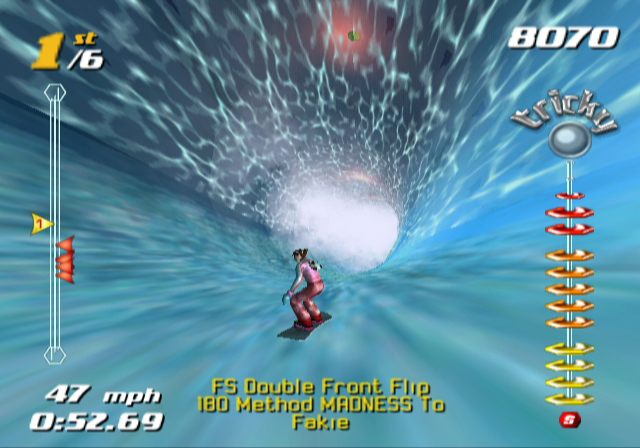
Snow crystals high in the air boost style points: Yellow doubles, Orange triples, Red multiplies by five.
•
Showoff courses have more objects than Race mode.
•
Courses have checkpoints. Fail to pass a checkpoint before time runs out, and the race ends, losing all points. Passing a checkpoint adds time.
•
You can win medals in Showoff events in World Circuit mode.
Time Challenge
Race against the clock. Speed isn't always the only factor.
Time Challenge Facts
•
Tricks increase your Adrenaline Meter. A full Adrenaline Meter helps you go faster. •
Know the track. The main path isn't always the fastest. Explore for cliffs, ramps, and jumps to set a blistering time.
Select Character Screen
Choose from unique boarders, each with their own personality and riding style.
•
Press the D-Button or left analog stick to scroll through boarders.
•
Rider attributes/Rider ranking
•
Press the START button or press the button to select.
When first playing, only Eddie, Elise, Moby, and Mac are available. Unlock other riders in World Circuit mode.
Skill potential shows the maximum skill level a character can achieve for each attribute, based on their current board. Different boards affect skill potential.
Setup Character Screen
Customize your outfit and board, and view your Trick Book.
Outfit
Change your look by choosing unlocked outfit options. Outfits are unlocked by completing chapters in the character's Trick Book.
Select a locked outfit to see which tricks you need to perform to unlock it. Board
Different boards can boost or lower your skill potential. The red area on each skill bar shows the skill boost from the selected board.
Boards come in three types:
•
FREESTYLE: Best for tricks, not speed. •
ALPINE: Great for speed, not tricks. •
BX: A mix of Freestyle and Alpine, good for both speed and tricks. Select a locked board to see what rank you need to achieve to unlock it.
Rider Profile
Check out a rider's Biography, Backstory, World Circuit (WC)
.png)

.png)
