PlayStation 2 Setup
Set up your PlayStation 2 computer entertainment system according to its Instruction Manual. Ensure the MAIN POWER switch (on the back of the console) is turned on. Press the RESET button. When the power indicator lights up, press the OPEN button to open the disc tray. Place the SEGA SOCCER SLAM disc on the disc tray with the label side facing up. Press the OPEN button again to close the disc tray.
Attach game controllers and other peripherals as appropriate. Follow on-screen instructions and refer to this manual for information on using the software.
PlayStation 2 Components
DUALSHOCK®2 ANALOG CONTROLLER CONFIGURATIONS
•
left analog stick (L3 button when pushed down)
•
right analog stick (R3 button when pushed down)
SHOWBOAT SCREEN
After the Sega Soccer Slam intro, the title screen (Showboat screen) appears. Players parade onto the screen one-by-one. •
To go directly to the Main Menu, press the START button.
•
If no action is taken, a brief game demo begins after one character from each team appears.
ARCADE MODE
QUICK START
Quick Start mode is the fastest way to get onto the field, but teams and venue are randomly selected.
To begin a Quick Start game:
1. Select Quick Start from the Arcade mode menu or from the Main menu, highlight Arcade, press and hold both L1 and R1. The Quick Start option appears.
2. Continue to hold L1 and R1 and press the X button. The Choose Sides screen appears displaying the two randomly selected teams' logos.
3. Press the left analog stick to move your Controller icon to the team you wish to control.
•
To assign a name to your controller, press the ● button. When the Enter Name pop-up appears, press the left analog stick to change letters, ➡ to advance to the next characters, and press the X button to accept.
4. Press the X button to select. The game begins.
PLAYING AN EXHIBITION GAME
An Exhibition game is a battle for Sega Soccer Slam bragging rights. You can play against a friend or a computer-controlled opponent. To begin an Exhibition game, from the Arcade Menu, choose EXHIBITION. The Choose Sides screen appears.
CHOOSING SIDES
At the Choose Sides screen, you can control the Home or Away team. An icon for each connected Controller appears in the middle of the field. The Home team takes the first kickoff.
To choose a side:
1. Press the left analog stick to move your icon to the side you wish to control during the match.
•
To assign a name to your Controller, press the ● button. When the Enter Name pop-up appears, press the left analog stick to change letters, ➡ to advance to the next characters, and press the X button to accept.
2. Press the X button to select. The Choose Teams screen appears.
If all Controller icons are left in the center of the screen, the game is played in Demo mode, with all players computer controlled.
CHOOSING TEAMS
Select the team you wish to control. You can compare all six teams in five skill categories.
To choose a team:
1. Press the left analog stick to highlight the team you wish to control.
•
To lock your Controller onto a single player, rather than your entire team, press the ● button. When the pop-up appears, press the left analog stick then to the player you wish to control, then press the X button to accept.
2. Press the X button to select. If an opponent is assigned, they choose their team next. Otherwise, you have the option of choosing the opposing team.
3. When both teams are chosen, the Venue Select screen appears.
SELECTING THE VENUE
Sega Soccer Slam features nine unique, international venues (only three are available initially), including a home field for each team and three neutral arenas. To select a venue:
1. Press the left analog stick to highlight the venue.
2. Press the X button to select. When the option screen appears, press the left analog stick to select an option and to adjust. When all options are set, press the X button to start. The game loads.
MINI-GAMES
Select Hot Potato or Brawl for exciting 1-4 player mini-game action. Participants can choose any available Sega Soccer Slam characters. Hot Potato
1. Use the left analog stick to highlight a character and press the X button to select.
2. When the mini-game options screen appears, press the left analog stick to select an option and to adjust. When all options are set, press the X button to start.
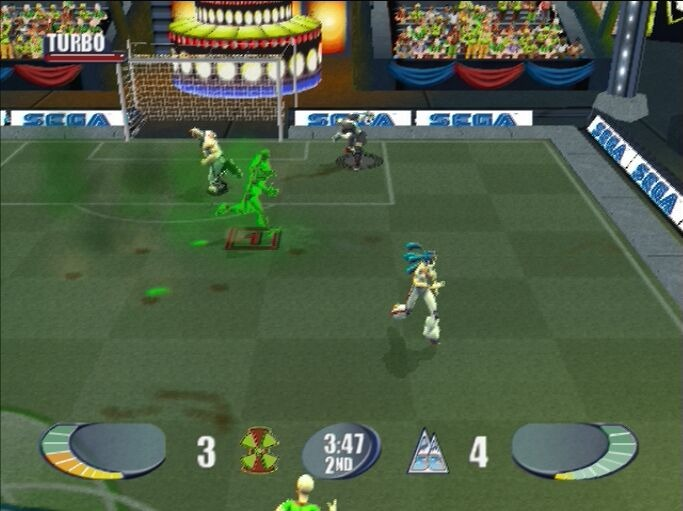
Object: Maintain control of the ball to accumulate your bonus. Protect or "bank" your bonus by passing the ball. When another player has the ball, use "hit" or "steal" moves to acquire it. Successfully stealing the ball from an opponent multiplies their bonus by 1.5 and transfers it to you. Don't hold the ball too long; when
.png)


.png)