System Setup
Set up your PlayStation®2 computer entertainment system according to its Instruction Manual.
Make sure the MAIN POWER switch (on the back of the console) is ON. Press the RESET button.
When the power indicator lights up, press the OPEN button to open the disc tray. Place the Dreamworks® Shark Tale™ disc with the label side facing up. Press the OPEN button again to close the disc tray.
Attach game controllers and other peripherals as appropriate. Follow on-screen instructions and refer to this manual for software information.
Memory Card
To save game settings and progress, insert a memory card (8MB) (for PlayStation®2) into MEMORY CARD slot 1.
You can load saved game data from the same memory card or any memory card (8MB) (for PlayStation®2) containing previously saved games. A saved game's data takes up 270KB.
Dance Pad Controller
Shark Tale supports most 3rd party dance pad controllers (sold separately). The dance pad controller is optional for playing Shark Tale's Dance Mode.
To play using a dance pad controller, connect it to controller port 2 on your PlayStation®2 system. Use the dance pad controller in chapters 3, 6, 15, 20, and 23 to bust out your best moves!
Once you complete the game, you can replay these chapters to beat the high score!
Dance Pad Safety
Please use the dance pad in a safe environment where you won't slip and fall. Position your dance pad controller in an area where you won't disturb others with your movements and sound.
Extreme play motions can be dangerous on a dance pad controller, so please play carefully!
Pause Menu
•
Continue - Resumes the game from where you left off.
•
Restart - Restarts the game from the beginning of the current chapter.
•
Quit - Stops gameplay and returns to the main menu.
•
Options - Adjust audio, video and control settings.
•
Chapters - Select the current chapter or play one of the previously completed chapters.
•
Mission - Displays chapter mission objectives.
•
Fame Chart - Displays current fame ranking and shows fame hierarchy.
Chapters
Shark Tale is broken into 25 chapters. Each chapter features one of the following types of gameplay: adventure, race, fight or dance.
Game Types
Adventure
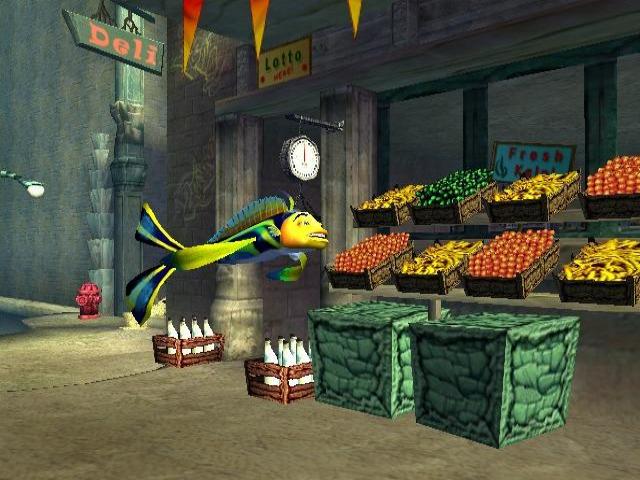
See Reef City for yourself. Swim through the city streets, work your way through the Whale Wash, or sneak around in the shipwreck. Follow the mission objectives to earn fame and bonuses.
While exploring, collect clams and watch out for predators. If you've taken damage and need to increase your health, use the action button (button) to knock on a neighborhood door and waltz in for a treat. You can enter a door if it has a yellow displayed in front of it. You can also swim down side streets and alleys by using the action button (button) on street signs that have a yellow. When stealth is an option, make sure to hide behind objects. You can hide behind objects when a yellow is displayed in front of the object. Race
The hustling and bustling reef can be a traffic jam! Oscar can't wait around, being an up-and-coming superstar. Grab a taxi fish or shark fin and race through the streets and trenches of Reef City. To keep the lead or catch up, use shortcuts. When you see an indicator pointing to a shortcut, quickly dodge (R1 or L1 button) to make the turn. Also, look out for boost currents. They'll propel you through the water like never before. Don't forget, the faster you are, the more famous you'll become.
Fight
Defeat huge sharks and their cronies in your quest for fame and fortune! Fame comes at a price, and the cost is protecting yourself and the reef from those nasty sharks!
Sometimes it's better to flee and fight another day, and Oscar can only fight when he has enough fame to ensure victory. Before Oscar hits the big time (and even after he's a star), make sure to follow the hints displayed on the sides of the screen to avoid being eaten when being chased. While fighting against huge enemies, use the left analog stick to dodge and the A, or buttons to attack your opponent. Oscar can also taunt an opponent during a fight by pressing and holding the button. A successful taunt will help Oscar recover some much needed energy. Dance
Oscar's got the grooves, but do you have the moves? Command Oscar to dance to the funkiest tunes in Reef City. Stay on the beat and don't miss a step to dance your way to fame. Press the ↑, ↓, ←, → directional buttons or the △, ✕, ◯ or ☐ buttons in the direction of the arrow displayed on the screen. Timing and rhythm are important, so make sure to press when the arrows are in the center of the target. The better your moves, the more fame Oscar acquires! If you see an arrow that has 2 directions (←→), press the corresponding directional button and the △, ✕, ◯ or ☐ button at the same time.
Clams
Clams are the currency of Reef City. Throughout your adventure, you'll have the opportunity to earn clams to unlock special items from the Extras menu.
Clams are earned by collecting and swimming around pearls, placing high in races, scoring in dance mode, and completing the mission objectives displayed at the beginning of each chapter. Be sure to collect as many clams
.png)


.png)





 (Fr,De,Es).png)



_1.png)



.png)





.png)