System Setup
Set up your PlayStation®2 computer entertainment system following the provided instructions. Ensure the system is on (green on/standby indicator).
•
Press the OPEN button to open the disc cover.
•
Place the DEVIL SUMMONER™ disc label-side up in the disc holder.
•
Attach game controllers and other peripherals.
•
Follow on-screen instructions and refer to this manual for software use.
Memory Card (8MB) (for PlayStation®2)
To save game settings and progress, insert a memory card (8MB) (for PlayStation®2) into MEMORY CARD slot 1.
You can load saved game data from the same memory card or any memory card (8MB) (for PlayStation®2) containing previously saved games.
Title Menu
Each visit to the Title Menu offers a chance to begin a new life or continue an ongoing case.
After the opening movie, the title screen appears. Press any button to reach the Title Menu. From here, you can choose "Continue," "New Game," or "Vibration Settings."
Continue
To resume a suspended investigation, ensure a Memory Card (8MB) (for PlayStation®2) with a save file is in MEMORY CARD slot 1.
•
Choose "Continue" to go to the Load Menu.
•
Press up or down on the directional buttons/left analog stick to select a file.
•
Confirm with the button to load the game.
New Game
Starting a New Game allows you to begin fresh. After the introduction movie, you will select a name for the main character before he becomes Raidou.
Vibration Settings
Adjust vibration functions by pressing left or right on the directional buttons/left analog stick to turn them on or off.
How to Save
To save your game, go to the Narumi Detective Agency (p. 35) or a Save Point (p. 36).
•
Choose "Check In" from the menu.
•
When the File Menu appears, select the desired save file with the directional button/left analog stick.
•
Press the button to confirm.
Ensure the memory card has at least 100KB of free space to save. Do not insert or remove memory cards during saving or loading.
Beginning the Game
Selecting New Game starts the game. First, you'll enter the main character's real name before he becomes "Raidou Kuzunoha."
Step 1: Enter the main character's full name
Text Entry Controls
•
directional buttons/left analog stick: Move the cursor
•
L2 button: Edit the last name
•
R2 button: Edit the first name
Step 2: Trial at the Kuzunoha Training Hall
This trial teaches basic controls (p. 2) and the finer points of Devil Summoning.
Exploring the World
Raidou solves cases by searching the City Map and Field Maps for clues.
The Big Picture and the Little Things
The Capital has many stories, and navigating the City Map and Field Map helps Raidou uncover them.
City Map (p. 13)
The City Map provides a broad overview. Move the blue icon to talk to people; there are no enemies here.
Field Map (p. 14)
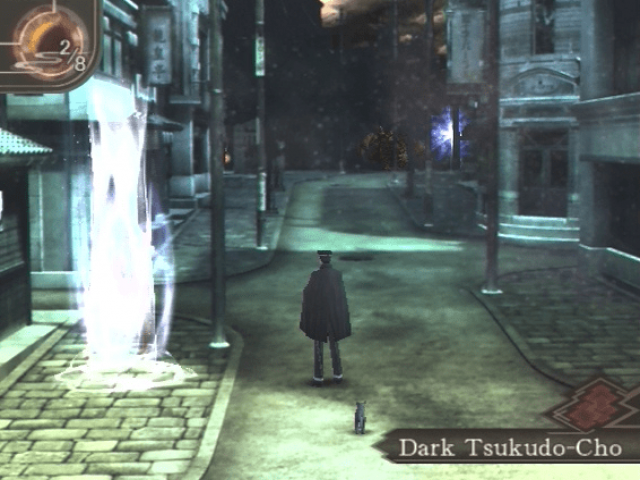
Upon reaching a destination, you enter its Field Map. Look for people to talk to and be ready to fight demons.
Battle (p. 24)
Enemies will surprise you on the Field Map. Use your sword, gun, and confined demons to fight them.
Real World and Dark Realm
The Dark Realm features tougher enemies and more frequent battles, along with fiendish puzzles. Visit the "Nameless Shrine" (p. 34) to access the Dark Realm.
Pay Careful Attention to Your Surroundings
Search areas by pressing the button. Look for shining spots on the ground and other suspicious items. A demon partner can help spot hidden things.
Things to watch for
Shikimi no Kage
If Raidou's path is blocked by a Shikimi no Kage, it is vulnerable to only one type of attack. Confine a demon with the correct attack if you don't have one. Dragon's Jaws are impassable by humans.
Shaking Down the Capital
Solve cases by asking around. Both humans and demons may have useful information. Use your demons' investigation skills in conversations.
Demon Detectives
Demons can assist in investigations. Choose "Solo" from the Investigation Menu to send a demon out alone. This is useful if Raidou is blocked from an area.
Anatomy of an Investigation
Investigation Menu
Press the R1 button to bring up the Investigation Menu and decide your next action.
Summon
Raidou can summon one demon at a time.
•
Choose "Summon" to see confined demons.
•
Use directional buttons or the left analog stick to select a demon.
•
Press the button to confirm.
•
Summoned demons stay close to Raidou but require magnetite.
Return
Use this command to return a summoned demon. If you summon a new demon, the current one will return automatically.
Solo
Take control of a demon while Raidou is inactive. Demons can access
.png)

.png)
.png)
.png)

.png)
.png)


.png)

_1.png)





.png)



.png)

