Starting the Game
Please insert the “Battle B-Daman” Game Pak into the Game Boy® Advance and turn the power ON. When the title screen appears, proceed to mode select by pressing START or the A Button. Select your mode with the Control Pad.
At the start, only B-Daworld and System mode can be selected. After you save your game, other modes will be unlocked.
Game Modes
•
B-Dabattle: Free Battle Mode, with a selection of characters
•
Toolbox: Customize your B-Daman
•
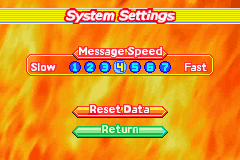
System Settings: Game Setup Data Reset (Erases saved data. Erased data cannot be restored.)
•
B-Training: Review of what you learned from B-DaMage
You can also adjust message speed using the Control Pad (Left for Slow, Right for Fast).
Saving Data
In B-Daworld mode, when options like “Move” appear, you can save your progress by pressing START. Next time you start B-Daworld mode, you can resume right where you left off.
In Toolbox mode, only one save can be made.
B-Daworld Navigation
Press the A Button after selecting the "MOVE" option in the upper-left side of the screen. A list of places will appear. You can visit any destination on the list by selecting one and pressing the A Button.
By selecting "LEAVE AREA", the map of the entire B-Daworld will appear on-screen. Select one with the Control Pad and press the A Button. You will move to the town you have chosen. The number of towns you can visit will keep on increasing as you advance further in the game.
•
Cat Café: Yamato and his mother's house
•
Cowtoon: The name of the town Yamato lives in
•
Gailtoon: The name of the town where the B-Coliseum is located
Interaction Options
When someone is near you, the “TALK” option will appear in the upper-left side of the screen. Press the A Button to get a list of names. Select one and press the A Button. Try to talk as much as possible so that you can discover new leads.
•
BATTLE: This will put you into a B-Dabattle with someone near you. Select your opponent and press the A Button. If you win, the parts on the opponent's machine will be sold in shops. Save as much B-Dabucks (money to purchase parts) as you can.
•
TOOLBOX: This option opens up the TOOLBOX.
•
HINT: Select this option to make you and Tommi think about what to do next. You might make an unexpected new discovery when using this option in specific areas. Sometimes a tiny piece of information can be the biggest breakthrough!
TIP FROM B-DAMAGE: When in trouble, hit the HINT option. You might get some good ideas. Utilize them and move forward!
B-Da Battle Rules
In DHB (Double Hammer Battle), you need to hit opponents' machines with B-Da balls and reduce their Hit Points. Some battles will have a time limit. In these battles, the one with the most HP at the end is declared the winner.
TIP FROM B-DAMAGE: Remember, you are reading about the rules for DHB here. There are some other types of battles in this game. Different types of battles have different rules. Be sure to read the instructions beforehand.
Before participating in a B-Da battle, you can customize your machine. From the Player's B-Daman screen, press START to go to TOOLBOX.
Battle Commands
•
NORMAL SHOT: Press the A Button lightly
•
CLOSE SHOT: Control Pad Up + A Button
•
POWER SHOT: Press and hold the A Button. This will get the crosshair to change colors and start to spin. When fully charged, it will change to red. Release the A Button to fire the Power Shot.
•
CURVE SHOT: Control Pad Left + Down + A Button OR Control Pad Right + Down + A Button
•
PAUSE: Press START to suspend the battle. Press START again to resume.
Toolbox Customization
Here you can customize your machine and check your status. The list consists of two sections, "CUSTOM" and "ORIGINAL".
•
MODIFY: Equip new parts on your machine.
•
SPA: Set special attacks programmed in the parts.
•
NAME: Change the name of your machine.
•
COPY: Copy a customized B-Daman's data.
In the "Original" section, you can check the status of your machine and its special attacks. If you collect all the needed parts for an ORIGINAL B-DAMAN, the name of the machine will appear on the list.
•
B-DANOTE: Here you can see a brief overview of the machine, including special attacks, character information, and battle records. Select the category you want to see with the Control Pad and press the A Button.
•
SAVE: Saves your machine's configuration.
TIP FROM B-DAMAGE: You need new parts to make your machine stronger. You can get information on parts by selecting "SPA" in "CUSTOM".
Parts Shop
Every time you win a battle, you will be awarded with B-Dabucks. You can buy parts at Parts Shops using your B-Dabucks. The numbers to the right of the part refer to the

.png)
.png)
.png)
_1.png)
