GETTING STARTED
Set up your PlayStation®2 computer entertainment system according to the instructions supplied with your system. Check that the system is turned on (the on/standby indicator is green).
Press the OPEN button to open the disc cover. Place the SPIDER-MAN 3™ disc with the label side facing up in the disc holder, and then close the disc cover. Attach game controllers and other peripherals as appropriate. Follow the on-screen instructions and refer to this manual for information on using the software.
Memory Card (8MB)(for PlayStation®2)
To save game settings and progress, insert a memory card (8MB)(for PlayStation®2) into MEMORY CARD slot 1 of your PlayStation®2 system. You can load saved game data from the same memory card or any memory card (8MB) (for PlayStation®2) containing previously saved games.
BASIC COMBAT
Quick Attacks
•
Press the button to perform a quick attack.
Strong Attacks
•
Tap the button to attack enemies with a powerful hit.
Attack Combos
Pay attention to Spider-Man's movements, and time your attacks well to perform attack combos. If you perform one or more quick attacks before a strong attack, Spider-Man will execute a more powerful strong attack and do more damage to his enemies. Dodging
Spider-Man may be strong, but that doesn't mean it's a good idea for him to stand around and get punched. If enemies have you cornered, quickly press the L2 button to dodge. When you see spider-sense flash around Spider-Man's head, an enemy is about to hit Spider-Man with a major attack. Dodge out of the way as fast as you can! LOCOMOTION
With great power comes great responsibility...and the chance to have a great time swinging around the city you love. Here's how:
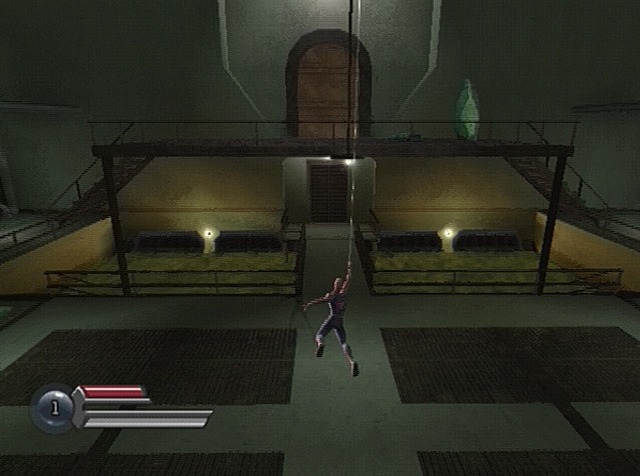
Press and hold the R2 button to cast a web-line to a building nearby. (If there isn't a building nearby, go for trees and lampposts.) Your web-line will choose a good target in the direction you're pointing the left analog stick.
Press down on the R2 button through the arc of your swing; when you let go of the R2 button, Spider-Man will let go of his web-line and soar through the air. From here, press and hold the R2 button again, to continue swinging, or press the button to do a double-jump, increasing his time in the air...or you can just drop gracefully to the ground. As Spider-Man swings along, you can steer his path with the left analog stick. You also can give him a big swing boost when you press and hold the button, after which you'll see Spider-Man bring his legs back behind him. Let go of the button and Spider-Man will swing his legs forward, generating an extra burst of speed. Try to time the release of your web-line to match the end of the boost, to add extra distance after the release point. Sometimes, though, you don't need to go swinging all over the city; you just want to get across the street. Press the R1 button to do a web zip: Spider-Man will cast out a web-line and zip to whatever the web-line is attached. CITY MAP
Press the SELECT button to bring up the City Map. Use the left analog stick to scroll around the map. Use the right analog stick to zoom in and out.
Press the button to set a marker on the map. You'll be able to see the marker on-screen as you explore the city, helping you to get wherever you want to go.
You can change the information shown on the map by pressing the and ➡ directional buttons.
•
General - See where you are in the city.
•
Crime Wave - Shows you where the various gangs are acting up; head to these spots and start a crime patrol to help the police take back control of the neighborhood.
•
Challenges - Find trick races to test your spider skills.
•
Current Missions - Helpful when you're lost, this will mark the next place (or places) you need to go to keep things moving.
SCRAPBOOK
•
Game Progress - See how many missions you've completed, check your trick race scores, and view other stats about your game.
•
Load/Save - Save your game, load up a previously saved game, or start a new game from the beginning. You can also retry your current mission.
•
Settings - Adjust sound and controller settings.
•
Hero Upgrade - Upgrade your Spider-Man to be the best web-swinging, wall-crawling Spider-Man he can be. (See page 7 for more information.) As you swing about the city, completing missions and finishing secondary objectives, Spider-Man will gain experience. Once your experience bar is completely filled, you'll earn a hero point, which you can use to upgrade Spider-Man's abilities. You can see your experience meter on the game's HUD; once you've earned a hero point, head to the Hero Upgrade section of the Scrapbook to spend it on improvements like health upgrades, increased knockback power, special web combat moves and more.



_1.png)





_1.png)
.png)


_1.png)



.png)


_1.png)






_1.png)




_1.png)