GETTING STARTED
Set up your PlayStation®2 computer entertainment system according to the instructions in its Instruction Manual. Make sure the MAIN POWER switch on the back of the console is turned ON.
Press the RESET button. When the power indicator lights up press the OPEN button and the disc tray will open. Place the Sprint Cars: Road to Knoxville disc on the disc tray with the label side facing up. Press the OPEN button again and the disc tray will close.
Attach game controllers and other peripherals, as appropriate. Follow on-screen instructions and refer to this manual for information on using the software.
PlayStation®2 Components
MEMORY CARD (8MB) (FOR PLAYSTATION®2)
To save game settings and progress, insert a memory card (8MB) [for PlayStation®2) into MEMORY CARD slot 1 or MEMORY CARD slot 2 of your PlayStation®2 system. You can load saved game data from the same memory card (8MB) (for PlayStation®2), or from any memory card (8MB) (for PlayStation®2) containing previously saved Sprint Cars: Road to Knoxville games.
At least 623 KB of free space must be available on the memory card (8MB] (for PlayStation®2) in order to save. If less free space exists, erase the older data before saving. Do not remove the memory card (8MB) [for PlayStation®2) or turn off the power to the PlayStation®2 while data is being saved or loaded. Your game data may be lost or corrupted as a result.
INTRODUCTION
Welcome to the world of Sprint Cars: Road to Knoxville, the total Sprint Car, 3/4 Midget and Open Wheel Modified racing experience. Race in six gameplay modes including an extensive multi season career mode. Play as a driver or as a team owner, or both, it's up to you how you want to earn your prestige and money.
In Time Trial mode you can compare your best times against other players from around the world. Take your Time Trial code to www.sprintcarsthegame.com to see how you match up against the best drivers!
Sprint Cars: Road to Knoxville offers you over 20 tracks from across the U.S including famous tracks such as Knoxville Raceway, Eldora Speedway, Dodge City Raceway Park, and Williams Grove Speedway. Your opponents will be tough but you can gain extra speed from them by drafting. Be careful though, if you're too aggressive you'll make enemies and it won't be easy to get around the track with a vengeful opponent resisting your attempts at drafting or blocking your race line.
HOW TO DRIVE IN THE DIRT
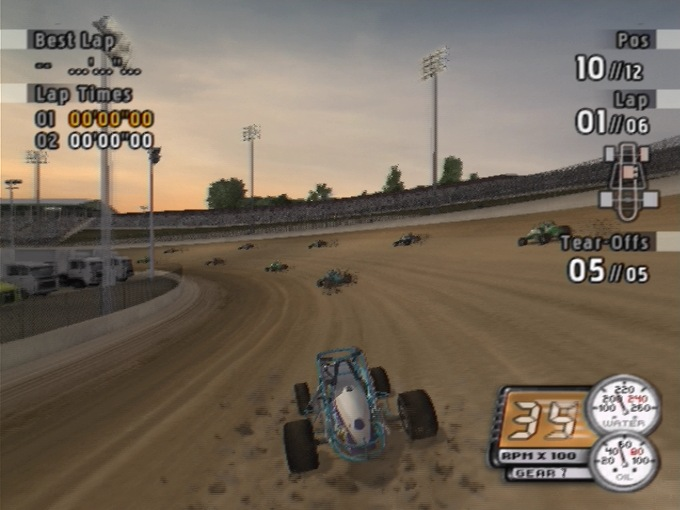
When you race on a dirt track you'll notice that it's much different than racing on a paved track. In dirt racing you actually want to spin out around the corners. This is known as a powerslide. The trick is to maintain control as you slide through the turns.
Using the break and the gas while you turn around the corners will allow you to control the slide. Practice racing in Rookie mode to get a feel for how to turn your car on several tracks. Short tracks, banked tracks and longer tracks offer different challenges. Learn to master each track to become a well rounded driver.
QUICK START GUIDE
The quickest way to get straight into the action in Sprint Cars: Road to Knoxville is to select Arcade mode and Single Race. Before you fire up your engine for the first time however you should take a look at the Tutorial found in Arcade mode.
The Tutorial offers a great overview of drafting, and mastering the powerslide turn. To access the Tutorial select Arcade from the Main Menu and Tutorial. Additional information about each of the menus is available in the Race section of this manual.
Once you've finished with the tutorial it's time to race. To start a single event race select Arcade and Single Race from the Main Menu. If you just want to practice select Arcade and Practice.
Next, choose the level of difficulty class from the Difficulty menu. From the Car Select menu choose the car class, model and skin you want. Select your track from the Track Select menu.
In a Single Race you can also select the Race Length and Race Format from this menu, while in Practice mode just the Time of Day can be selected. Choose your Control Setup. At the Race Format screen you can start your race, tune your car or skip a race. Select Race when you're ready to get behind the wheel.
GOALS
There are many different goals in Sprint Cars: Road to Knoxville, depending on the mode of play you have chosen.
Arcade Mode
In Arcade mode you have several different race types. In Single Race you can race any car class on any track. This mode is good for testing different tuning set ups and racing techniques as well as understanding the flow of an event from the qualifying round all the way through the A Main race. You can pick your track and time of day to create racing conditions you will encounter in Career mode.
Championship Mode
In the Championship mode the goal is to be the top points leader after 15 events. In this mode you can race any car class. The Championship mode is a good way to become familiar with the flow of a season.
Multiplayer Mode
When you select Multiplayer from the Arcade menu you will be racing against another player in a formal event race including standard qualifying, heat and main races. The goal here is to beat
.png)

.png)
.png)
.png)
