Setting Up Your PlayStation 2
Set up your PlayStation®2 computer entertainment system according to its Instruction Manual. Ensure the MAIN POWER switch (on the back of the console) is on.
•
When the power indicator lights up, press the open button to open the disc tray.
•
Place the Pro Race Driver™ disc on the disc tray with the label side facing up. •
Press the open button again to close the disc tray.
•
Attach game controllers and other peripherals as appropriate.
•
Follow on-screen instructions and refer to this manual for software information.
Loading the Game
The controller in port 1 primarily controls game loading and the menu system.
You will see the LANGUAGE SELECTION screen followed by credits screens. Select your language with the left and right directional buttons, then press the X button to confirm and continue to the MAIN MENU.
Memory Cards
The term 'memory card' in this booklet refers to the Memory Card (8Mb) (for PlayStation®2) - (product code SCPH-10020 E). Other Memory Cards, such as Memory Card (SCPH-1020 E) designed for PlayStation® system, are not compatible with this game or hardware.
Ensure sufficient space on your memory card before playing.
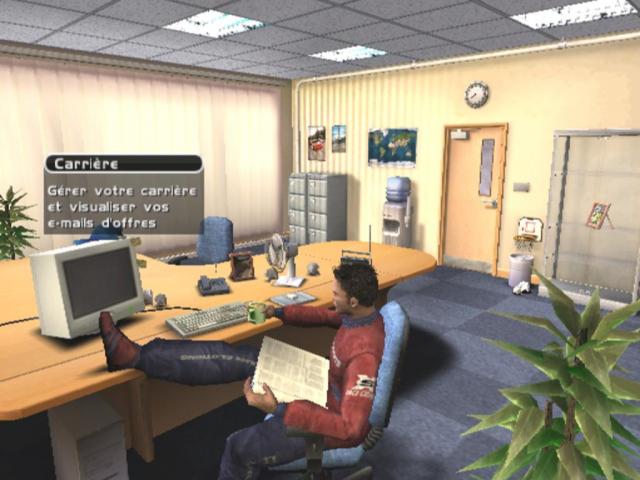
Drivers' HQ
Welcome to the HQ. Here's a quick tour:
Career
Manage your entire career, get job offers, etc., here. First, set up a user name to access your mail.
Log-In
In the Drivers' HQ, highlight the Computer Terminal and press the X button. Highlight a 'New User' slot to create a new profile, or choose an existing profile and press the X button.
New User
Enter your name by highlighting each letter with the directional buttons and pressing the X button to enter it into the title bar.
•
Select 'âáä' to add accents to the previous letter.
•
Select 'Aa' to change the case of the next letter.
•
To delete characters, select '';
•
When finished, select 'Done' to continue to the Desktop.
Email Offers
All incoming messages land in your Inbox. These include notifications of Single Day Events, Job Offers, and Personal mail.
Enter Your Name
Race
Look through your mails using the up and down directional buttons. As you highlight a mail title on the left, the message contents will display on the right.
If you receive a job or test drive offer you want to act on immediately, highlight the message to read it, then press the X button to accept.
Progress
The Progress screen shows the entire Championship structure, from the Super Sports Tier to the World Championship.
To check details of unlocked race series or review performance in driven series, highlight the series logo using the directional buttons and press the X button.
Log-off
Select 'Log-off' to close the computer and return to the Drivers' HQ, or press the button to leave the computer without logging off.
Managing Your Career
You're aiming high, and you'll need to work hard to reach the Number One spot in the World Championship.
Test Drive
To get onto a team, you'll need a Test Drive to prove your skills. If you meet the team's criteria, they'll likely offer you a position for the rest of the series.
Your Test Drive offers will reflect your performance. Good performance leads to good offers (or even a job based on reputation), while poor performance will only attract lesser teams.
Once you see an interesting offer, open and accept it. Race day will arrive quickly.
Progressing Your Career
The Test Drive was the easy part. To progress your career, you must score points by finishing in the top six places. Points are awarded as follows:
Check the Championship structure under 'Progress' on the HQ computer to see how many points you need for the next tier. Pick up contracts for individual series through email and keep racing until you have enough points to move up. Maintaining high finishing positions in the top six will allow you to compete with top drivers.
All your career successes, failures, and scores are saved to your profile on the HQ computer and loaded each time you log on.
Each career success unlocks more elements for other game modes, such as cars and tracks. Keep racing and winning to get the full set. Pro Race Driver Map
Take on the best drivers in the world. If you're good enough to be a threat, they'll contact you.
Language
Use the left and right directional buttons to change the game's language option.
Bonus
If you acquire a Bonus Code, enter it here. Use the directional buttons to highlight each letter, pressing the X button to enter each one and spell out the code.
Graphics
Use the left and right directional buttons to change, activate, or deactivate on-screen settings. Select 'Reset to Defaults' to restore the game's original settings.
Sound
Use the directional buttons to adjust your game's sound settings.
Controllers
To set up controllers for each player, first select the player name to enter Controller Options.







_1.png)
.png)

_1.png)
.png)


.png)










_1.jpg)
_1.jpg)
_1.jpg)
_1.jpg)