Getting Started
Illustration may not match all PlayStation 2 console types. For owners of SCPH-70000 series PlayStation 2 systems, refer to the setup instructions supplied with your system. Set up your PlayStation®2 computer entertainment system according to the instructions in its Instruction Manual. Make sure the MAIN POWER switch (located on the back of the console) is turned ON.
Press the RESET button. When the power indicator lights up, press the OPEN button and the disc tray will open. Place the TOCA Race Driver™2 disc on the disc tray with the label side facing up. Press the OPEN button again and the disc tray will close.
Attach game controllers and other peripherals, as appropriate. Follow on-screen instructions and refer to this manual for information on using the software.
Memory Card (8MB) (for PlayStation®2)
To save game settings and progress, insert a memory card (8MB) (for PlayStation®2) into MEMORY CARD slot 1 of your PlayStation®2 system.
You can load saved game data from the same memory card or any memory card (8MB) (for PlayStation®2) containing previously saved games.
Getting Ready to Go
Player Profile
When the game has loaded, select an existing player profile or create a new one. You will need to create a new profile if you are loading the game for the first time.
Creating a New Profile
First select a save slot to store your new profile in. As you continue through your driving career, all of your progress and feature unlocks will be saved to this profile. Next set up your profile details and select "Done." Finally, complete your profile by defining game options (see Options for more information) and when you have finished, select "Begin" to start your career.
Your Racing Career
The gauntlet has been thrown down. Become the master of the racing world or vanish into obscurity forever! The career of a professional racing driver is not an easy one; you'll contend not only with a multitude of racing styles and types of vehicles, but also with a host of deadly rivals out to claim the title for themselves. It's all about winning - there's no room for mediocrity here. You'll have to fulfill all your team's objectives to earn your place in the next event.
With each successful step through your career, you'll unlock more tracks, vehicles and competitions in Simulator mode.
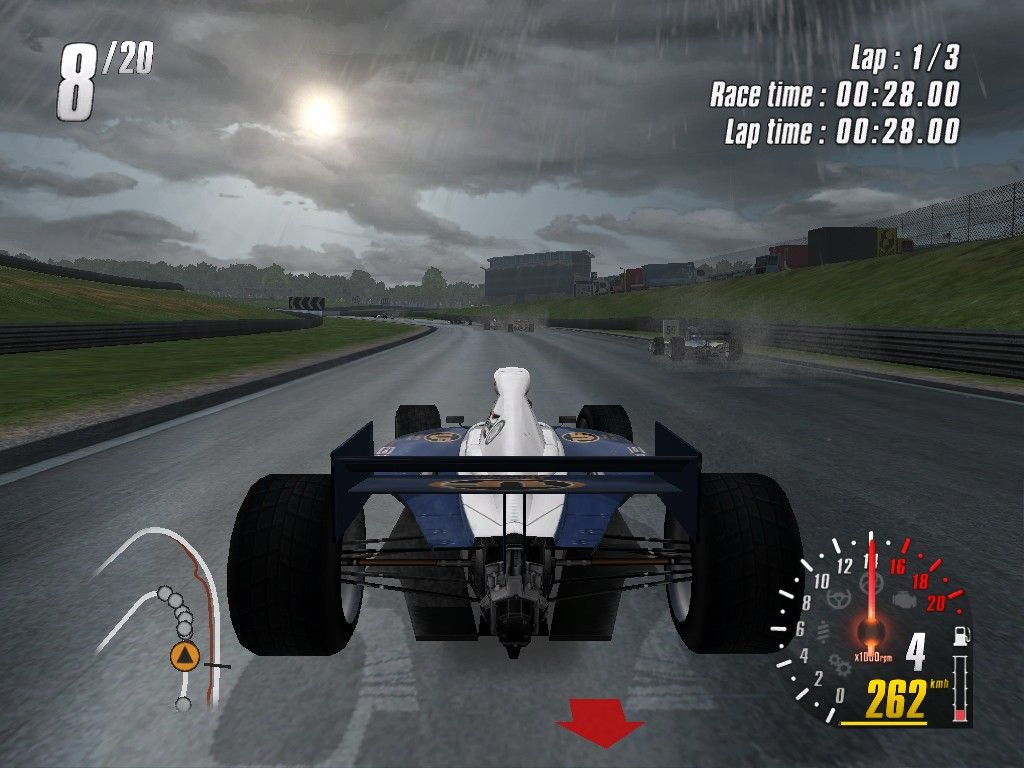
Race Display Elements
•
Race Position: Your position in the field of competitors.
•
Circuit Map: The position of your car and your nearest rivals on the current circuit (your car is indicated by the arrow).
•
Lap Counter: Shows current lap.
•
Total Race Time: The time elapsed so far through your current race.
•
Lap Time: The time elapsed so far on your current lap.
•
Revs: Your current engine speed (rpm).
•
Damage Indicators: Illuminate from yellow (minimal) to red (serious) as parts of your vehicle become damaged. If a part becomes so damaged that you cannot finish in a competitive position, you may want to retire. To retire, press the START button to pause the game and "Retire from Race."
•
Gears: damage to your gearbox could impair your ability to reach top speeds or shift effectively from gear to gear.
•
Suspension: suspension damage will affect road-holding and cornering abilities.
•
Steering: as your steering becomes damaged you will be less able to hold a straight line and your vehicle's responsiveness will be reduced.
•
Wheels: a puncture or loss of a wheel could prevent you from finishing the race.
•
Engine: if your engine becomes damaged, your performance can be seriously reduced.
•
Fuel: The amount of fuel remaining in your tank.
•
Gear: The gear you are currently in.
•
Speed: Your current speed.
•
Stage Progress: Shows your progress through the stage in rally championships.
•
Split Time: Split times represent the fastest recorded time through each section of a rally stage. As you approach a split time marker on a rally stage, your split time will appear next to the stage progress bar. If your time is green, you are currently faster than the previous record for the stage; if the time shown is red, you are slower.
•
Co-driver Indicator: Indicates the direction and hazardousness of the road ahead.
Note: If you sustain terminal damage and parts can no longer function at all, you will automatically be retired from the race.
The Trailer
Select Profile
Return to the Profile Select screen to load, create or delete a profile.
Continue Career
Pick up your racing career from where you left off (depending on the profile you've loaded) and select which championship to compete in if more than one is available. Keep racing and keep winning to meet the Championship Objective/s and Season Objective/s set by your team. Simulator
Come to the Simulator when you want to create your own race (Free Race) or improve your best time (Time Trial) on any of the unlocked tracks. Whenever you achieve a team objective in your racing career, more tracks, vehicles and championships will become unlocked. Note: cars are only unlocked when difficulty is set to either "Normal" or "Hard" and default AI is selected. Cars cannot be unlocked using a custom difficulty level or when AI options are adjusted from






_1.png)
_1.png)

.png)

_1.png)
.png)


.png)










_1.jpg)
_1.jpg)
_1.jpg)
_1.jpg)