GETTING STARTED
Set up your PlayStation 2 computer entertainment system according to the instructions in its Instruction Manual. Make sure the MAIN POWER switch (located on the back of the console) is turned ON. Press the RESET button. When the power indicator lights up, press the OPEN button and the disc tray will open. Place the Teen Titans disc on the disc tray with the label side facing up. Press the OPEN button again and the disc tray will close.
Attach game controllers and other peripherals, as appropriate. Follow on-screen instructions and refer to this manual for information on using the software.
Memory Card (8MB) (for PlayStation®2)
To save game settings and progress, insert a memory card (8MB) (for PlayStation 2) into MEMORY CARD slot 1 of your PlayStation 2 system. You can load saved game data from the same memory card or any memory card (8MB) (for PlayStation 2) containing previously saved games. STARTING UP
DUALSHOCK®2 ANALOG CONTROLLER CONFIGURATIONS
•
left analog stick (L3 button when pushed down)
•
right analog stick (R3 button when pushed down)
PAUSE MENU
Press the SELECT button during play to bring up the Pause Menu where you can choose from:
•
Back to Game: Return to the game in progress.
•
Auto Save: Turn automatic save feature ON/OFF.
•
Load Game: Load a previously saved game from the Memory Card (8MB) for PlayStation®2).
•
Restart: Start playing from the beginning of the level.
•
Options: Adjust Music Volume, SFX Volume, Voice Volume and the controller Vibration ON/OFF.
•
Controls: Display complete controller diagram.
•
Quit: Exit the game and return to the Main Menu.
ON-SCREEN DISPLAY
The On-Screen Display shows important information, so keep an eye on it as you play the game.
•
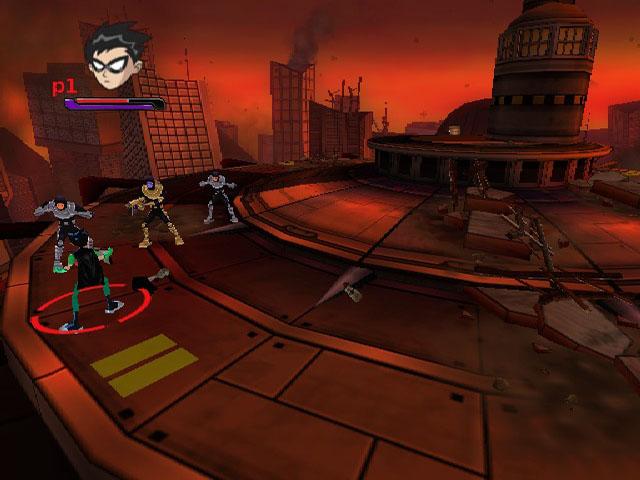
Character: Shows the current Teen Titan you are playing. The character icon will change each time you change Titans. The icon will also change into a super-deformed face when your character is low on energy, charges up attacks or takes damage. •
Note: Computer-controlled Titans do not appear on the display.
•
Energy Meter: Shows available energy. When your energy meter is empty, your Titan is knocked out for a few seconds. •
Charged Attack Meter: The available charge for any charged attacks.
•
Boss Energy Meter: Tells you how close you are to beating the boss. •
Continues: Shows how many character continues remain. Every time your Titan is knocked out, you lose a continue. When the meter shows zero, the next knockout means mission failure.
•
Player Indicator: Designates current players (P1=Player 1, P2=Player 2, P3=Player 3 and P4=Player 4).
SAVING THE GAME
Teen Titans autosaves after every completed level. To make sure you can start playing again where you left off, make sure you Create A Saved Game File at the Main Menu.
Teen Titans requires 50 KB on your Memory Card (8MB) (for PlayStation®2).
SWITCHING TITANS
You can swap Titans at any time by pressing left or right on the directional buttons. The team cycles in this order: Robin, Raven, Cyborg, Starfire and Beast Boy. The on-screen character icon will change to show each Titan as you cycle through. Whether you are playing alone or with friends, every Titan is playable so long as that character is not knocked out or being played by another player. If the next Titan in order is knocked out, you just skip to the Titan that follows.
Each Titan has a unique set of moves, abilities and strengths, so some Titans are more useful than others in certain situations. The Titans can also work together to perform team attacks, giving you five times the super hero power to defeat enemies!
JUMPING
Your Titan will jump when you press the ▲ button (unless he/she is knocked out). You can also attack and jump at the same time to launch even more combos!
Note: When Beast Boy jumps, he transforms! PICKING UP & THROWING OBJECTS
The ○ button has two main functions: press it once to pick up a nearby object and press it again to throw the object. Use the left analog stick to hurl an enemy or object in a particular direction.
The Titans can also walk with an object before throwing it. Some thrown objects will explode or spill on impact; when you discover these, be sure to use them to your advantage during combat!
Note: Hitting an enemy three times in quick succession will stun him. When an enemy is stunned, that's the perfect time to pick him up and hurl him into something to finish him off!
Team Attacks
Being a Titan means being part of a super hero team! Team attacks let you eliminate enemies together by taking advantage of your fellow Titans' strengths. You can perform team attacks at close range or from a distance.
Note: Team attacks
.png)

.png)
