PlayStation 2 Setup
Set up your PlayStation® 2 computer entertainment system according to the instructions supplied with your system. Check that the system is turned on (the on/standby indicator is green).
Insert the Tony Hawk's Proving Ground disc in the system with the label side facing up. Attach game controllers and other peripherals as appropriate. Follow the on-screen instructions and refer to this manual for information on using the software. Memory Card (8MB) (for PlayStation®2)
To save game settings and progress, insert a memory card (8MB) (for PlayStation®2) into MEMORY CARD slot 1 of your PlayStation 2 system. You can load saved game data from the same memory card or any memory card (8MB) (for PlayStation®2) containing previously saved games.
In-Game Information
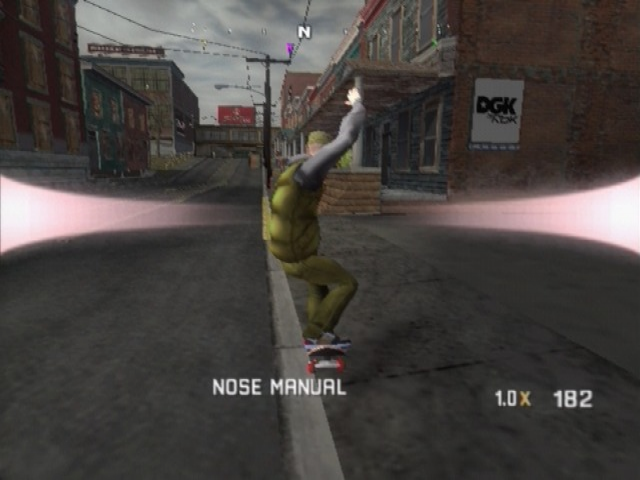
Compass
On the top of the in-game screen is a compass, which helps you to locate all the various things to do throughout the city. The compass shows you where different goals and challenges are located. Also look to your map in the in-game Pause menu.
View Goals
At any time during the story, you can visit the Pause menu and select My Goals to view current episodes and where to find them.
Motorola ic 902 Video Phone Messages
Keep an ear out for your Motorola ic 902 video phone. You can receive text messages and video messages that provide further information about the story and your mission objectives.
Rigger Menu (Moveable Pieces)
Modify the world by creating and placing up to 30 ramps, quarter pipes, rails, and other objects almost anywhere to build your own personalized skate spots. Story mode will also include Rigger goals, in which you can create pieces to complete the goal or go for a higher score.
To access this menu, press the SELECT button. You must unlock the Rigger menu in Story mode before you can use it during gameplay.
Create-A-Skater
Activision Customer Support cannot troubleshoot user-made skaters. Creating Your Skater
You can create nearly any kind of skater. From the Pause menu, select My Skater, then Create-A-Skater. Randomize your skater or start from scratch. You can also load a previously saved skater.
Some items or customization options are not compatible with others.
Piece Categories
The available piece categories when creating a new skater or editing your current skater are Information, Hats, Face, Torso, Pants, Eyes, Hair, Accessories, Feet, Tattoos, Skateboards and Misc.
Available Pieces
At the start of the game, some pieces will be unavailable to you until you've unlocked them or earned them from sponsors throughout your story. To unlock more pieces with which to customize your skater, you'll need to play through Story mode and earn them or purchase them in Create-A-Skater.
Multiplayer Games
Trick Attack
The player with the highest score at the end of the time limit wins!
Graffiti
The player with the most "tagged" objects wins! Obstacles are tagged with your color by tricking off them. Try to steal your friend's tags by pulling higher scores and bigger combos off the same object.
Horse
Pull off higher combos than your friends on the objects you choose to get them to spell H-O-R-S-E—the classic b-ball game skater style.
Free Skate
Keep it real with a no-time, no-score and no-rules session. Skate just like you do on the street, minus the ever-present cops and security guards.
Game Options
Save Game/Load Game
To save a game, you'll need at least 197Kb of free space available on your memory card (8MB)(for Playstations*2). To load a previously saved game, select Load Game from the Options menu.
The Story/Skater save requires 197Kb. This save contains both your skater and any progress through Story mode as well as any unlockables you may have earned.
.png)

.png)