GETTING STARTED
•
Note: Illustration may not match all PlayStation 2 console types. For owners of SCPH-70000 series PlayStation 2 systems, refer to the setup instructions supplied with your system. Set up your PlayStation®2 computer entertainment system according to the instructions in its Instruction Manual. Make sure the MAIN POWER switch (located on the back of the console) is turned ON.
Press the RESET button. When the power indicator lights up, press the OPEN button and the disc tray will open. Place the W SmackDown! vs Raw 2006 disc on the disc tray with the label side facing up. Press the OPEN button again and the disc tray will close.
Attach game controllers and other peripherals as appropriate. Follow on-screen instructions and refer to this manual for information on using the software.
PlayStation 2 Components
MEMORY CARD (8MB)(FOR PLAYSTATION®2)
To save game settings and progress, insert a memory card (8MB)(for PlayStation®2) into MEMORY CARD slot 1 of your PlayStation®2 system.
You can load saved game data from the same memory card (8MB) (for PlayStation®2) or any memory card (8MB)(for PlayStation®2) containing previously saved games.
Multitap (for PlayStation®2)
MAIN MENU
After the game loads up, the main menu appears on screen. Use the directional buttons to move up and down through the menu. Press the button to make your selection. Press the button to choose which Profile you are using.
•
Exhibition: Play an exhibition match.
•
Game Modes: Participate in a PPV, play in General Manager Mode, or start / continue a Season.
•
Create Modes: Here you can create a W Superstar, create a moveset, create your own entrance, create a stable of Superstars, customize attributes and create a W Championship.
•
Locker Room: See the trophies, belts, and honors you've earned in your career. You need to create a profile to save accomplishments to your Locker Room. See page 14 for details.
•
Online: Go online and compete head to head with people from around the world. Do you have what it takes to be the best? See page 15 for more details.
•
Options: Adjust sound settings, match rules, in-game options, advanced options, save and load your profiles, and more. Follow the onscreen directions to adjust all of these options.
PRE MATCH MINI GAMES
With the pre match mini games option turned on, the match starts out with a quick mini-game. Select from Stare Down, Test of Strength, Lock Up, or None. See who starts the match mini-game at the 1P/2P on-screen prompt.
MOMENTUM / STAMINA
As you compete in the match, your Superstar gains momentum with each strike and grapple that he/she lands, as well as taunting successfully. When you fill the momentum meter, your Superstar will earn the ability to perform a Finishing move.
Throughout the course of a match your Superstar will also begin to lose stamina and tire out. You can replenish lost stamina by pressing SELECT.
GENERAL MANAGER MODE
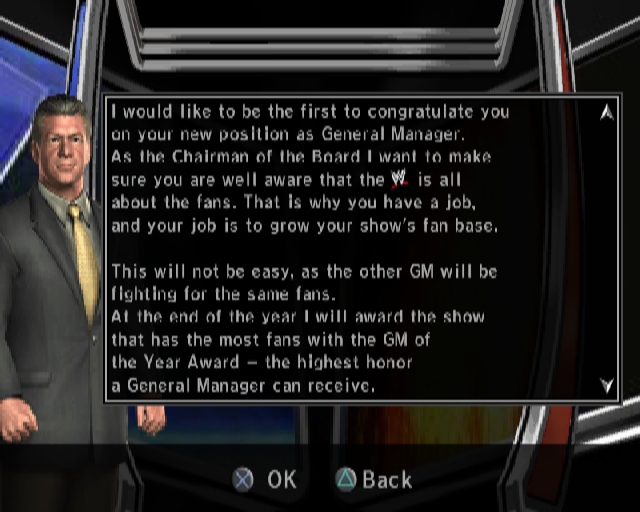
Take control of SmackDown! or Raw as the General Manager in this all-new game mode. Can you increase your fan base in the world of sports-entertainment? This is your shot. Control General Manager mode via the following menu: •
Schedule: View the schedule of upcoming events.
•
E-mail: Check your E-mail inbox for messages.
•
Rosters: View the rosters, set up a rivalry, propose trades with the other brand, look at free agents and adjust C-A-S attributes.
•
Weekly Reports: Check out what happened in previous Pay-Per-View events, previous SmackDown! and Raw episode results, look at the Fan Support Line, and look over Tazz's and JR's reports.
•
Financials: Check the income generated from your show.
LOCKER ROOM
As you compete in the world of sports-entertainment, you will earn awards and championships. View them in your profile's Locker Room. The Locker Room is your place to hang out between matches and enjoy all of your accomplishments. Customize the appearance of your locker room with various unlockables.
PLAYING POSSUM
Brute strength alone will not always carry you to a victory inside the WWE ring. Using your quick wits will often pull you out from the doldrums of defeat.
New to W SmackDown! vs Raw 2006 is the ability to play possum during matches. You can now feign an injured state in order to lure in your opponent and secure a pinfall.
When down on the mat, and in possession of a stored special, hold the button and press the L2 button to counter an expected strike or the R2 button to counter an expected ground grapple in order to take your opponent by surprise and perform a quick pin on your opponent. If you guess wrong, you will lose your special.
ONLINE PLAY
This Software uses "DNAS" (Dynamic Network Authentication System), a proprietary authentication system created by Sony










.png)


_1.jpg)



_1.jpg)