GETTING STARTED
•
(L3 button when pushed down)
•
(R3 button when pushed down)
STARTING UP
Set up your PlayStation®2 computer entertainment system according to the instructions in its Instruction Manual. Make sure the MAIN POWER switch (located on the back of the console) is turned on.
Press the RESET button. When the power indicator lights up, press the open button and the disc tray will open. Place the WHIPLASH™ disc on the disc tray with the label side facing up. Press the open button again and the disc tray will close.
Attach game controllers and other peripherals, as appropriate. Follow onscreen instructions and refer to this manual for information on using the software.
DUALSHOCK®2 ANALOG CONTROLLER CONFIGURATIONS
Connect the DUALSHOCK®2 analog controller to controller port I before starting play.
ABOUT SAVING GAMES
You can save games at any time from the Pause Menu (see page 7). To save your progress, insert a Memory card (8MB) (for PlayStation®2) into MEMORY CARD slot I before you start a new game. The memory card must have at least 128KB of free space available in order to save games. This game uses MEMORY CARD slot I only. Do not press the RESET button or remove the memory card while saving a game, or your game data could be lost or corrupted.
MOVING SPANX
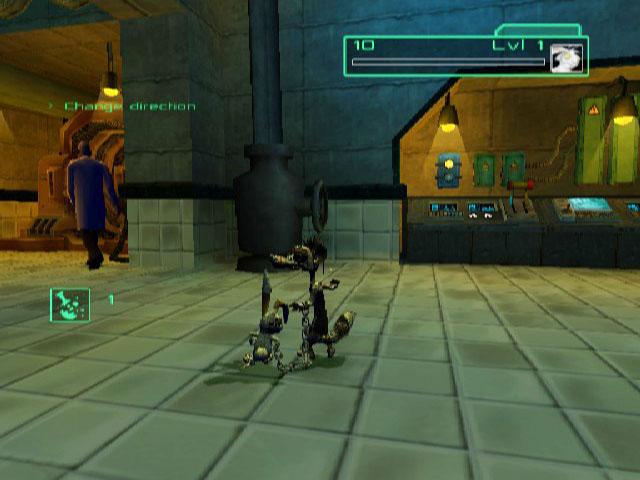
Move Spanx with the left analog stick or directional buttons. As a weasel (actually as a weasel chained to a rabbit), you have some advantages over the humans in the facility. There are plenty of places you can get to that they cannot reach. And you have some advanced moves to show off... GRAPPLING
Genron is obsessive about cleanliness. They have installed hundreds of air purifying spheres. And your little bunny pal, because of his "special" fur, can attach to these things. This lets you swing over and above danger.
•
To use a grapple, jump (X button) toward a sphere, and whip button) the sphere to attach Redmond to it. •
Press the X button to release the grapple.
GLIDING
You can glide anywhere in Genron once you have earned this ability. To glide, double jump (X button, then press again in mid-air) and hold. Gliding is great for floating over deep drops when grapple spheres are not present. Just be ready to hear Redmond's opinions about gliding-whether you like them or not! SCURRYING AND SCURRY RAILS
Four legs are always better than two when it comes to speed.
•
To sprint by scurrying on all fours, press and hold the L2 or R2 button while using the left analog stick or directional buttons to control your direction.
•
Scurry rails appear throughout the facility. By using them, you can access places (particularly higher-up areas) that look too remote to reach.
•
To attach to a scurry rail, jump (X button) and press and hold the L2 or R2 button. You'll scurry on the rail.
ZIPLINES
Ziplines let you glide over areas that are otherwise inaccessible. And you'll be safe from the clutches of Genron creeps who want to scramble your genes.
•
To attach Redmond to a Zipline, jump (X button) toward the Zipline and press the whip button button). •
To release from the line, tap the X button again.
VENTS
Located throughout the facility, Vents often provide the only way to travel between areas. Any time you are having trouble escaping from an area, look for a Vent. No special moves are required to get into and through a Vent. The only question is how to break apart the Vent opening. But I think you might have a little something for that, right?
INTRUDER ALERT
COMBAT
Buck up! Your willing (or not?) partner is quite a versatile tool. Sadly for Redmond, using him is the only way either one of you is going to get out of Genron in your original birthday suit. Once you become skilled at using your little buddy, you will be one powerful weasel, my friend. BASIC ATTACKS
WHIP
This is a simple attack. Just hurl Redmond at the target. •
Press the button to perform a whip attack.
OVERHEAD SMASH
Useful on larger enemies. It's slow but does high damage.
•
Press the button to perform an Overhead Smash.
•
Hold down the button to allow the attack to charge, then release to perform a Super Overhead Smash that does even more damage.
360 SWEEP
•
To perform this attack and trip your enemies, press the L2 or R2 button to duck and then press the button.
COMBOS
Some enemies are tougher than others. For those enemies who laugh at your basic attacks, you must learn to chain your moves.
•
CHARGED SMASH - button (hold, then release), with Chain Charge only. This is an earned ability.
.png)

.png)